Most teams have seen it: a release goes out and for a few seconds requests fail. Users see a failed page, an alert fires, and someone says "it was just the deploy". Kubernetes gives you several ways to replace a running version, and the defaults do not guarantee zero downtime. In this post I look at what a zero-downtime deployment is, what each strategy solves and what it costs, and then I show the lab where I sent 40 requests per second to an app while replacing it in six different ways and counted every failed request. Not everything went the way I expected; those parts are at the end, with the real output.
What is a zero-downtime deployment?
A zero-downtime deployment replaces the running version of an application with a new one while every request keeps getting an answer. No error page, no timeout, no "please try again" during the release.
In Kubernetes, a Deployment manages a set of identical pods, and its strategy decides how old pods are replaced by new ones:
- Recreate: stop all old pods, then start the new ones.
- RollingUpdate (the default): replace pods a few at a time, so some are always running.
Two more strategies are built from Deployments and Services rather than set as a field:
- Blue/green: run the new version next to the old one, fully, then switch all traffic at once.
- Canary: send a small share of traffic to the new version first, and widen only if it looks good.
Whether any of these is really zero-downtime depends on one more thing: Kubernetes has to know when a new pod is actually ready to serve. That is the job of the readiness probe.
What problem does it solve?
Releases that users can see. If every deploy causes a few seconds of errors, teams start deploying less often, at night, in "release windows". Small changes pile up into big, risky ones.
"Running" is not "ready". A container can be running for seconds before the app inside it listens on its port: loading config, warming a cache, connecting to a database. Without a readiness probe, Kubernetes sends traffic to it anyway.
Rollbacks that take as long as the release. If the new version is broken, getting back to the old one should take seconds, not another full rollout.
What each strategy gives you
| Strategy | What it means in practice | In the lab (2,400 requests) |
|---|---|---|
| Recreate | Simple, never two versions at once; a gap while nothing runs | 690 failed, rollout 32 s |
| RollingUpdate, no readiness probe | Looks fast; new pods get traffic before the app listens | 550 failed, rollout "done" in 1 s |
| RollingUpdate + readiness probe | Traffic only to ready pods; maxUnavailable: 0 keeps full capacity |
0 failed, rollout 36 s |
| Blue/green | Instant switch and instant rollback; double the pods during the switch | 0 failed, switch 70 ms, rollback 94 ms |
| Canary | Real traffic on the new version, small share first | 21 of 200 requests on the new version (10.5 %) |
And what you don't get from the built-in tools:
| Need | Plain Kubernetes |
|---|---|
| Blue/green as one command | No. You run two Deployments and change the Service selector yourself (or use Argo Rollouts / Flagger). |
| A canary at 1 % or 5 % | Not with pod counts alone. 9 + 1 pods gives about 10 %. Exact weights need Gateway API or a service mesh. |
| Automatic rollback on errors | No. A Deployment rolls back only when you tell it to. Progressive delivery tools add analysis. |
| Database migrations | Not handled. Two versions run at the same time during a rolling update, so the schema must work with both. |
How it works
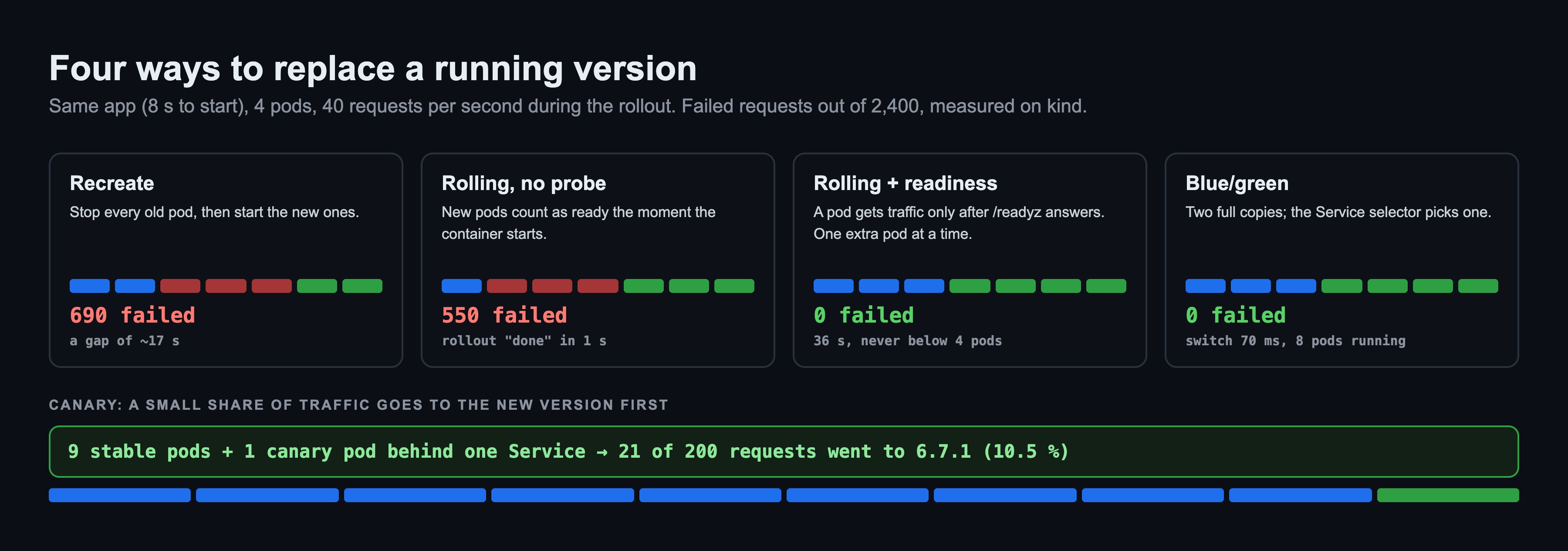
- The Service only sends traffic to ready pods. Every pod behind a Service is either in the ready list or not. A pod without a readiness probe is ready as soon as its container starts.
maxSurgeandmaxUnavailablecontrol the pace of a rolling update. WithmaxSurge: 1andmaxUnavailable: 0, Kubernetes starts one extra pod, waits until it is ready, and only then removes an old one.- Blue/green and canary both work through labels. The Service selects pods by label. Change the selector and traffic moves; put two Deployments under the same label and traffic splits by pod count.
The lab: what I built
Everything runs on kind on a MacBook (Colima, 4 CPU / 8 GB): Kubernetes 1.37 with one control plane and two workers, the default network plugin and kube-proxy. The app is podinfo, with one change: it waits 8 seconds before it starts listening, like a real app that loads config and connects to a database. Four pods, version 6.7.0, replaced by 6.7.1. During each rollout, fortio runs inside the cluster and sends 40 requests per second for 60 seconds through the Service: 2,400 requests per run. Every scenario is one make target. The whole lab took about 10 minutes.
Step 1: Recreate
Recreate stops all four old pods, waits until they are gone, then starts four new ones. For the time in between, nothing answers.
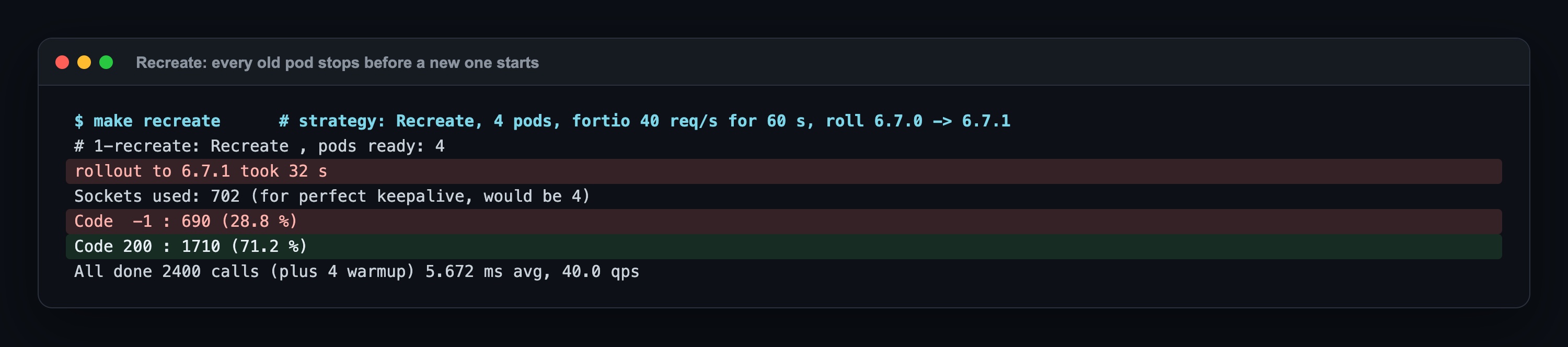
690 of 2,400 requests failed, about 17 seconds of outage at 40 requests per second. Code -1 is fortio's word for "no HTTP answer at all": the connection was refused because no pod was listening. I would pick Recreate only when two versions must never run at the same time, and then I plan for the gap.
Step 2: RollingUpdate without a readiness probe
This is the default strategy with no probe, which is what many first Deployments look like.
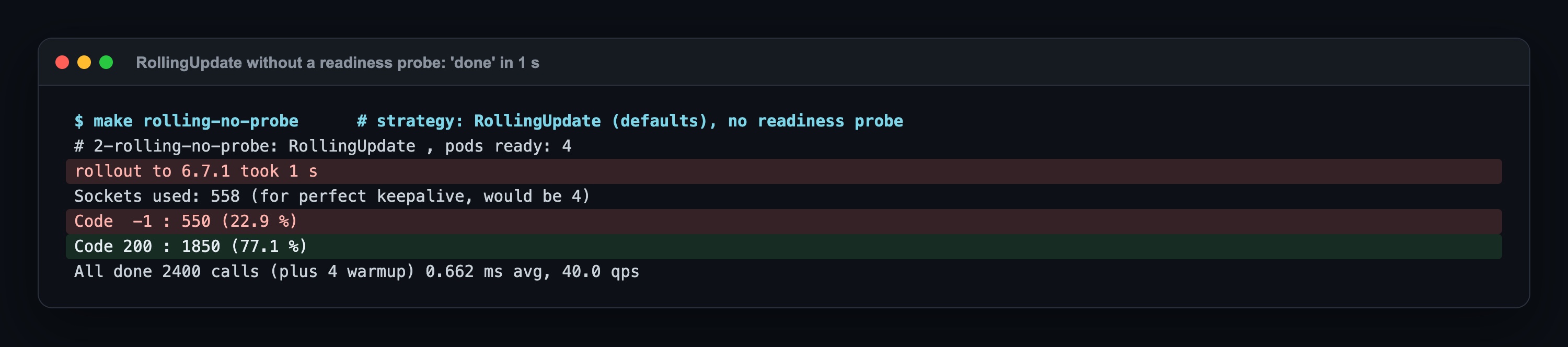
The rollout finished in 1 second, and then 550 requests failed. Without a probe, each new pod counted as ready the moment its container started, so Kubernetes removed the old pods right away. The new ones then spent 8 seconds not listening. On paper the rolling update succeeded. In practice it was worse than not deploying at all.
Step 3: RollingUpdate with a readiness probe
The same rollout with two changes: a readiness probe on /readyz that checks every second, and maxSurge: 1, maxUnavailable: 0.
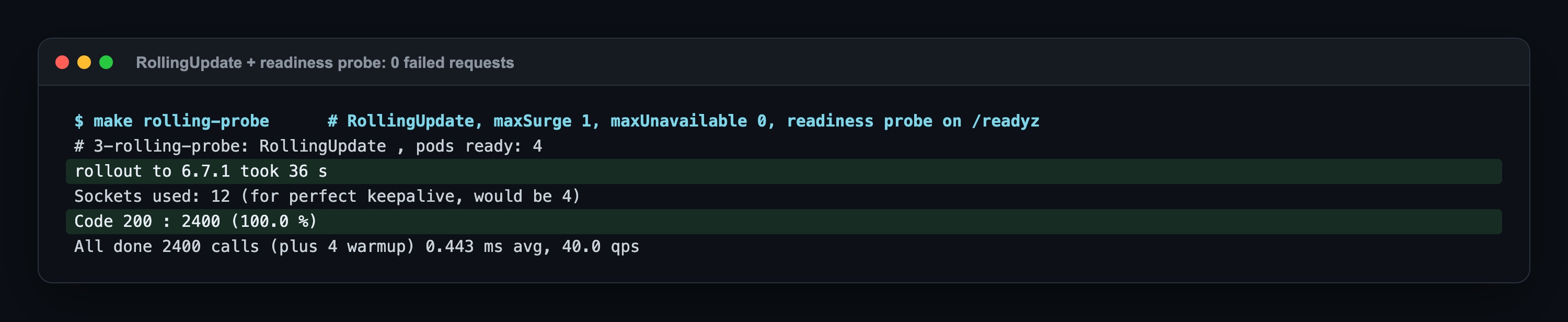
0 failed requests. The rollout took 36 seconds instead of 1, because Kubernetes now waited for each new pod to answer before removing an old one, four times. The cluster never had fewer than four serving pods. This is what "zero downtime" actually costs: time, and one extra pod during the rollout.
Step 4: Blue/green
Two complete Deployments, web-blue (6.7.0) and web-green (6.7.1), four pods each. The Service selects color: blue. Under the same load I changed the selector to color: green, then back.
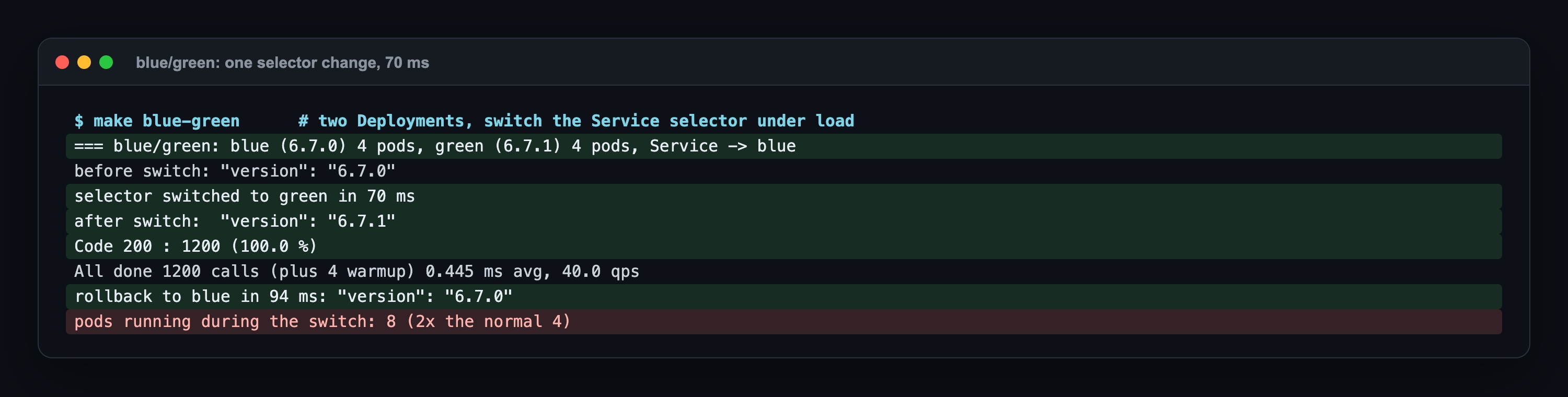
The switch took 70 ms, the rollback 94 ms, and all 1,200 requests in that run got an answer. The price is visible in the last line: eight pods running for a four-pod app. Blue/green buys an instant rollback with double capacity during the release.
Step 5: Canary
Nine pods of 6.7.0 and one pod of 6.7.1, all with the label the Service selects. 200 requests, counted by the version that answered.

21 of 200 went to the new version, about the 10 % the pod count predicts. That is the limit of this simple canary: the share follows the number of pods. For 1 % you would need 99 stable pods. Weighted routing solves that; in the Gateway API post one HTTPRoute sent 177 of 200 requests to v1 and 23 to v2 with two pods.
Where it broke: 2 real surprises
1. "Rollout complete" in 1 second, then 550 errors
The most dangerous result of the lab is Step 2. kubectl rollout status reported success after one second, and a pipeline that waits for it would have moved on, green. Every request in the next 8 seconds failed. Without a readiness probe, Kubernetes has no way to know the app is not listening yet. If your Deployments have no readiness probe, a successful rollout tells you nothing about your users.
2. The preStop hook I expected to need changed nothing here
The usual advice is to add a preStop sleep, because a pod can receive SIGTERM before every node has stopped sending it traffic. I tested it four ways: with podinfo's own graceful shutdown, with an app that exits the instant it gets SIGTERM, at 40 and at 400 requests per second.
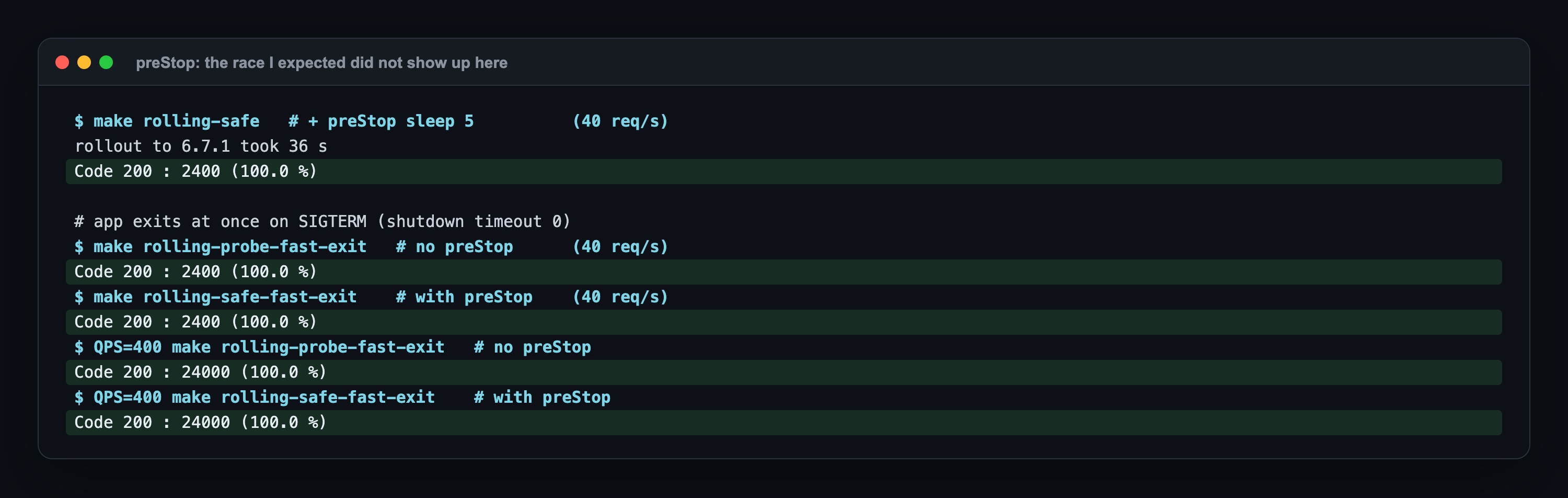
Every run was 100 %. On a three-node kind cluster, the pod was removed from the Service's ready list faster than the app shut down. That is a real result, not a proof that preStop is useless: on large clusters, with external load balancers or ingress controllers that refresh their backend list every few seconds, the delay is longer. I keep the hook in the lab's final manifest, but I did not measure a difference, so I don't claim one.
One more practical note on canaries: with plain Deployments the split is whatever the replica counts say. 9 + 1 is about 10 %, 4 + 1 is already 20 %. Decide the share as replicas before you deploy, or use a router with weights.
When to use which
| Situation | Choice |
|---|---|
| Stateless web service, normal releases | RollingUpdate with a readiness probe, maxUnavailable: 0. The default you should actually use. |
| The new version must be tested with real traffic before everyone gets it | Canary, with weights if you need small shares (Gateway API, service mesh, Argo Rollouts). |
| You need a rollback in seconds, and can afford double capacity for a while | Blue/green. |
| Two versions must never run at the same time (an exclusive lock, an incompatible schema change) | Recreate, in a maintenance window, knowing there is a gap. |
Summary
- A zero-downtime deployment replaces a version while every request keeps getting an answer.
- Recreate dropped 690 of 2,400 requests; the default rolling update without a readiness probe dropped 550 and still reported success in 1 second.
- A readiness probe with
maxUnavailable: 0took the failures to 0, at the cost of a 36-second rollout and one extra pod. - Blue/green switched in 70 ms and rolled back in 94 ms, with twice the pods running.
- A canary built from pod counts splits by pod count: 9 + 1 pods sent 10.5 % of requests to the new version.
Sources: Kubernetes docs Deployments (strategy, maxSurge, maxUnavailable), Configure Liveness, Readiness and Startup Probes, Pod Lifecycle (termination, preStop); fortio and podinfo documentation.
Next in the series
This is the first post in the Core Skills, Measured series, where each post takes a topic people are asked about in interviews and measures it in a lab. Next: CMD vs ENTRYPOINT, and ADD vs COPY, where one line in a Dockerfile decides whether docker stop takes 1 second or 10. The previous series ended with What Is Tetragon?.
The code for this lab (kind config, the six strategy manifests, the blue/green and canary scripts, the fortio load script and the Makefile) is shared with Lab Access members on Buy Me a Coffee; the repo invite comes by email after you join: https://buymeacoffee.com/miraccanyilmaz/membership