We scan images before they run, and an image with a critical finding never reaches the registry. But the scan looks at the image, not at what happens inside the container later. If someone gets in and reads the service account token, Kubernetes itself does not record it: reading a file is not an API call. In this post I look at what Tetragon is, what it solves and what you gain, and then I show the lab where a read of /etc/shadow inside a pod was first seen, then killed before it printed a single byte, while the pod next to it kept working. It broke in a few places; those are at the end, with the real messages.
What is Tetragon?
Tetragon is a runtime security tool from the Cilium project. It watches what processes do inside containers and can stop them.
It runs as one agent per node and uses eBPF: small programs loaded into the Linux kernel. Because the kernel sees every process start, every file access and every network connection, Tetragon sees them too, and it adds the Kubernetes context: namespace, pod name, labels.
It does three things:
- Process events: every process start and exit, with its arguments, without writing a single rule.
- Policies: a
TracingPolicy(a Kubernetes resource) picks a kernel function, for example "a file is being read", and filters it in the kernel, for example "only/etc/shadow". - Enforcement: when a policy matches, Tetragon can kill the process (
Sigkill) or make the operation fail (Override), right there in the kernel.
Tetragon works without Cilium. I run it on the same cluster as the rest of the series.
What problem does it solve?
The image scan stops at the image. A green scan says nothing about what runs in the container a week later. A shell, a curl to an unknown IP, a read of a secret: none of that is in the image.
Kubernetes doesn't see inside the container. The audit log records API calls: who created a pod, who ran kubectl exec. The command that ran after that, and the file it read, are not API calls.
Logs come too late. Many tools collect events and evaluate them later in userspace. By the time an alert fires, the file is already read and sent out. To stop it, the decision has to happen before the read completes.
What you gain with Tetragon
| Gain | What it means in practice | In the lab |
|---|---|---|
| Process visibility with no rules | Every start and exit, with arguments and pod name | head -1 /etc/shadow and curl https://ebpf.io as events in the victim pod |
| Sensitive file reads | A policy on the kernel's file permission check, filtered by path | 📚 read victim/victim /usr/bin/head /etc/shadow |
| Connections leaving the cluster | A policy on TCP connect, minus the cluster's own networks | 🔌 connect ... -> 104.26.4.27:443 |
| Enforcement in the kernel | Kill the process before the read returns | exit code 137, nothing printed |
| Scoped by label | A namespaced policy with a pod selector | The unlabelled neighbour, same image, kept working and was still observed |
| Low overhead | Filtering happens in the kernel, irrelevant events are never created | 0.5 to 3.7 MB of kernel memory per policy |
Before deciding, know what you don't get:
| Need | Tetragon 1.7 |
|---|---|
| A ready-made rule set | No. You start with a blank page and the project's example policies. Falco has a large set of ready rules. |
| Safe cluster-wide enforcement | No such thing. A cluster-wide kill rule also covers the kubelet, Cilium and Tetragon itself. |
| Stopping a network connection before the first packet | Override doesn't work on the TCP connect hook; only Sigkill. The first packet may leave. |
| Alerting and storage | Tetragon writes JSON events; you ship them to Loki or a SIEM yourself. |
How it works
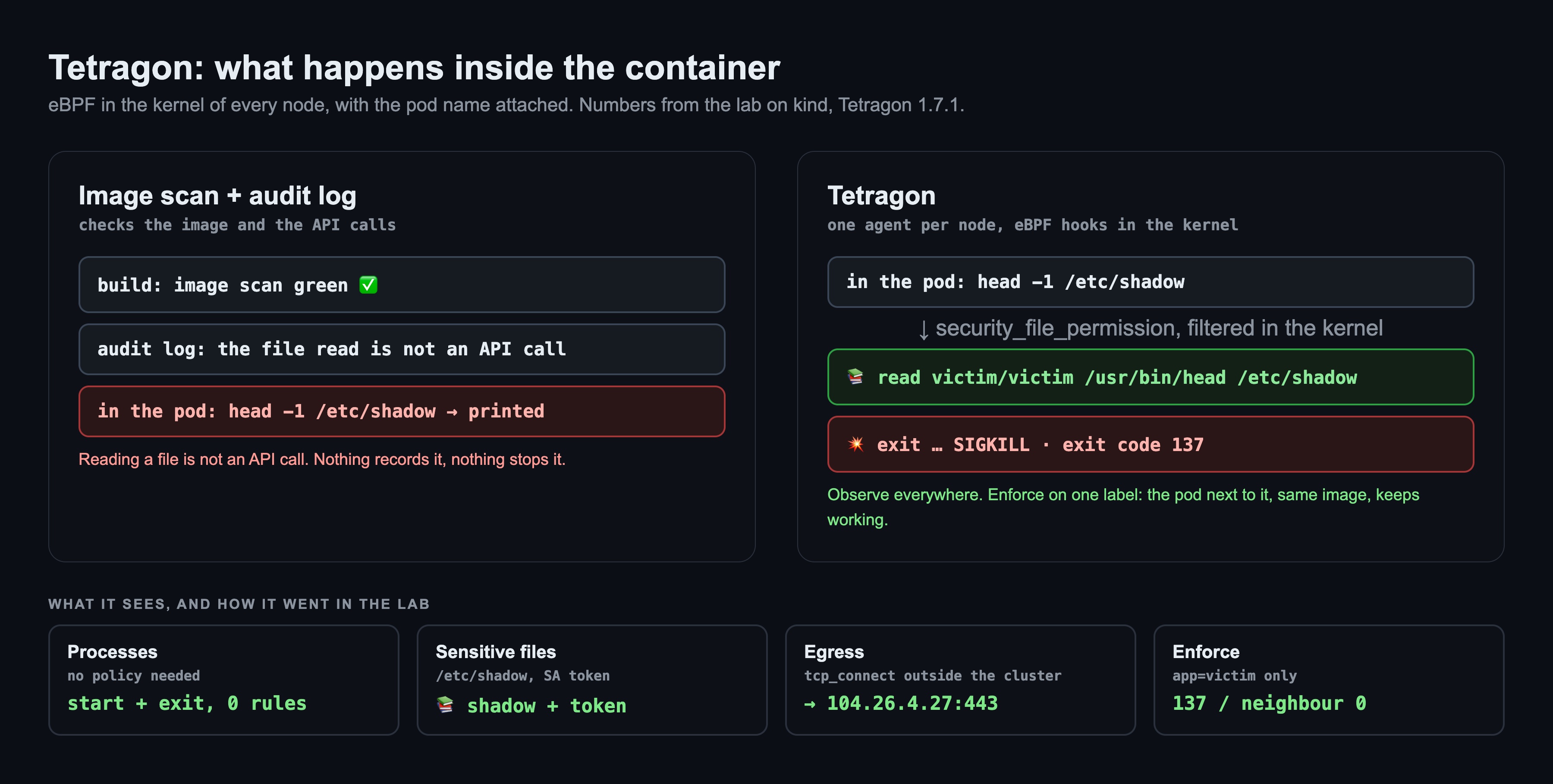
- Hooks: a policy attaches to a kernel function. For files it is
security_file_permission, the check the kernel runs before every read or write. For network it istcp_connect. - Filter in the kernel: the policy compares the arguments (the file path, the destination IP) inside the eBPF program. Reads of other files never leave the kernel as events.
- Action: on a match,
Sigkillkills the process,Overridechanges the function's return value so the read fails. Both happen before the program gets the data.
The lab: what I built
Everything runs on kind on a MacBook (Colima, 4 CPU / 8 GB, kernel 6.8 with BTF): Kubernetes 1.37, Cilium 1.20.2 and Tetragon 1.7.1. Two pods run the same image (netshoot, which has a shell and curl) in the victim namespace: victim with the label app: victim, and bystander without it. In each one I run the same four things a compromised pod might do: read /etc/shadow, read the service account token, connect to an outside site, write to /etc/hosts. The whole lab took about 5 minutes.
Step 1: Process events, no policy needed
Process events don't need any policy. Tetragon showed every process in the pod: the shell, head with its arguments, curl, and each exit code.
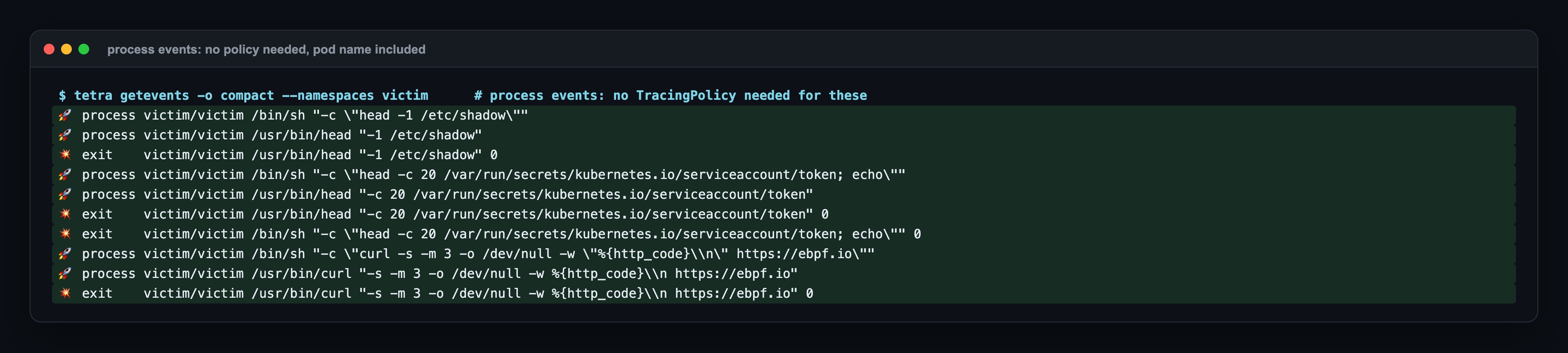
This alone answers "what ran in that pod?", which Kubernetes can't answer.
Step 2: Watch sensitive files and outside connections
Then three cluster-wide policies that only observe: reads of sensitive files, TCP connections to addresses outside the cluster networks, and privilege changes. tetra tracingpolicy list shows them as monitor_only.
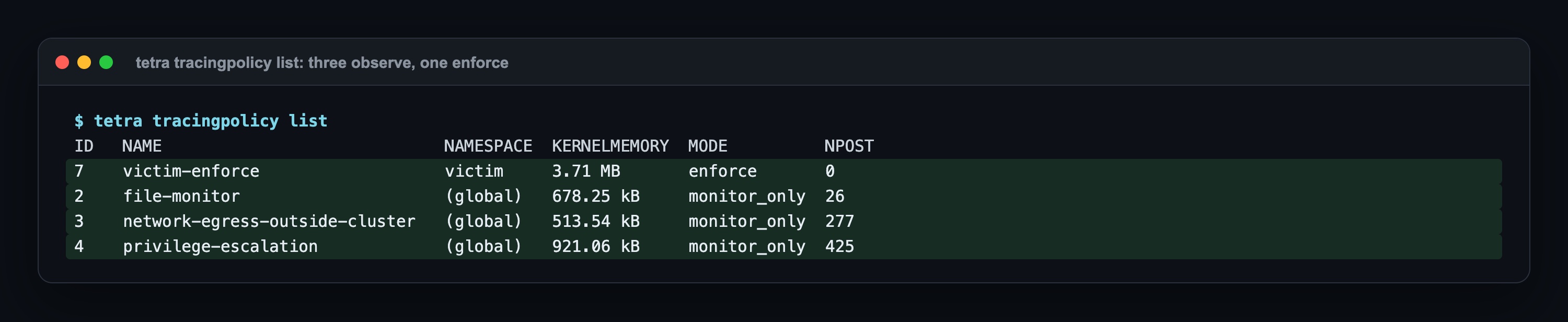
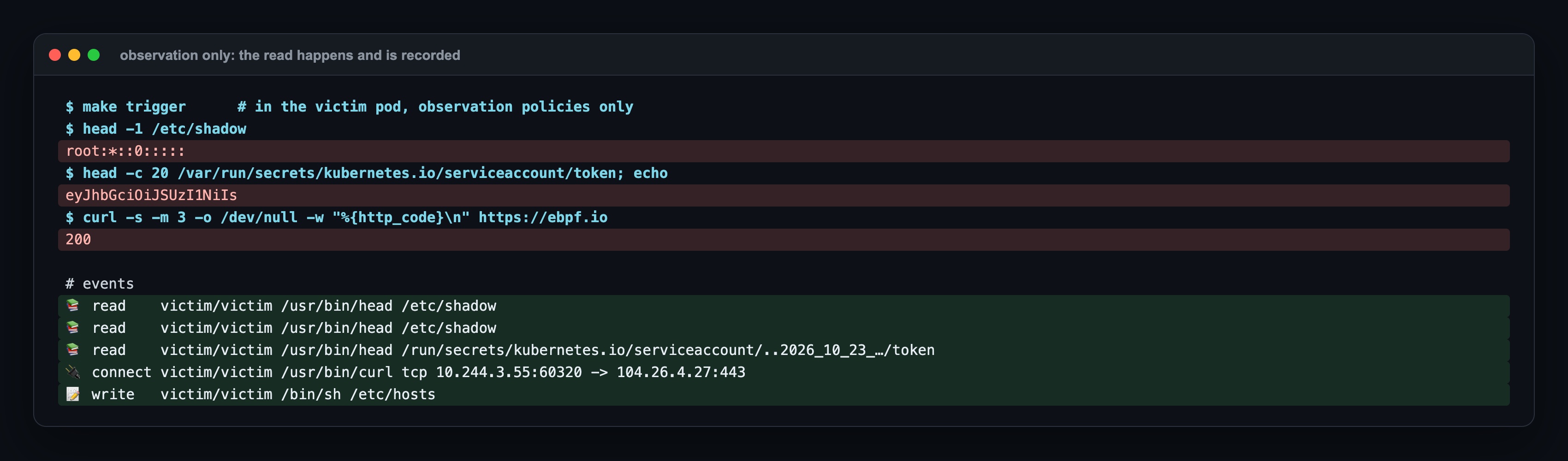
With only those, the commands in victim still worked: the first line of /etc/shadow, the start of the token and 200 from the site were printed. But now each one left an event with the pod name: two reads of /etc/shadow, one read of the token, one connection to 104.26.4.27:443 and one write to /etc/hosts.
Step 3: Enforce, on one label only
Now the policy that acts: a TracingPolicyNamespaced in the victim namespace, with a pod selector app: victim. On reads of /etc/shadow and the token it does Override (the read fails) and Sigkill; on connections outside the cluster it does Sigkill.
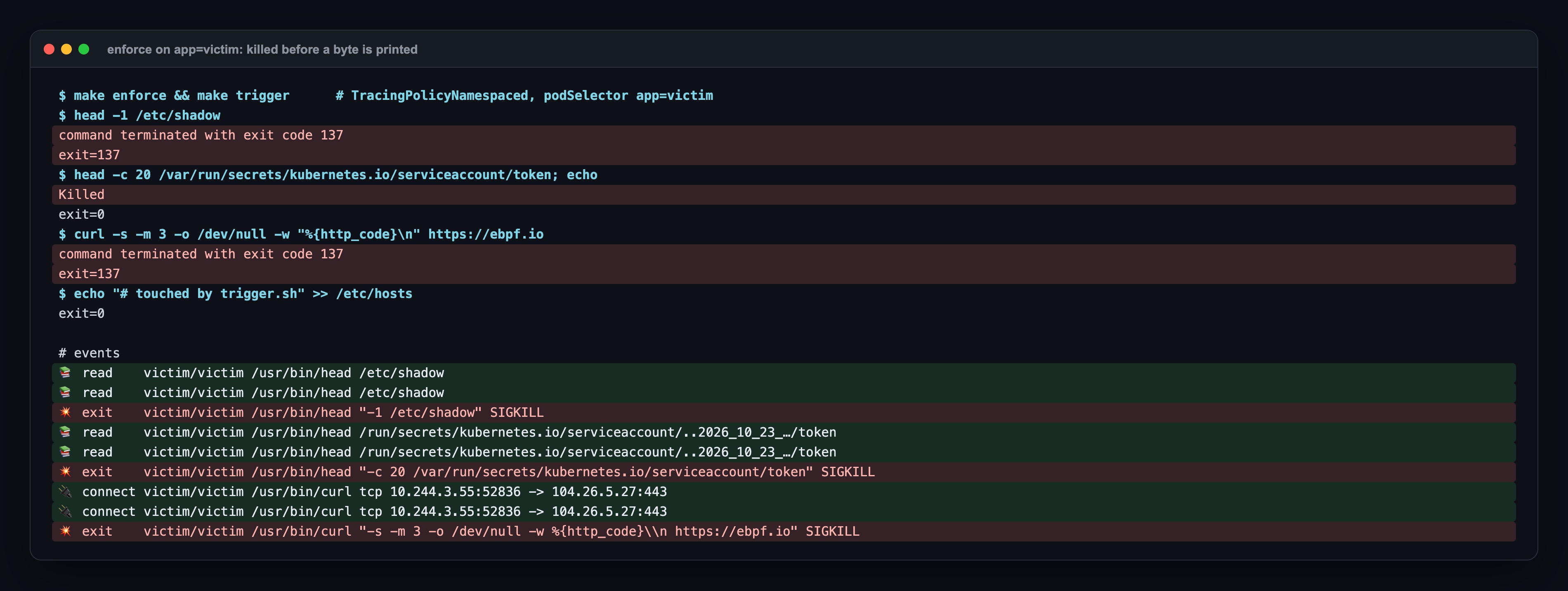
137 is 128 + 9, the kill signal. Nothing was printed before the kill: no line of the file, no token, no HTTP status. The write to /etc/hosts is not in the policy and went through, as it should.
The real test is the pod next to it. Same namespace, same image, same commands, but no app: victim label:
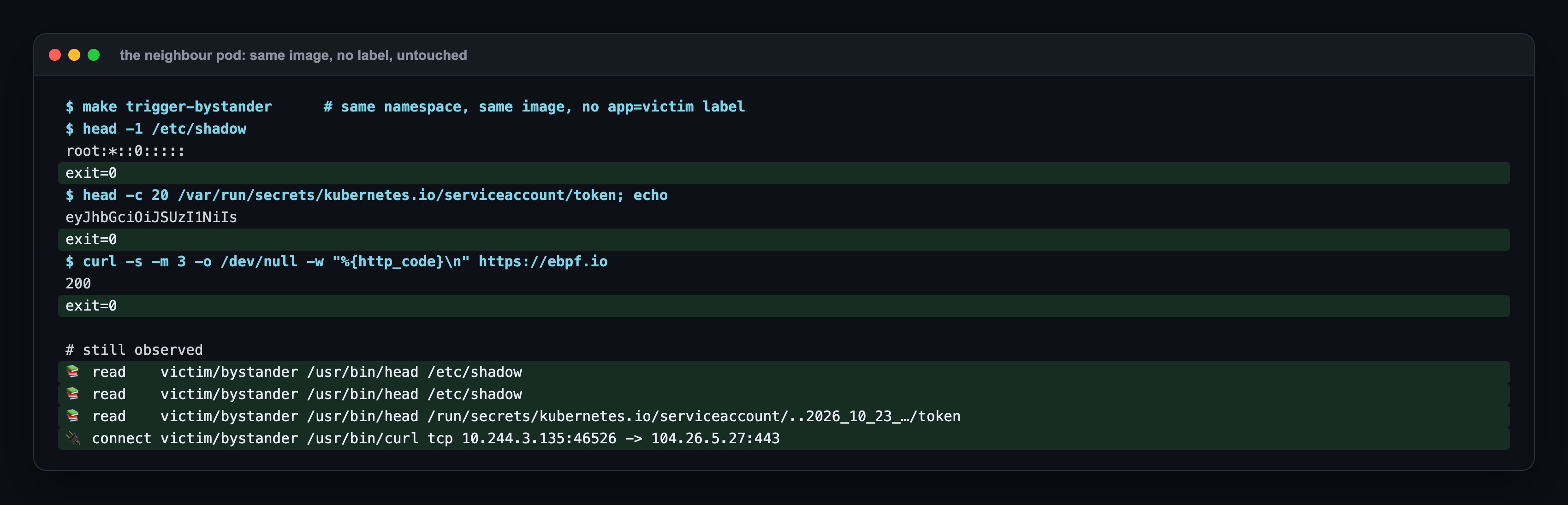
Everything worked, and everything was still recorded by the observation policies. That is how I would turn enforcement on in production: by label, one workload first, then wider.
Step 4: Override on its own
To see the two actions separately, I swapped in a variant with only Override on /etc/shadow. The process survived, the read failed with I/O error, and the neighbour read the file as usual.
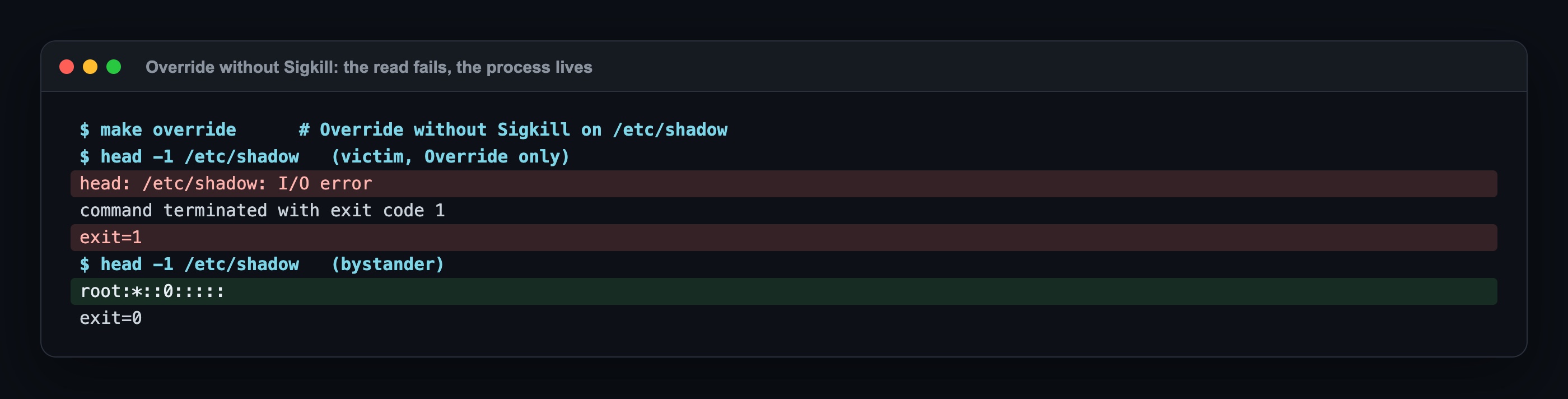
Override blocks the operation; Sigkill ends the process. Together they make sure the data never reaches the program.
Final check
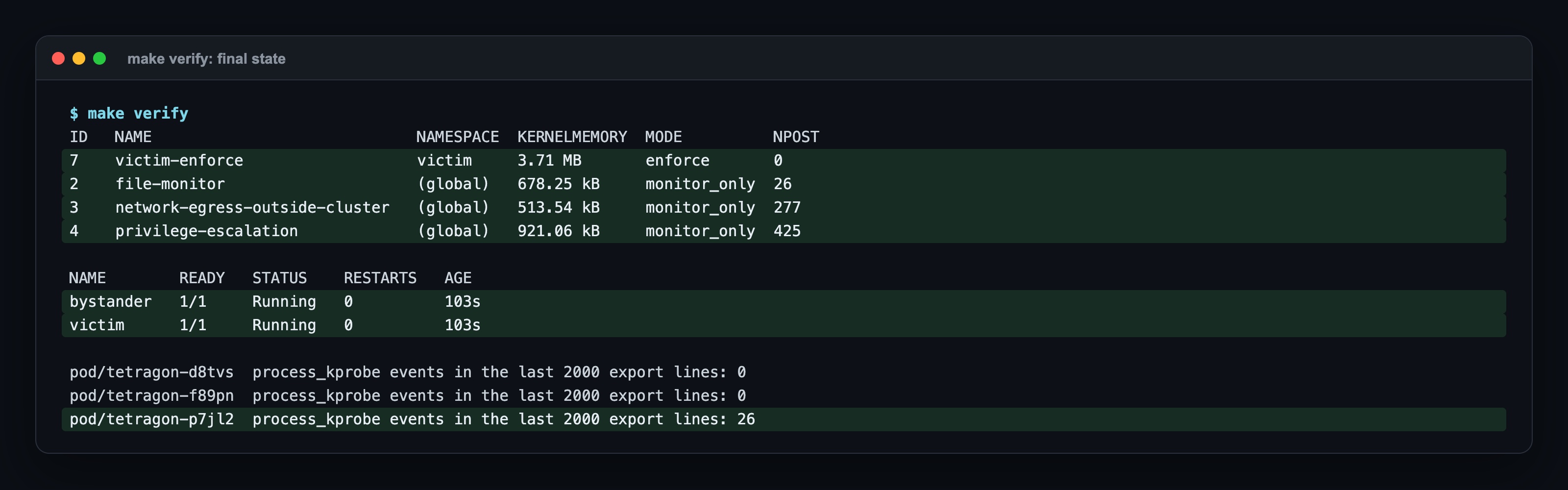
Both pods are still Running: the kill hit the commands started with kubectl exec, not the container's main process. In a real app, the main process would be killed and the container would restart.
Where it broke: 3 real errors
1. The token read was not stopped: the policy watched /var/run/...
The first version of the policy listed /var/run/secrets/kubernetes.io/serviceaccount, the path everyone types. The token was read and printed, and the process was not killed. Inside the container, /var/run is a link to /run, and the kernel reports the real path: /run/secrets/kubernetes.io/serviceaccount/..<timestamp>/token. The event from the observation policy shows it. A prefix on /var/run/... never matches. Write the path the kernel sees, which you read from the event, not the path you typed.

2. Killed, but exit=0
With the correct policy, the token command printed Killed and still reported exit=0. It looks like a bypass. It isn't: the command was head ...; echo, so head was killed, the shell survived and returned the exit code of echo. The events show it clearly: head ... SIGKILL, then the shell with 0. When you test enforcement, run one process per command and read the events, not only the exit code.

3. Override says I/O error, not Operation not permitted
I expected the program to see "permission denied". It saw I/O error (Step 4). The read is blocked either way, but if you search your logs for "Operation not permitted" to prove enforcement, you find nothing. Search Tetragon's events for the override action instead.
One more practical note: events are per node. kubectl logs ds/tetragon picks one of the agents, often the wrong one. In the final check only the victim's node had events (26), the other two had 0. The lab's verify script loops over every agent.
When to use it, and when not
| Situation | Choice |
|---|---|
| You want to know what runs inside your containers and stop a few clear behaviours (reading secrets, unknown outbound connections) | Tetragon. Observe cluster-wide, enforce by label. |
| You want a large set of ready-made detection rules and alerts out of the box | Falco, maybe next to Tetragon. Falco detects in userspace and needs another component to act. |
| You only need to block traffic between pods | A network policy (see the network policy post). Tetragon is about processes, not traffic rules. |
| You want to block bad images before they run | An image scan and an admission policy. Tetragon starts where those stop. |
Summary
- Tetragon watches processes, file reads and connections inside containers with eBPF, and adds the pod name.
- With no rules it showed every process start and exit in the pod.
- Observation policies recorded reads of
/etc/shadowand the token and a connection to an outside IP, without stopping them. - A namespaced policy killed the same commands in the labelled pod with exit code 137, before anything was printed; the neighbour pod with the same image kept working.
- Write paths as the kernel sees them:
/run/secrets/..., not/var/run/secrets/....
Sources: Tetragon docs Getting started, Tracing Policy (hook points, selectors, Sigkill and Override actions), Policy filtering (namespaced policies, pod selectors) and Events export; the Tetragon examples/ policies.
Next in the series
This is the seventh and last post in the Cilium End to End series. It started with installing Cilium on kind: What Is Cilium: Kubernetes Without kube-proxy, eBPF and Hubble, Hands-On. Previous post: What Is Cilium Cluster Mesh? What It Solves, What You Gain, and a Lab with Two kind Clusters and Failover.
The code for this lab (kind config, Cilium and Tetragon values, the victim/bystander manifest, the four policies plus the Override-only variant, the trigger/events/verify scripts and the Makefile) is shared with Lab Access members on Buy Me a Coffee; the repo invite comes by email after you join: https://buymeacoffee.com/miraccanyilmaz/membership