"We have a security scan in the pipeline" usually means one tool, added once, with nobody checking what it actually misses. Some teams pick a code scanner, some pick a web scanner, and both assume they are covered. I wanted a number for that, so I wrote a small Flask app with 10 security bugs I planted myself, ran two static scanners and two modes of one dynamic scanner against the same commit, and counted which bug each one found. SAST found 8, DAST found 5, together 9. One bug, a forgotten backup file with a database password in it, was missed by every scan. In this post I explain what SAST and DAST are, what each one can and cannot see, how to put both in a GitHub Actions or GitLab CI pipeline, and what the lab showed.
What is SAST? What is DAST?
SAST (Static Application Security Testing) reads your source code without running it. It follows data from inputs (request.args) to dangerous calls (cursor.execute, subprocess.run, pickle.loads) and reports the file and line. It runs in seconds on a pull request, before anything is built.
DAST (Dynamic Application Security Testing) never sees the code. It talks to the running application over HTTP like an attacker would: it crawls the pages, looks at headers and cookies, and sends payloads such as ', <script> and ; cat /etc/passwd into every parameter it finds. It reports a URL and a parameter. It needs a deployed app, usually in staging.
The tools in this lab:
- Semgrep: pattern and taint rules for many languages; rule packs like
p/python,p/secrets,p/security-auditdecide what it looks for. - Bandit: a Python only static scanner from PyCQA, with a fixed set of checks (B101...B703).
- OWASP ZAP: an open source web scanner.
zap-baseline.pyonly crawls and watches (passive);zap-full-scan.pyalso attacks (active).
Two neighbours worth knowing: SCA (software composition analysis, for example Trivy or Dependabot) checks your dependencies for known CVEs, and IAST puts an agent inside the running app to see both the request and the code path. Neither is part of this lab.
What problem do SAST and DAST solve?
Bugs that reach production are expensive, and reviewers miss them. A SQL query built with an f-string looks fine in a diff. A missing HttpOnly flag is not in the diff at all, because it is a default nobody wrote down. Security scanning exists to catch these before a user or an attacker does.
Each kind of scan is blind in a different place. SAST cannot see what the server actually answers: response headers, cookie flags set by a framework, a file someone copied into static/. DAST cannot see a code path it never reaches, and it only finds what its payloads trigger. A team that runs only one of them ships the other one's bugs.
The earlier, the cheaper. SAST on a pull request tells the author the exact line while the change is still in their head ("shift left"). DAST tells you how the built, configured, deployed thing behaves, which is closer to what an attacker sees. You want both signals, at different stages.
SAST vs DAST: advantages and disadvantages
| SAST | DAST | |
|---|---|---|
| Needs | source code | a running app (URL) |
| When in the pipeline | every pull request, before build | after deploy to staging |
| Speed in this lab | 6–12 s | 60 s passive, 731 s active |
| Reports | file and line | URL, parameter, payload |
| Good at | injection sinks, secrets in code, weak crypto, debug=True, unsafe deserialization |
headers, cookies, server config, real injectable parameters, error pages |
| Blind to | runtime config, headers, files nobody references | code it cannot reach, payload types it does not try |
| False positives | more (it guesses about data flow) | fewer for injections (it saw the response), noisy for headers |
| Language | per language | language independent |
| Fix cost | low, the author is still on the change | higher, the change is already merged |
How SAST and DAST fit into a CI/CD pipeline
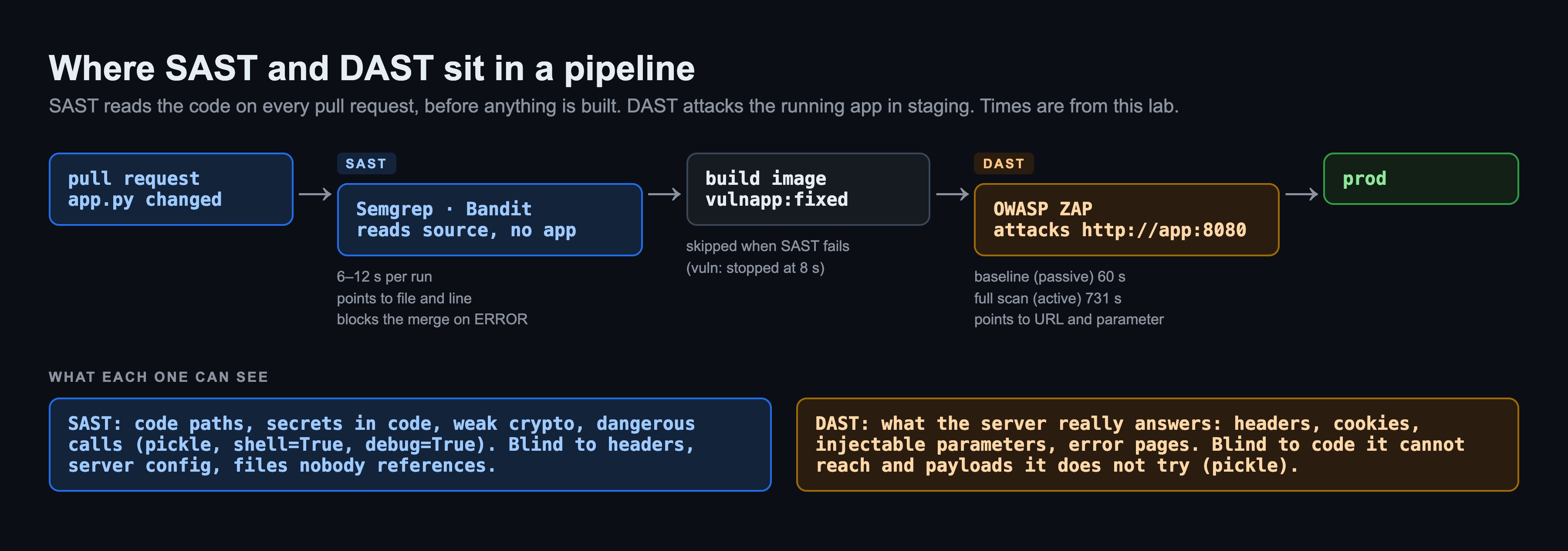
The rule I used: SAST blocks the merge on ERROR severity, DAST blocks the release on High risk alerts. Everything below that is a report, not a gate. Why the threshold matters is in Where it broke #5.
GitHub Actions example
# .github/workflows/security.yml
name: security
on:
  pull_request:
  push:
    branches: [main]

permissions:
  contents: read

jobs:
  sast:
    runs-on: ubuntu-24.04
    container: semgrep/semgrep:1.182.1
    steps:
      - uses: actions/checkout@v5
      - name: Semgrep
        run: >
          semgrep scan --metrics=off
          --config p/python --config p/secrets --config p/security-audit
          --severity ERROR --error
          --sarif -o semgrep.sarif .
      - uses: actions/upload-artifact@v4
        if: always()
        with:
          name: semgrep
          path: semgrep.sarif

  dast:
    needs: sast
    runs-on: ubuntu-24.04
    steps:
      - uses: actions/checkout@v5
      - name: Build and start the app
        run: |
          docker build -t shop:${{ github.sha }} app
          docker run -d --name shop -p 8080:8080 shop:${{ github.sha }}
          for i in $(seq 30); do curl -sf -o /dev/null http://localhost:8080/ && break; sleep 1; done
      - name: ZAP full scan
        run: |
          mkdir -p zap && chmod 777 zap
          docker run --rm --network host -v "$PWD/zap:/zap/wrk:rw" zaproxy/zap-stable:2.17.0 \
            zap-full-scan.py -t http://localhost:8080 -m 2 -J report.json -r report.html -I
      - name: Fail on High risk alerts
        env:
          ZAP_IGNORE: "43"   # reviewed false positives, reasons in .zap/ignore.tsv
        run: |
          high=$(jq '[.site[].alerts[] | select(.riskcode == "3")
                      | select(.pluginid as $p | env.ZAP_IGNORE | split(",") | index($p) | not)] | length' zap/report.json)
          echo "High risk alerts: $high"
          test "$high" -eq 0
      - uses: actions/upload-artifact@v4
        if: always()
        with:
          name: zap
          path: zap/
-I tells ZAP not to fail on warnings by itself; the jq step decides. ZAP_IGNORE lists plugin ids of alerts someone reviewed and marked as false positives, each with a reason in a file next to the workflow. Why that list exists is Where it broke #3. ZAP's own exit codes (1 for FAIL, 2 for WARN) treat a missing Permissions-Policy header the same as a SQL injection unless you write a rules file, and I wanted the gate to be one readable line. For a real staging URL, replace the docker run of the app with the URL of your environment.
GitLab CI example
# .gitlab-ci.yml
stages: [sast, build, dast]

variables:
  IMAGE: $CI_REGISTRY_IMAGE:$CI_COMMIT_SHA

semgrep:
  stage: sast
  image: semgrep/semgrep:1.182.1
  script:
    - >
      semgrep scan --metrics=off
      --config p/python --config p/secrets --config p/security-audit
      --severity ERROR --error
      --gitlab-sast -o gl-sast-report.json .
  artifacts:
    when: always
    reports:
      sast: gl-sast-report.json

build:
  stage: build
  image: docker:28.5
  services: [docker:28.5-dind]
  script:
    - docker login -u "$CI_REGISTRY_USER" -p "$CI_REGISTRY_PASSWORD" "$CI_REGISTRY"
    - docker build -t "$IMAGE" app
    - docker push "$IMAGE"

zap:
  stage: dast
  image: zaproxy/zap-stable:2.17.0
  services:
    - name: $IMAGE
      alias: shop
  variables:
    ZAP_IGNORE: "43"   # reviewed false positives, reasons in .zap/ignore.tsv
  script:
    - mkdir -p /zap/wrk
    - zap-full-scan.py -t http://shop:8080 -m 2 -J report.json -r report.html -I
    - cp /zap/wrk/report.* .
    - >
      python3 -c "import json,os,sys; ig=os.environ['ZAP_IGNORE'].split(',');
      a=[x for s in json.load(open('report.json'))['site'] for x in s['alerts'] if x['riskcode']=='3' and x['pluginid'] not in ig];
      print('High risk alerts:', len(a)); sys.exit(1 if a else 0)"
  artifacts:
    when: always
    paths: [report.html, report.json]
--gitlab-sast writes the report format GitLab shows in the merge request widget. GitLab also has its own SAST.gitlab-ci.yml and DAST templates; I kept the tools explicit so the same commands work on both platforms and locally. Both files above were checked with a YAML parser; I did not run them on GitHub or GitLab for this post. The lab ran the same commands locally.
The lab: 10 planted bugs, 5 scans
Why my own app and not OWASP Juice Shop? To measure how many bugs a scanner finds, I need to know how many there are. Juice Shop has more than a hundred challenges, and mapping scanner output to them is a project of its own. My app is about 90 lines of Flask: a home page with three forms, a login that sets a cookie, a profile page that reads it. Every planted bug has a # Vn tag on its line, so a script maps every finding to a bug by file and line (SAST) or by ZAP rule id (DAST). Findings that map to no planted bug are kept as "extra" and checked by hand.
| # | Planted bug | Where you can see it |
|---|---|---|
| V1 | SQL injection: f-string in execute() on /user |
code and runtime |
| V2 | OS command injection: subprocess.run(..., shell=True) on /ping |
code and runtime |
| V3 | Hardcoded secrets: Flask SECRET_KEY and an AWS key pair |
code |
| V4 | Insecure deserialization: pickle.loads of the session cookie |
code and runtime |
| V5 | app.run(debug=True): Werkzeug debugger |
code and runtime |
| V6 | md5 for passwords | code |
| V7 | No security headers (CSP, X-Frame-Options, ...) | runtime |
| V8 | Cookie without HttpOnly, Secure, SameSite |
runtime (and code, as it turned out) |
| V9 | Reflected XSS and template injection: render_template_string("..." + q) on /search |
code and runtime |
| V10 | static/config.php.bak with a DB password, linked from nowhere |
runtime |
The scanners all ran as containers in one Docker network; ZAP reached the app at http://vulnapp:8080.
A. SAST: Semgrep with the common rule packs
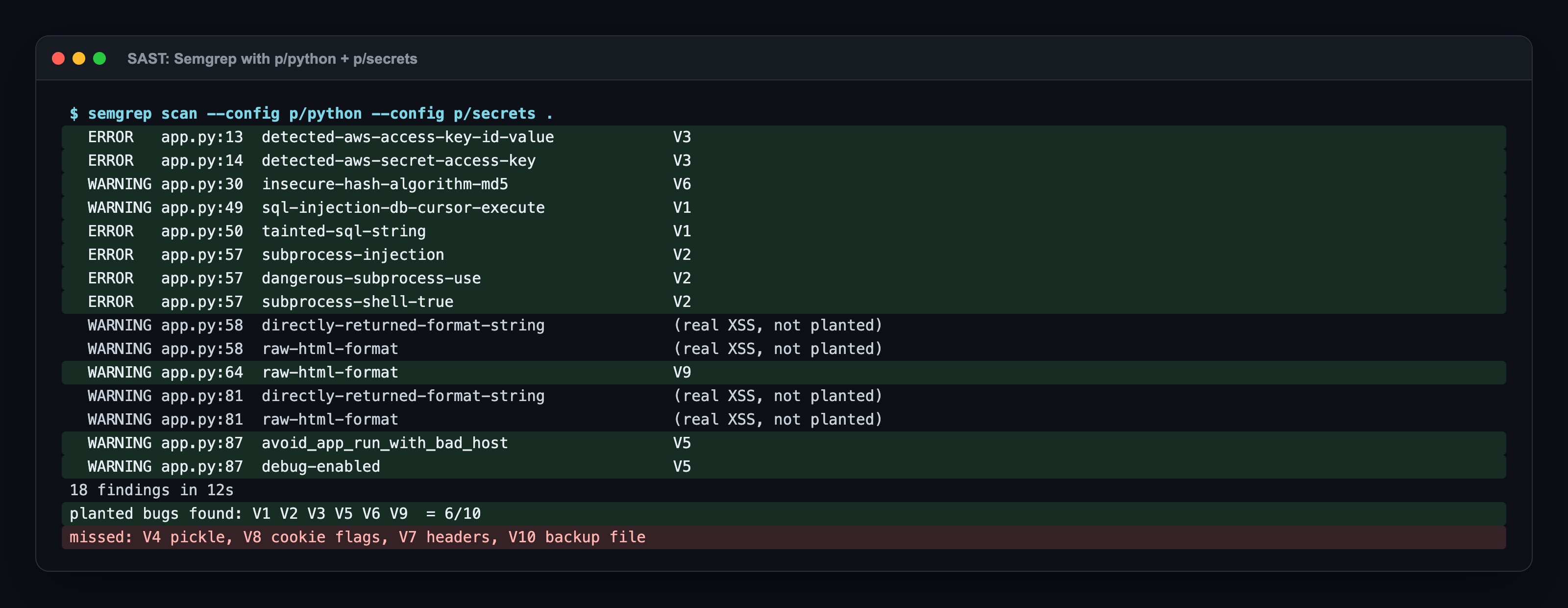
p/python plus p/secrets is what most "add Semgrep to CI" guides start with. It found 6 of 10 in 12 seconds and pointed at the exact line every time. It also found two XSS bugs I had not planted: /ping returns the command output as HTML, and /profile puts the user name from the cookie into an f-string. Both are real. It missed the pickle deserialization, which is the worst bug in the app (remote code execution through a cookie).
B. SAST: the same scan with p/security-audit, and Bandit
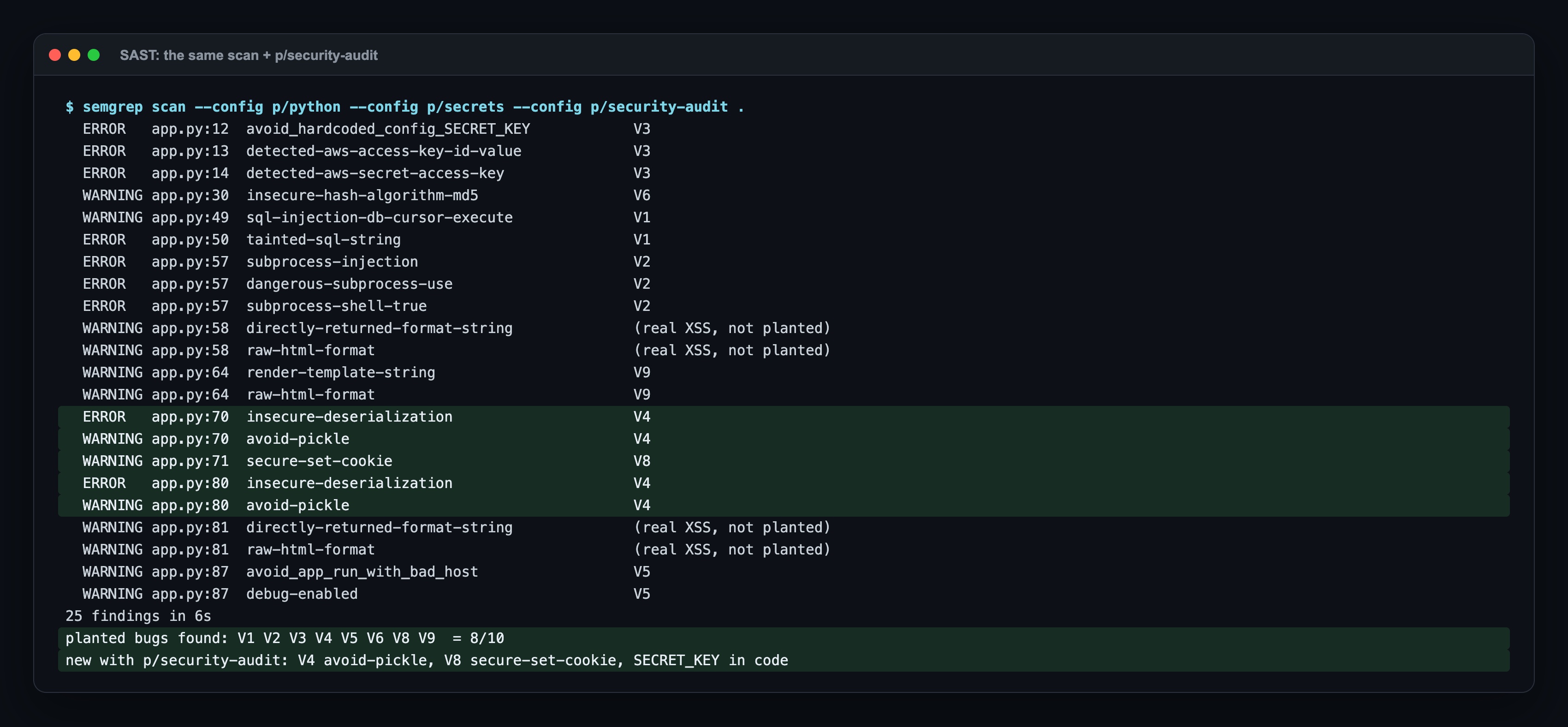
One more rule pack, two more bugs: pickle (V4) and the cookie flags (V8). I had put V8 in the "runtime only" column, but set_cookie("session_data", ...) without httponly=True is visible in the code, and the audit pack has a rule for it. The pack choice changed the result more than the tool choice did.
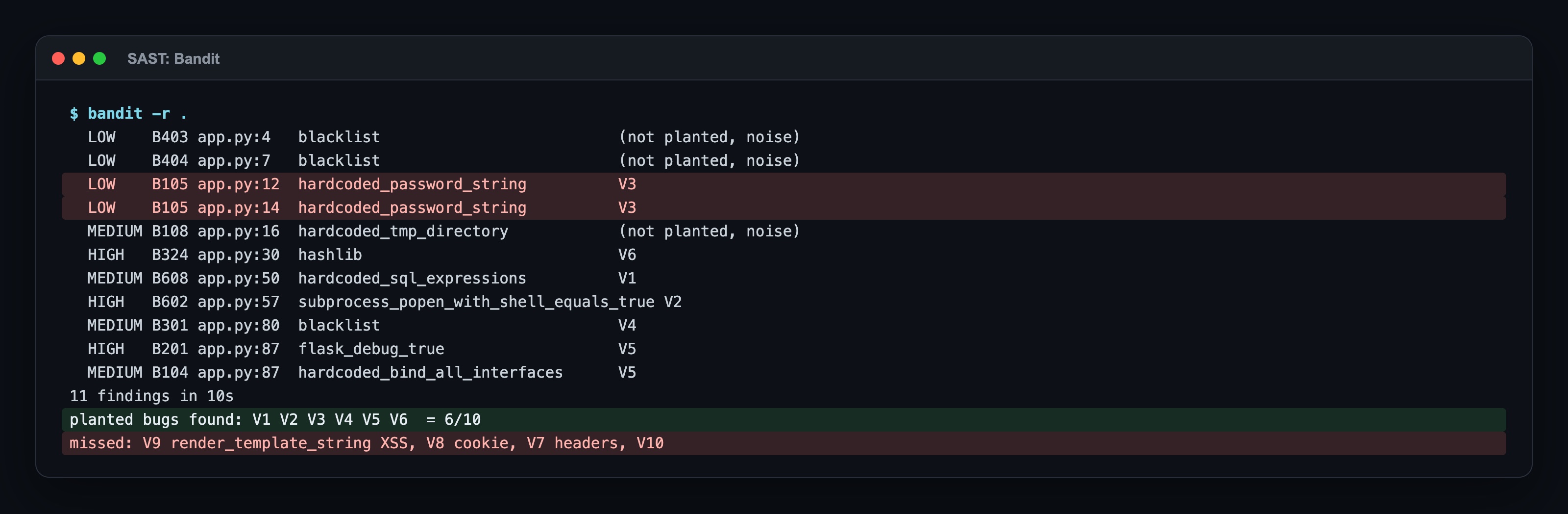
Bandit also found 6, but a different 6: it caught pickle without any extra rule pack, and it missed the XSS in render_template_string. It rated the hardcoded AWS secret as LOW, so a gate on HIGH would let it through.
C. DAST: ZAP baseline (passive)
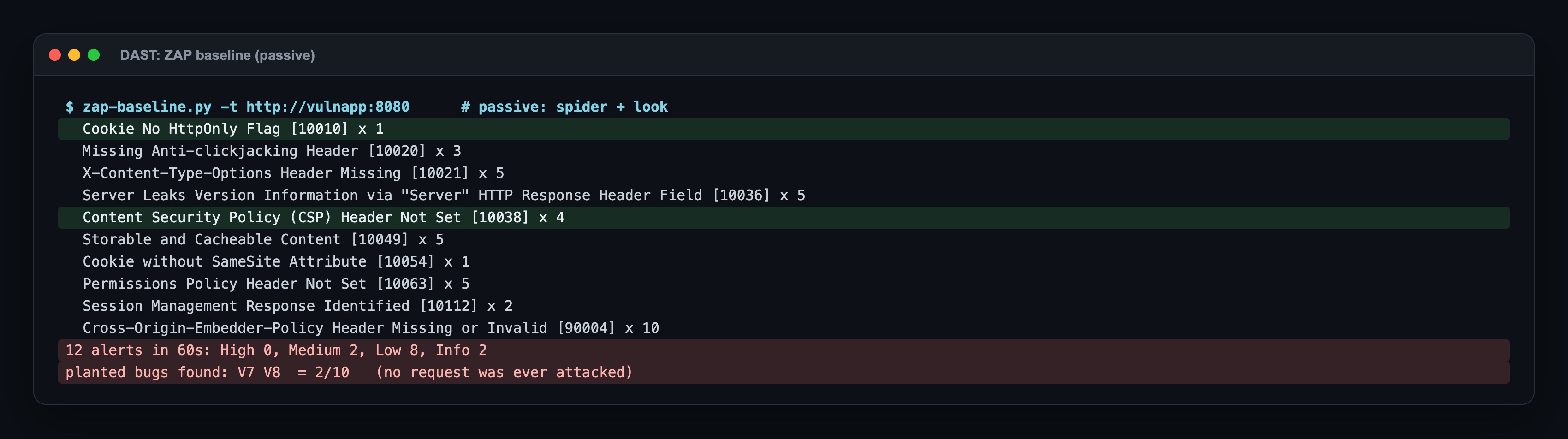
The baseline scan crawls and looks; it never sends an attack. In 60 seconds it found exactly the two bugs SAST could not see well: missing headers (V7) and cookie flags (V8). Zero High alerts while the app had SQL injection and command injection. A green baseline does not mean the app is safe; it means the responses look normal.
D. DAST: ZAP full scan (active)
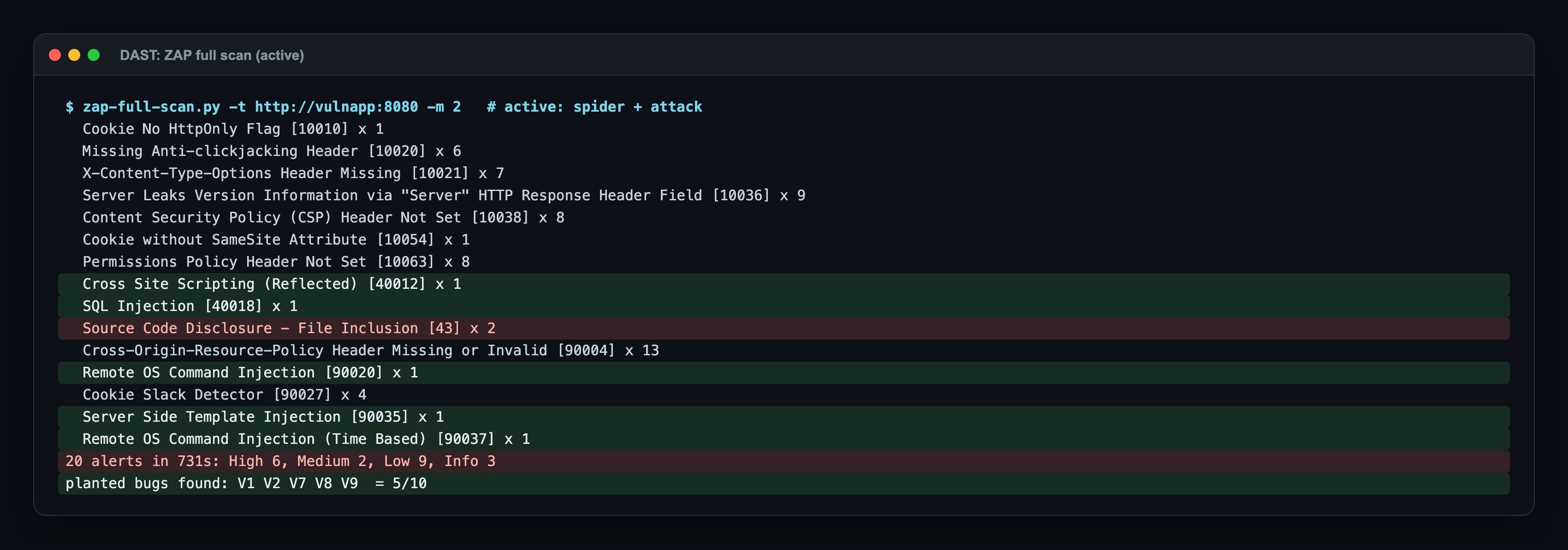

The active scan took 12 times longer and found the injections for real: it sent 127.0.0.1&cat /etc/passwd& and got /etc/passwd back, and it sent {{7014*3535}} and got the product back, which proves template injection, not only XSS. These are the findings nobody argues with in a review, because the payload and the response are in the report. It still missed pickle (it does not craft pickle payloads), the hardcoded secrets and md5 (not visible over HTTP), the debug console (Werkzeug 3 answers /console with 400 unless the Host header is localhost or 127.0.0.1, and even then it asks for a PIN) and the backup file.
E. The matrix
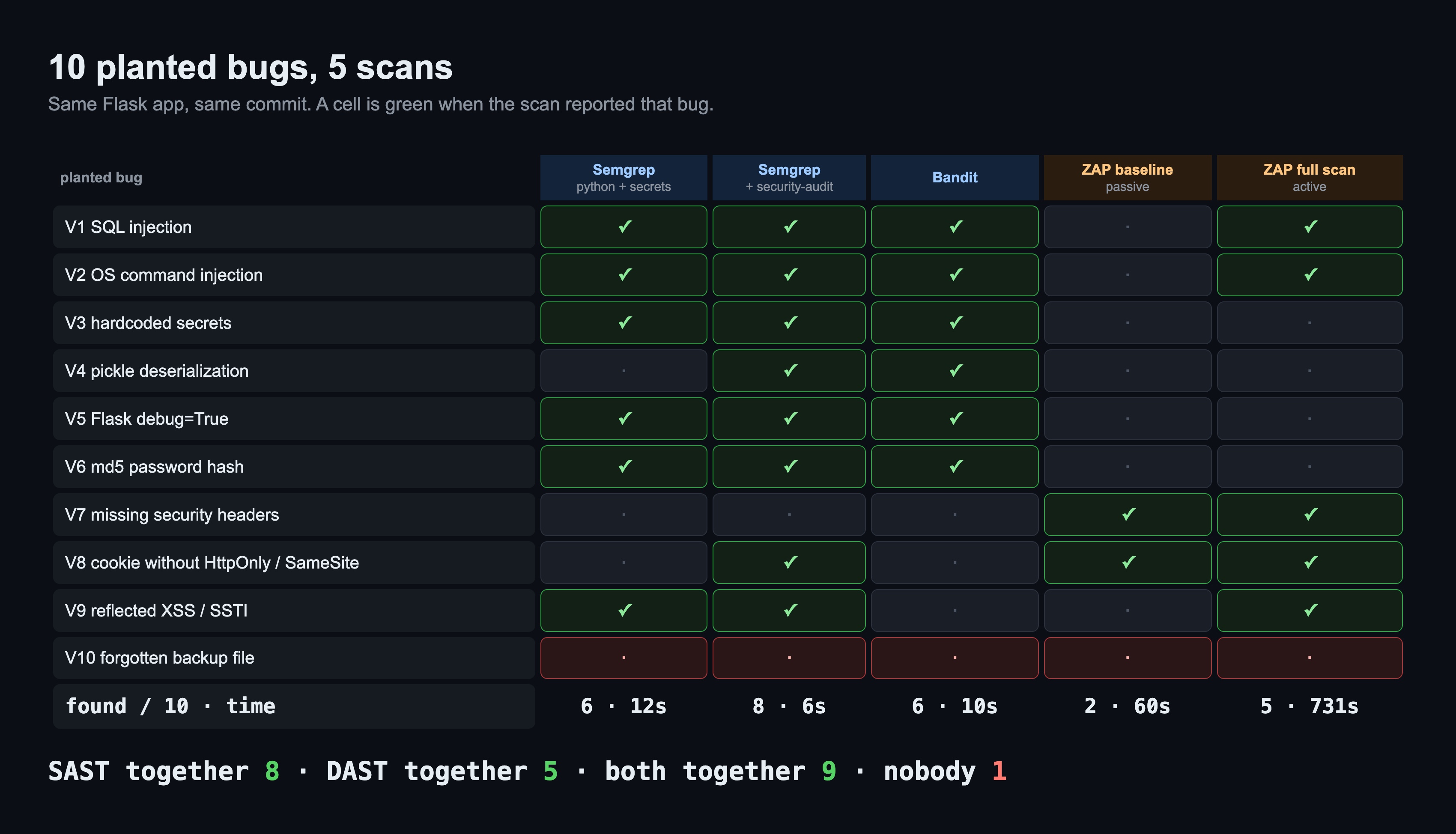
- Only SAST found: V3 secrets, V4 pickle, V5 debug mode, V6 md5.
- Only DAST found: V7 security headers.
- Both found: V1 SQL injection, V2 command injection, V8 cookie flags, V9 XSS.
- Nobody found: V10, the backup file with a database password.
F. The pipeline gate: vulnerable app, fixed app, and a false positive
Then I closed all ten bugs in a second copy of the app: a parameterized query, subprocess.run with a list and a host name allowlist, secrets from the environment, a signed JSON cookie instead of pickle, waitress instead of the debug server, scrypt instead of md5, an after_request hook with security headers, httponly/secure/samesite on the cookie, autoescaped templates, and no static/ folder. make pipeline runs the same gates as the YAML above: Semgrep with --severity ERROR --error, then build, then the ZAP full scan, then the High alert check.
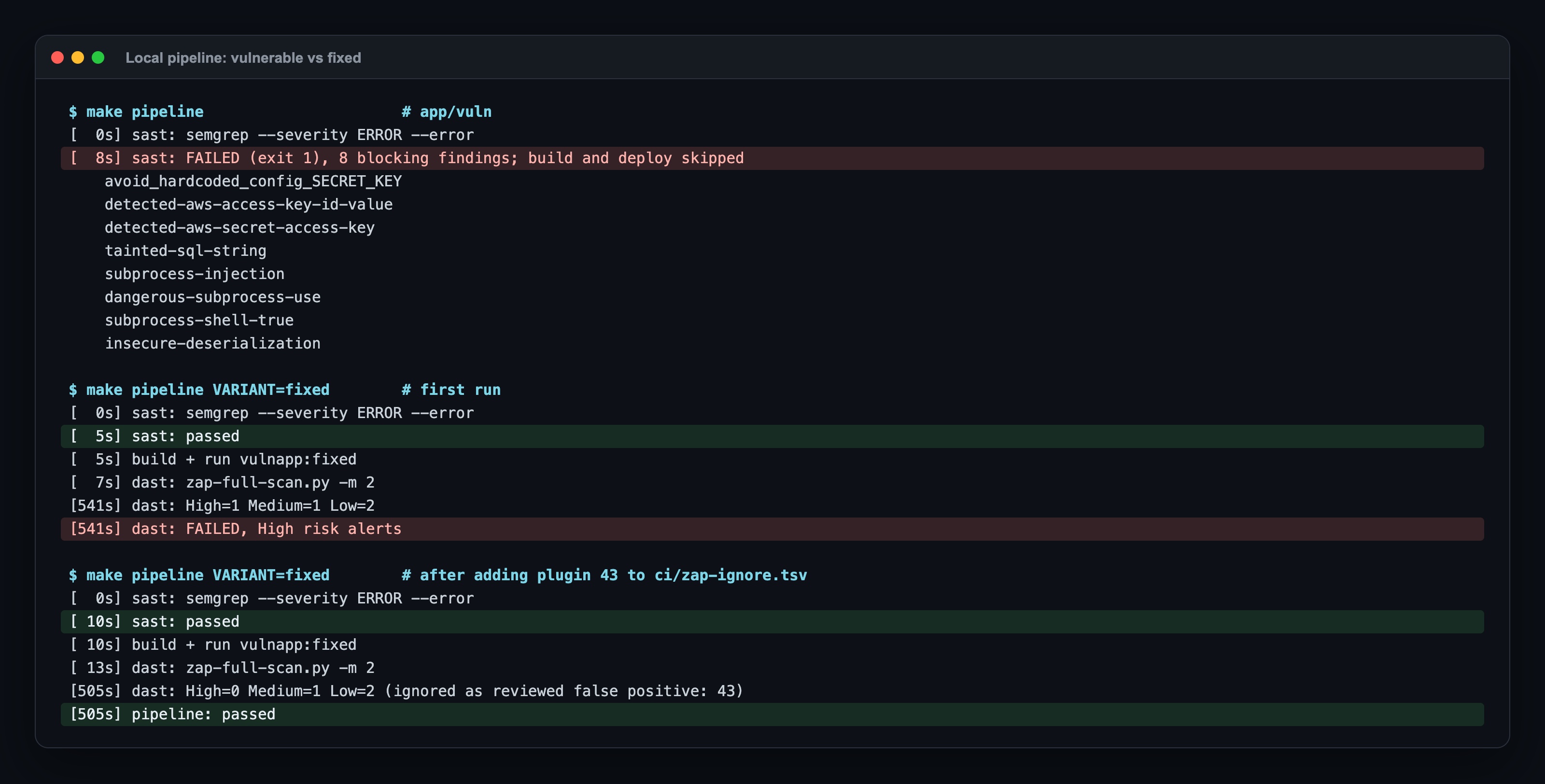
- Vulnerable app: SAST stopped it at 8 seconds with 8 blocking findings. No image was built, ZAP never ran. That is the cheapest place to stop a bug.
- Fixed app, first run: SAST passed, ZAP ran for 541 seconds and the gate failed on 1 High alert. The alert was a false positive (see Where it broke #3 below).
- Fixed app, after one reviewed ignore entry: passed in 505 seconds. What was left: Medium
HTTP Only Site(the lab has no TLS; in staging this is a real finding), LowCookie Slack Detector, and LowCross-Origin-Embedder-Policy Header Missing, a header I had not added. None of them block, all of them are in the report.
Where it broke: 6 real surprises
1. p/secrets ignored my first AWS key: it ended in EXAMPLEKEY
My first version used wJalrXUtnFEMI/K7MDENG/bPxRfiCYEXAMPLEKEY, the example key from the AWS documentation. Neither p/secrets nor p/gitleaks reported it; secret scanners allowlist the documented example on purpose. I replaced it with a random fake key in the same format and both packs flagged it immediately. If you test a secret scanner, do not test it with the key from the docs.
2. p/python alone did not report pickle.loads of a cookie
The worst bug in the app, remote code execution through the session cookie, was invisible to the most common Semgrep setup. The rule (avoid-pickle, insecure-deserialization) lives in p/security-audit. Bandit found it with its default checks. Check what your rule pack contains, not only that the tool runs.
3. A false positive failed the release of the fixed app
ZAP raised Source Code Disclosure - File Inclusion (High) on /ping?host=127.0.0.1 and /search?q=shoes. It sent the words ping and search as parameter values and read the response (the ping output, the search text) as leaked source code. There is no file inclusion in the app. On the vulnerable app this got lost among five real High alerts. On the fixed app it was the only High alert, and it failed the pipeline: High=1, FAILED, with zero real bugs left.
The tempting fixes are wrong: raising the gate to "fail only on 2 High", or dropping the DAST gate. I added the plugin id to an ignore file with the reason and the date, and the gate skips only that id. Every entry in that file is a decision a person made and can be asked about later.
4. PASS: Backup File Disclosure [10095] while a backup file was being served
ZAP has a rule for backup files, and it ran. It tries names like index.bak and index.old next to URLs it already knows. Nothing linked to /static/config.php.bak, so ZAP never knew the folder had that file, and the rule passed. SAST did not see it either, because it is not code. What catches this is a review of what goes into the image (a .dockerignore, a COPY of only what the app needs) or a forced browsing tool with a wordlist.
5. After the fix, the audit rules still reported 9 findings
On the fixed app the default Semgrep set reported 0 findings. With p/security-audit it reported 5 WARNINGs, all render-template-string, on templates that are constant strings with autoescaped {{ }} values. Bandit reported 4: B404 (importing subprocess), B603 and B607 (running ping by name, without shell), and B104 (binding to 0.0.0.0, which a container has to do).
None of these is a bug. If the SAST gate had blocked on WARNING or on Bandit LOW, the fixed app would never have shipped, and the team would have learned to add # nosec everywhere. That is why the gate is ERROR only: the 8 findings that stopped the vulnerable app were all ERROR, and the 9 that remained on the fixed app were all WARNING, LOW or MEDIUM. The audit pack is still worth running, as a report a reviewer reads, not as a gate.
6. Server Leaks Version Information is not proof of debug mode
ZAP flagged the Server: Werkzeug/3.1.9 Python/3.13.18 header on every response. I first counted that as V5 (debug mode), then checked: Werkzeug sends that header with debug=False too. ZAP never found the debugger itself: /console answered 400 to Host: vulnapp:8080, and with Host: 127.0.0.1 it showed "console is locked" and asked for a PIN. Werkzeug 3 made the debug console harder to reach by accident; debug=True in production is still a bug, and only SAST reported it. I did not give DAST credit for V5; the matrix would have looked better for DAST if I had.
When to use which
| Situation | Use | Why |
|---|---|---|
| Every pull request | SAST, gate on ERROR | seconds, exact line, the author fixes it before merge |
| Secrets in code | SAST secret rules (or gitleaks) on every push | DAST never sees them |
| After every deploy to staging | DAST baseline | 60 s, catches headers and cookies, safe to run often |
| Nightly or before a release | DAST full scan, gate on High | 12 minutes here, real proof of injections; it sends attacks, so never against prod without permission |
| Dependencies with known CVEs | SCA (Trivy, Dependabot) | neither SAST nor DAST checks library versions |
| Files in the image nobody references | image review, .dockerignore, forced browsing |
all five scans missed V10 |
Summary
- SAST reads code and reports a line; DAST attacks the running app and reports a URL. On the same app with 10 planted bugs, SAST found 8, DAST found 5, together 9.
- SAST alone missed the security headers; DAST alone missed secrets, pickle, md5 and debug mode. Both found the injections and the cookie flags.
- The Semgrep rule pack mattered more than the tool:
p/python+p/secretsfound 6, addingp/security-auditfound 8, including the remote code execution through pickle. - The ZAP baseline found 2 bugs and 0 High alerts while the app had SQL and command injection; only the active scan (731 s vs 60 s) found the injections.
- Gate on ERROR (SAST) and High (DAST), report the rest. The vulnerable app stopped at SAST in 8 seconds; the fixed app passed only after one reviewed false positive went into an ignore file. Nobody found the backup file; that one needs an image review.
Sources: OWASP Static Code Analysis (Controls for Static Code Analysis); OWASP ZAP docs ZAP Baseline Scan, ZAP Full Scan, Alert details; Semgrep docs Rule packs, CLI reference (--severity, --error, --gitlab-sast); Bandit docs Test plugins; GitHub Docs Workflow syntax for GitHub Actions; GitLab Docs Static application security testing, Dynamic application security testing, Artifacts reports.
Next in the series
This is post 3 of Core Skills, Measured. The previous one, What Is a Git Branching Strategy?, measured how a change reaches production; this one measured what the pipeline checks on the way. Next: rootless containers and image hardening, where the same kind of counting goes into CVEs and what a root container can write on the host.
The code for this lab (the vulnerable and the fixed Flask app, the SAST, DAST and pipeline scripts, the scoring script that maps every finding to a planted bug, and the Makefile) is shared with Lab Access members on Buy Me a Coffee; the repo invite comes by email after you join: https://buymeacoffee.com/miraccanyilmaz/membership