Every team argues about branches at some point. One person wants develop and release/*, another wants everything on main, and a third asks why staging runs something different from what was tested. The branching strategy is usually picked once, copied from a blog post, and then nobody measures what it costs. In this post I explain what a branching strategy is, compare GitFlow, GitHub Flow and trunk-based development with their real advantages and disadvantages, show which one fits a GitOps setup, and then go deep on image promotion: how the same container image should move from dev to staging to prod. Everything runs locally with real commands; I did not create a GitHub or GitLab repository for this.
What is a Git branching strategy?
A branching strategy is the team's agreement on three things:
- Where work happens: on long-lived branches, short-lived branches, or directly on
main. - How work gets integrated: merge, rebase, squash, and how often.
- What gets released: a tag, a release branch, or every commit on
main.
The three models people mean when they say "branching strategy":
- GitFlow: two permanent branches (
mainfor released code,developfor the next release), plusfeature/*,release/*andhotfix/*branches. - GitHub Flow: one permanent branch (
main). Every change is a short branch and a pull request; merging tomainmeans deploying. - Trunk-based development: everyone commits to
main(the trunk) at least once a day, with very short branches or none. Unfinished work hides behind feature flags. Release branches are optional and are cut from the trunk, never merged back.
What problem does a branching strategy solve?
Integration pain. Two people change the same file. The longer their branches live apart, the bigger the surprise when they meet. A branching strategy decides how long that can be.
Knowing what is in production. "Is the fix for the pricing bug live?" should have a one-line answer: a tag, a commit on main, a digest in a file. Without a strategy the answer is "let me check with the team".
Supporting more than one version. If customers run 2.3 and 2.4 at the same time (on-prem software, mobile apps, libraries), you need a place to fix 2.3 without shipping 2.4. That is what release branches are for.
GitFlow vs GitHub Flow vs trunk-based development: advantages and disadvantages
GitFlow
How it works: features branch off develop and merge back when done. When enough features are in, a release/x.y branch is cut from develop, stabilized, then merged into main (tagged) and back into develop. A production fix starts as hotfix/x.y.z from main and is merged into main and develop (and into an open release branch, if there is one).
git switch -c feature/wishlist develop        # work for days
git switch develop && git merge --no-ff feature/wishlist
git switch -c release/1.0 develop             # stabilize here
git switch main && git merge --no-ff release/1.0 && git tag -a v1.0 -m v1.0
git switch develop && git merge --no-ff release/1.0   # back-merge
git switch -c hotfix/1.0.1 v1.0               # prod fix
git switch main && git merge --no-ff hotfix/1.0.1 && git tag -a v1.0.1 -m v1.0.1
git switch develop && git merge --no-ff hotfix/1.0.1  # back-merge again
Advantages: releases are explicit and named; a release can be stabilized while new work continues on develop; it fits software with planned versions and several supported versions.
Disadvantages: long-lived branches mean late integration, so conflicts pile up; every release and hotfix is merged twice, and forgetting the second merge brings the bug back; CI has to handle five kinds of branches; changes wait for the next release, so lead time is measured in weeks. Vincent Driessen, who wrote the original GitFlow post in 2010, added a note in 2020 saying that for continuously delivered web apps a simpler workflow like GitHub Flow is the better fit.
GitHub Flow
How it works: branch from main, open a pull request, CI runs, someone reviews, merge, deploy. The branch lives hours or a couple of days.
git switch -c fix-timeout main
git commit -am "timeout 800ms"
git push -u origin fix-timeout      # open a PR; CI + review
# after approval: merge to main, the main pipeline deploys
Advantages: one rule, easy to teach; review happens on every change; main is always deployable; a hotfix is just another small PR.
Disadvantages: it assumes one production version, so it does not help if you must patch an old release; PRs that sit for days quietly become GitFlow feature branches; "merge = deploy" needs good tests and a fast rollback.
Trunk-based development
How it works: small commits go to main at least daily (directly or through a PR that lives a few hours). Work that is not finished ships switched off behind a feature flag. If you need a release branch, you cut it from main and only cherry-pick fixes into it; nothing is merged back.
git pull --rebase origin main
git commit -am "wishlist: api behind flag (off)"
git push origin main                # CI runs on every push
# optional release branch for a supported version:
git switch -c release/2.4 main && git cherry-pick <fix-sha>
Advantages: integration happens continuously, so conflicts stay tiny; there is only one version of the truth; lead time is hours; this is what the DORA research links with high-performing teams.
Disadvantages: it needs discipline and fast, reliable CI; feature flags are code you must clean up later; without review on every commit (or very short PRs), quality depends on tests; teams new to it break main often in the first weeks.
Comparison table
| GitFlow | GitHub Flow | Trunk-based | |
|---|---|---|---|
| Permanent branches | main, develop |
main |
main |
| Branch lifetime | days to weeks | hours to 2 days | hours, or none |
| Release unit | release branch + tag | every merge | every commit (or a cut release branch) |
| Hotfix | hotfix/*, merged twice |
normal PR | commit to main, cherry-pick if a release branch exists |
| Several supported versions | yes | no | yes, with release branches |
| CI complexity | high (5 branch types) | low | low, but CI must be fast |
| Best for | versioned products, on-prem, mobile, libraries | web apps and services with one prod version | teams that deploy many times a day |
| In my lab (same 10 changes) | 5 conflicts, 9.4 days to prod | 1 conflict, 2 days | 0 conflicts, same day |
How CI/CD pipelines follow the branching model
The branching model decides what your pipeline triggers on. These are the shapes I use; I did not run them on GitHub or GitLab for this post, the lab runs the same steps as local scripts.
GitHub Actions, trunk-based or GitHub Flow. One workflow: test on pull requests, build once on main, deploy dev automatically, prod behind an environment with required reviewers.
on:
  pull_request:
  push:
    branches: [main]
concurrency:
  group: deploy-${{ github.ref }}
  cancel-in-progress: false
jobs:
  test:
    strategy:
      matrix: { python: ["3.12", "3.13"] }      # matrix build
    runs-on: ubuntu-latest
    steps:
      - uses: actions/checkout@v4
      - uses: actions/setup-python@v5
        with: { python-version: "${{ matrix.python }}", cache: pip }   # dependency cache
      - run: pip install -r requirements.txt && pytest
  build:
    if: github.ref == 'refs/heads/main'
    needs: test
    uses: ./.github/workflows/build-image.yml   # reusable workflow (on: workflow_call), outputs the digest
  promote-dev:
    needs: build
    runs-on: ubuntu-latest
    steps:
      - uses: ./.github/actions/bump-digest     # composite action: edit envs/dev in the GitOps repo, push
        with: { env: dev, digest: "${{ needs.build.outputs.digest }}" }
The reusable workflow builds and pushes the image with a layer cache (cache-from: type=gha) and returns the digest; the composite action is the five shell lines that change one line in the GitOps repo. Staging and prod are not jobs here at all: they are pull requests to the GitOps repo, which brings me to the next section. Reusable workflows and composite actions get their own post later in this series.
GitLab CI, the same idea. Rules replace branch filters, and a monorepo can generate its pipeline at runtime with a dynamic child pipeline:
workflow:
  rules:
    - if: $CI_PIPELINE_SOURCE == "merge_request_event"
    - if: $CI_COMMIT_BRANCH == $CI_DEFAULT_BRANCH
test:
  parallel:
    matrix: [{ PYTHON: ["3.12", "3.13"] }]
  cache: { key: { files: [requirements.txt] }, paths: [.cache/pip] }
  script: [pip install -r requirements.txt, pytest]
generate:
  script: ./ci/generate-child.sh > child.yml    # one job per changed service
  artifacts: { paths: [child.yml] }
services:
  trigger:
    include: [{ artifact: child.yml, job: generate }]
    strategy: depend
With GitFlow the same file needs rules for develop, release/*, hotfix/*, main and tags, and each rule decides a different environment. That is the CI cost of five branch types.
Which branching strategy for GitOps?
GitOps has two repositories, and they need different answers.
The application repo (source code, Dockerfile, tests): use trunk-based development or GitHub Flow with short PRs. Every merge to main builds one image, tagged with the commit SHA. Use release branches only if you really support older versions in parallel.
The GitOps (config) repo (Kubernetes manifests that Argo CD or Flux applies): use one branch, main, and one folder per environment. Do not use a branch per environment.
apps/shop/base/            deployment, service
envs/dev/kustomization.yaml       namespace, replicas 1, debug logs, image digest
envs/staging/kustomization.yaml   namespace, replicas 2, image digest
envs/prod/kustomization.yaml      namespace, replicas 3, image digest
Environment branches look natural ("dev branch deploys to dev"), and GitLab Flow even describes them. For GitOps config they go wrong in a specific way, which I measured below: a merge moves everything, including the settings that should stay in one environment, and cherry-picks make branches drift until git diff no longer tells you what is different. With folders, the difference between staging and prod is a diff of two folders on the same commit, and Argo CD watches one branch with a different path per environment.
How should image promotion work?
Image promotion is moving one built image from one environment to the next without changing it. The rules I follow:
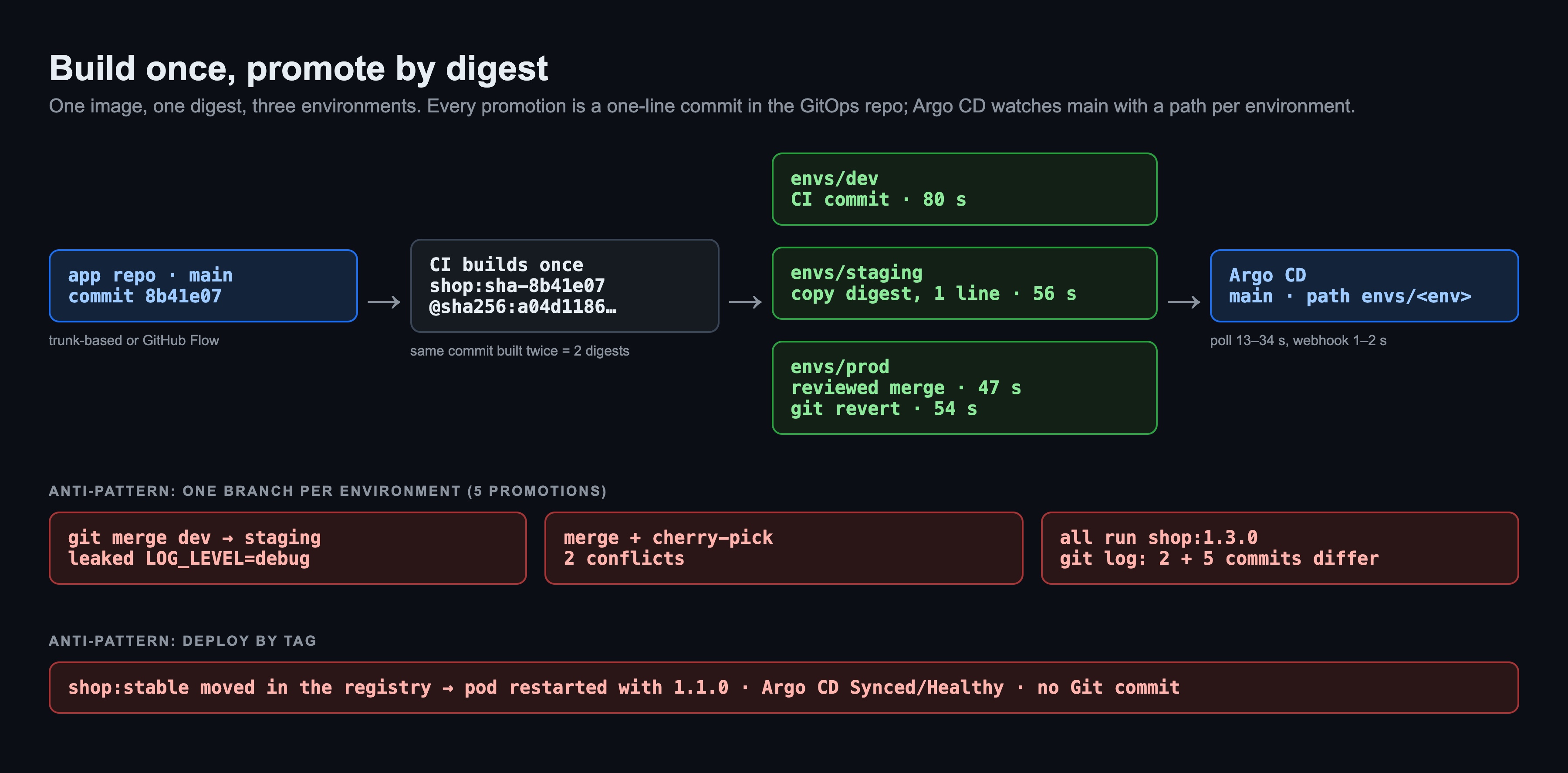
- Build once. CI builds the image once, from one commit, and every environment runs that exact artifact. Rebuilding for prod means prod runs something nobody tested: in the lab, building the same commit twice gave two different digests.
- Deploy by digest, not by tag. A tag like
:stableor:1.1.0is a pointer anyone can move. A digest (@sha256:…) is the content itself. Tag with the commit SHA for humans, pin the digest in Git for machines. - Promotion is a Git change. Moving to staging means changing one line (the digest) in
envs/staging. The commit says who promoted what, and when; rollback isgit revert. - Different gates per environment. dev: CI commits automatically. staging: automatic or one approval. prod: a pull request with required reviewers (CODEOWNERS on
envs/prod/, a protected environment). - Copy the digest, never the folder. Promote by taking the digest from the previous environment, not by merging or copying the whole folder, so environment settings stay where they are.
- Keep tags immutable in the registry (ECR tag immutability, Harbor immutable tag rules), and copy between registries with tools that keep the digest (
crane copy,skopeo copy). - Verify before prod. Sign the digest (cosign) and let an admission policy refuse unsigned images in prod. I covered the policy side in the Kyverno post.
- Automate the boring part. Argo CD Image Updater or Flux image automation can write the digest for dev; Kargo models the whole dev → staging → prod promotion with gates. They all end in the same thing: a commit in the GitOps repo.
The lab: what I measured
Three parts, all local:
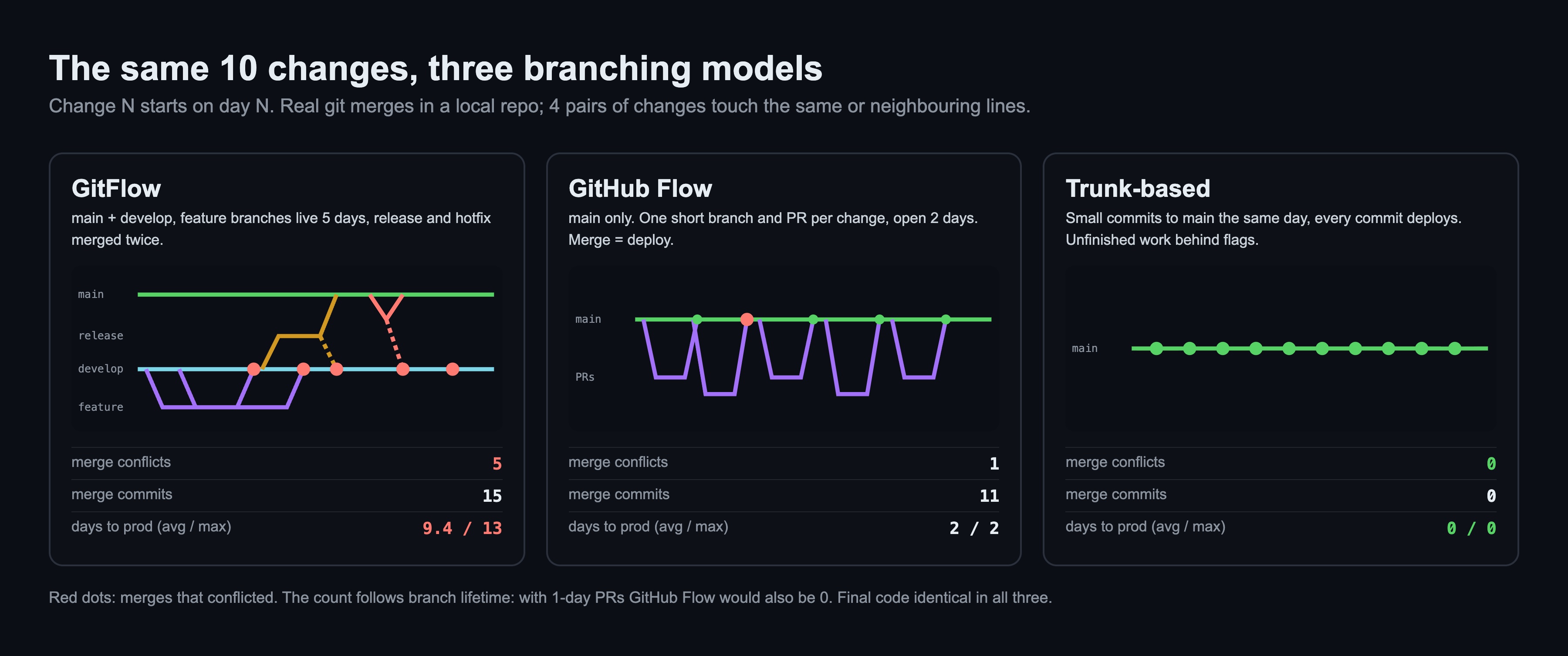
- A. A small Python repo and the same 10 changes from three developers, applied with real git under each model. Change N starts on day N; GitFlow feature branches live 5 days, GitHub Flow PRs 2 days, trunk commits land the same day. Four pairs of changes touch the same or neighbouring lines, as config files do in real life.
- B. A GitOps repo with one branch per environment and five promotions done with
git mergeandgit cherry-pick. - C. A kind cluster with Argo CD, a local registry on
localhost:5001, and the GitOps repo served bygit daemoninside the kind network instead of GitHub. One folder per environment, promotion by digest.
A. Same 10 changes, three branching models

GitFlow had 5 conflicts. Three came from features that were in flight at the same time (C3 next to C2, C6 next to C4, C9 next to C5). The other two came from the process itself: the release fix and the hotfix both had to be merged back into develop, where the same function had changed in the meantime. GitHub Flow had 1, because only C2 and C3 were open together. Trunk had 0. The final code is identical in all three; I checked that the conflict resolution did not drop a change.
To be fair about this part: the conflict count follows directly from how long branches live, and I chose 5 and 2 days. With 1-day PRs GitHub Flow would have had 0 too. The point is the mechanism, not the exact number.
The lead time is the bigger difference. In GitFlow a change waits for the next release: 9.4 days on average, 13 at most, even though every change was finished in a day.
B. One branch per environment
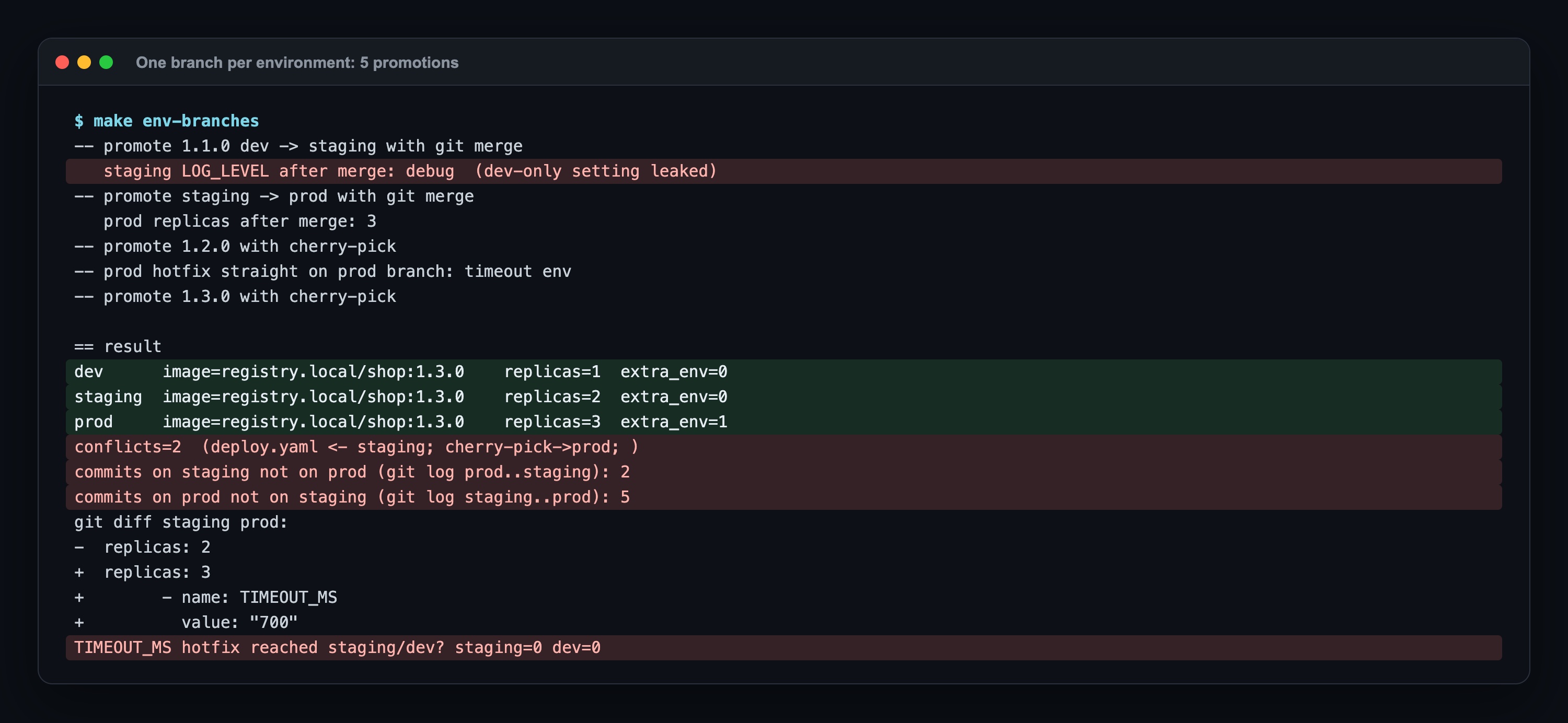
Five promotions, and each failure mode showed up once:
git merge devinto staging took the new image and the dev-onlyLOG_LEVEL=debug. Someone had to notice and undo it.git merge staginginto prod conflicted onreplicas, because each branch had its own value.- A hotfix made directly on the prod branch (
TIMEOUT_MS=700) never reached staging or dev; the next cherry-pick into prod conflicted with it.
At the end all three branches run shop:1.3.0, yet git log reports 2 commits on staging that prod does not have and 5 the other way. Git history stops answering "what is different between staging and prod?".
C. Build once, promote by digest through Argo CD
The same commit, built twice:
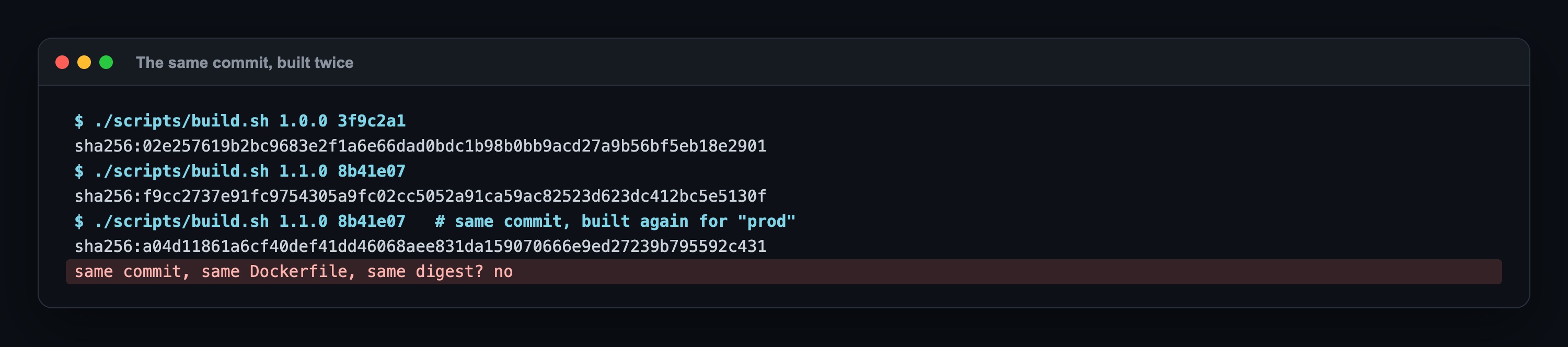
Same commit, same Dockerfile, two digests. The image config holds a creation time, and layers created by RUN get new timestamps. Worse, the second push moved the tag sha-8b41e07 to the new image without any warning. This is why "rebuild for prod" is not the same artifact, and why the digest is what goes into Git.
Promotion dev → staging → prod:
# dev: CI writes the digest it just built
./scripts/promote.sh dev sha256:a04d1186…
# staging: copy the digest from dev, nothing else
D=$(awk '/digest:/{print $2}' envs/dev/kustomization.yaml)
./scripts/promote.sh staging "$D"
# prod: a reviewed change (a PR on GitHub/GitLab, a branch + --no-ff merge here)
git switch -c promote/prod-1.1.0
sed -i '' "s#digest: .*#digest: $D#" envs/prod/kustomization.yaml
git commit -am "promote shop 1.1.0 staging -> prod"
git switch main && git merge --no-ff promote/prod-1.1.0 && git push
promote.sh changes one line, commits, pushes, and waits until every pod in that namespace was created for that digest and is ready.
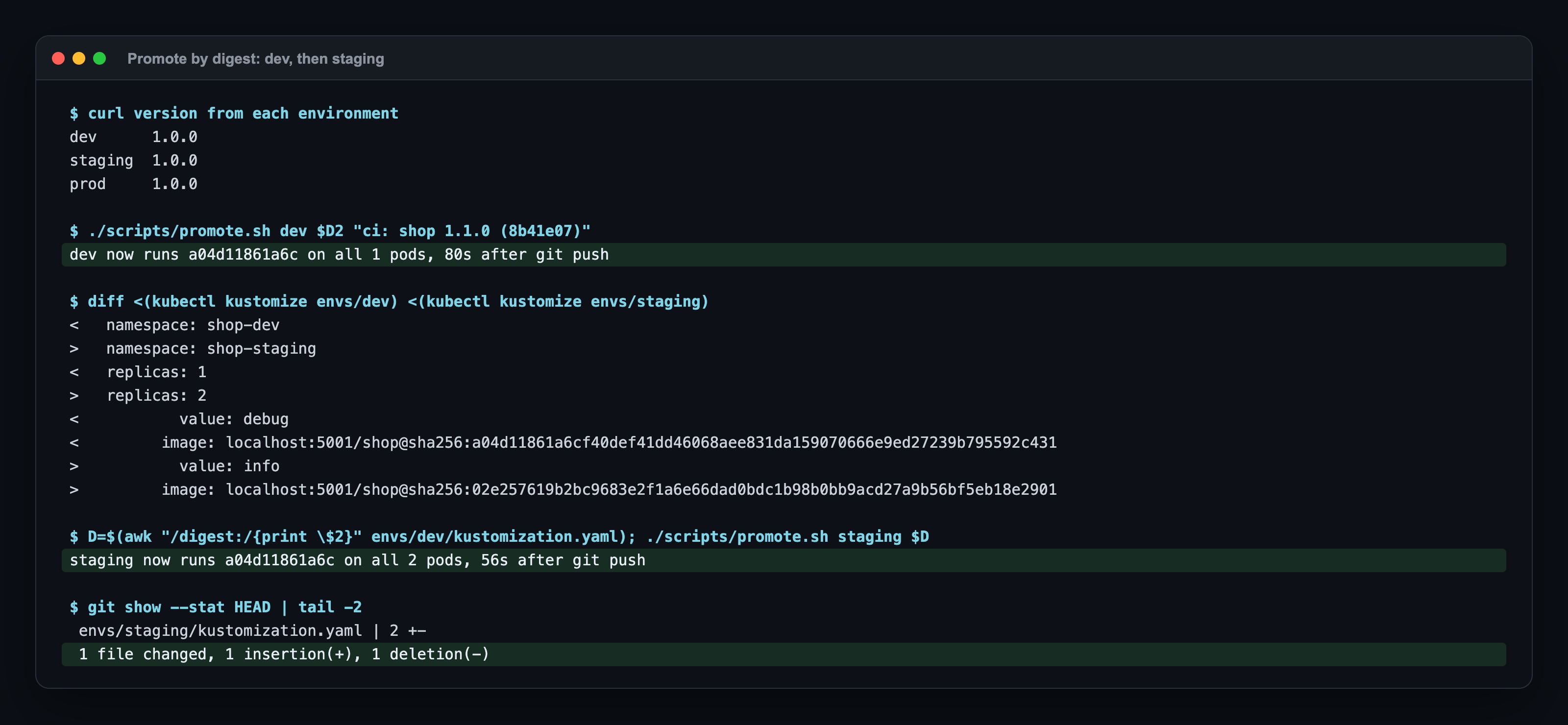
The diff between the rendered dev and staging folders shows exactly the intended differences: namespace, replicas, the debug log level, and the image. The staging promotion was 1 file, 1 line.
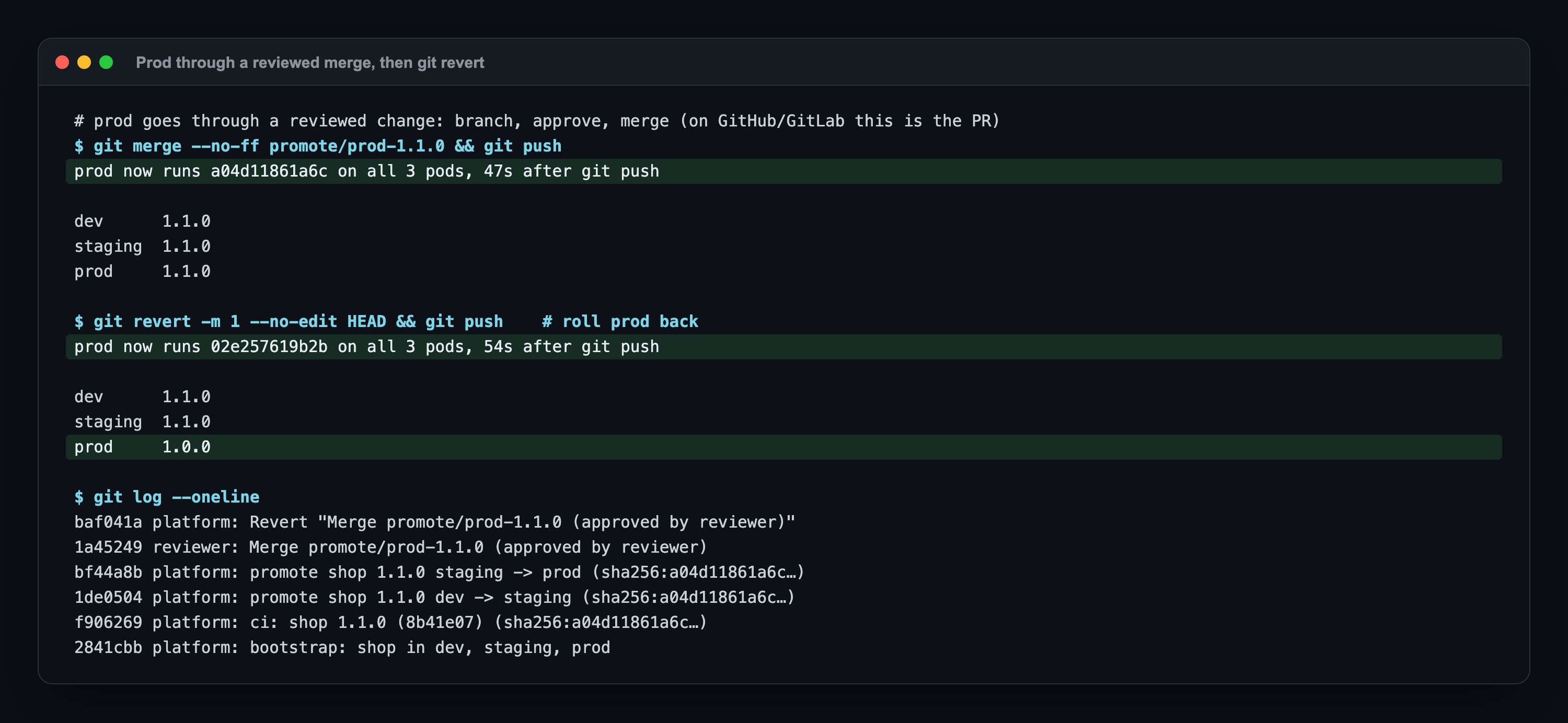
Prod moved 47 seconds after the merge was pushed, and git revert -m 1 rolled it back in 54 seconds. git log is now the deploy history: who promoted which digest, who approved, who rolled back.
Where those 47–80 seconds go:
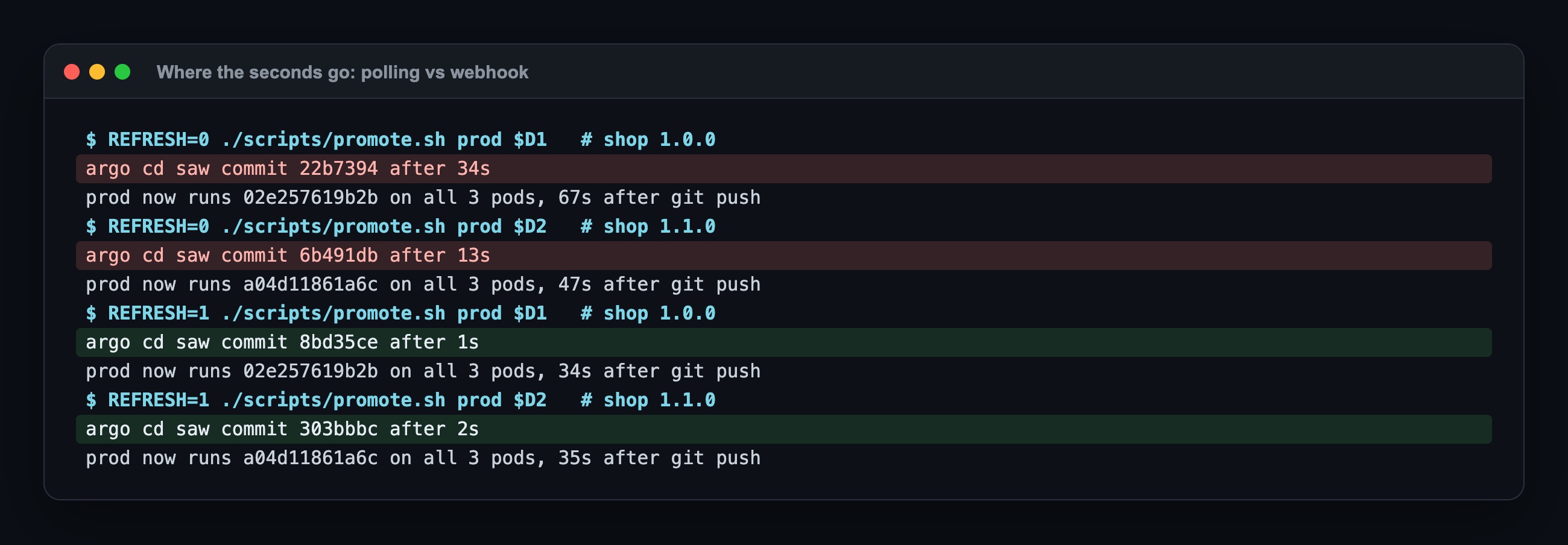
Two parts. First, Argo CD has to notice the commit: with polling (I set timeout.reconciliation to 10 s, the default is 3 minutes plus jitter) it took 13 to 34 seconds; with an immediate refresh, which is what a Git webhook does, 1 to 2 seconds. Second, the rollout: about 33 seconds, because the old pods take 30 seconds to stop. That one is a Dockerfile problem (kubectl delete pod took 31 s) and it is exactly the topic of the CMD vs ENTRYPOINT post in this series.
Where it broke: 4 real surprises
1. Argo CD failed to list refs: timeout exceeded with a local git daemon
Argo CD could not read the GitOps repo. The real reason was in the git daemon's log: fatal: detected dubious ownership in repository at '/srv/gitops.git'. The repo was mounted from my Mac with a different owner, and git refused to serve it. Adding safe.directory '*' inside the daemon container fixed it. Before that, the alpine/git image failed earlier with git: 'daemon' is not a git command: it does not ship git-daemon, plain alpine with apk add git-daemon does.
2. A mutable tag changed the code in production with no Git commit
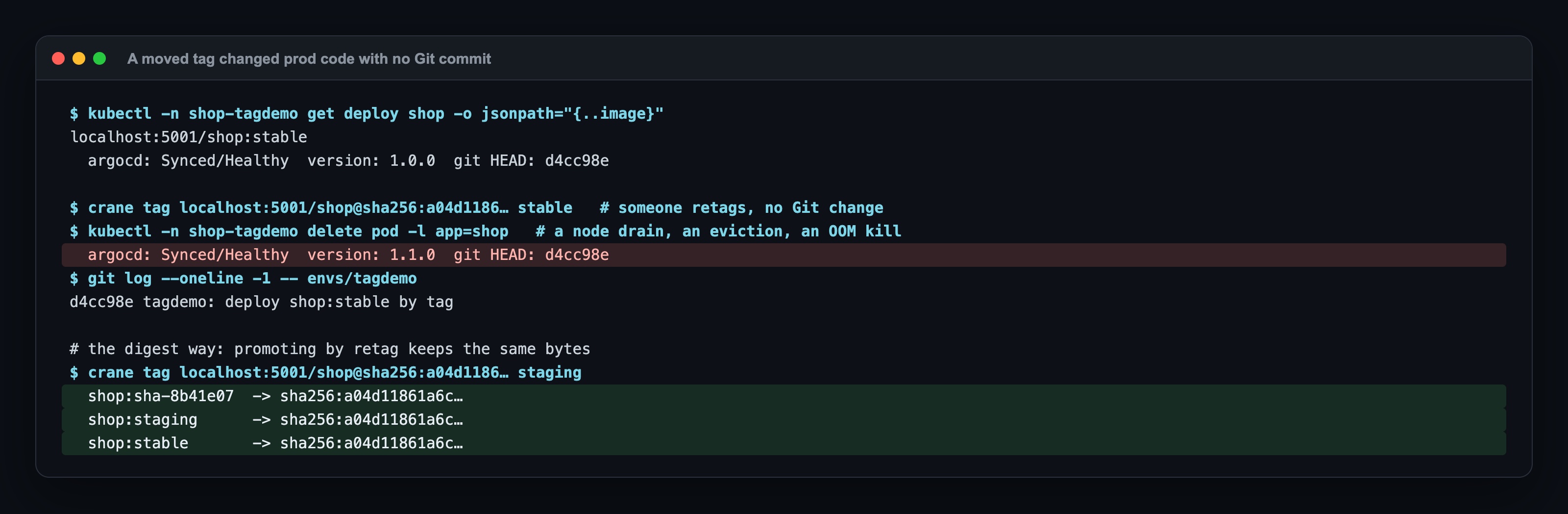
One environment deployed shop:stable with imagePullPolicy: Always. I moved the tag in the registry and deleted a pod, which is what a node drain or an eviction does. The new pod came up with version 1.1.0. Argo CD showed Synced/Healthy the whole time and git log had no new commit. GitOps promises that Git is the truth; with tags, the registry is the truth and Git only looks like it.
3. docker buildx imagetools create as a retag changed the digest
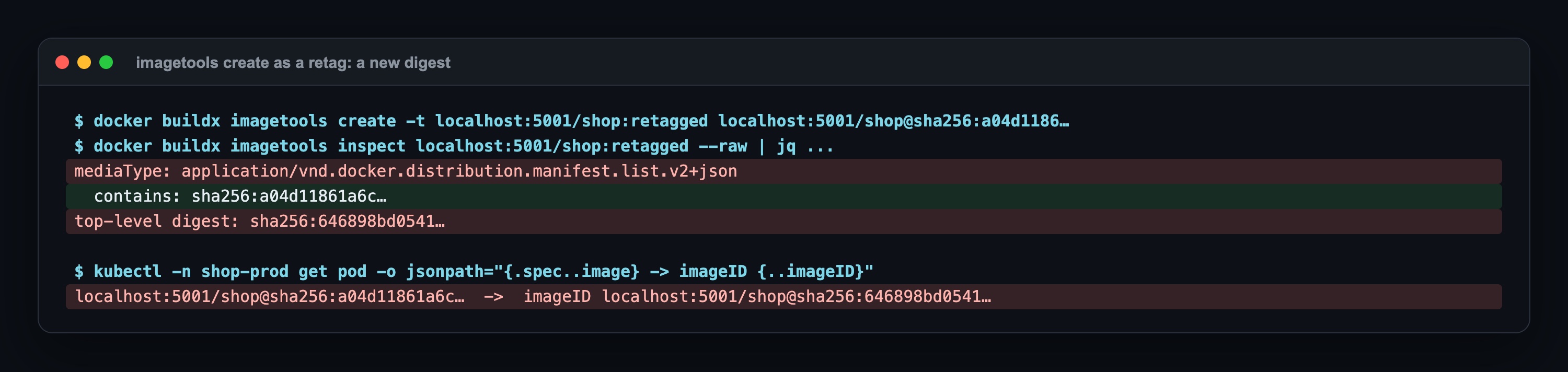
I first used docker buildx imagetools create -t to give the image a second tag. It does not just tag: it writes a new manifest list that contains the original manifest, so the tag points to a new digest (a04d1186… became 646898bd…). crane tag keeps the digest, and that is what I use in the promotion step now.
4. status.imageID showed a digest I never deployed
My first wait script compared the pod's status.imageID with the digest I had promoted. After surprise #3 it never matched: the pod spec said @sha256:a04d1186…, but kubelet reported 646898bd…, the manifest list from the retag. containerd keeps several repo digests for the same image and reports one of them. The script now checks the pod spec (what was asked for) and readiness. If you audit "what digest runs in prod" from imageID, keep this in mind.
When to use which
| Situation | Choice |
|---|---|
| Web service or API, one production version, deploys daily | Trunk-based (or GitHub Flow with PRs that live hours), feature flags for unfinished work |
| Team new to CI, wants review on every change | GitHub Flow, with a rule that PRs do not stay open for more than 2 days |
| Several versions supported at once (on-prem, mobile, SDKs) | Trunk + release branches cut from main, fixes cherry-picked; GitFlow only if you also need a separate integration branch |
| GitOps config repo | One main branch, one folder per environment, never a branch per environment |
| Moving an image between environments | Build once, pin the digest, promote with a one-line commit, PR with reviewers for prod |
Summary
- A branching strategy decides where work happens, how often it is integrated and what gets released.
- The same 10 changes produced 5 merge conflicts in GitFlow, 1 in GitHub Flow and 0 in trunk-based development, and took 9.4, 2 and 0 days on average to reach production.
- For GitOps, use trunk or GitHub Flow in the app repo and a single
mainwith one folder per environment in the config repo. Environment branches leaked a dev-only setting, conflicted twice and showed 7 commits of difference while all environments ran the same image. - Build once and promote by digest: the same commit built twice gave two digests, and a moved tag changed production code while Argo CD said
Synced. - Promotion is a one-line Git commit, rollback is
git revert; with a webhook Argo CD sees the change in 1–2 seconds.
Sources: Vincent Driessen, A successful Git branching model (2010, with the 2020 note); GitHub Docs GitHub flow, Reusing workflows, Creating a composite action, Caching dependencies; GitLab Docs CI/CD pipelines, Downstream pipelines (dynamic child pipelines), Merge request pipelines; trunkbaseddevelopment.com; DORA Accelerate State of DevOps; Argo CD docs Automated Sync, Git Webhook Configuration, Reconciliation; Kustomize images field; go-containerregistry crane docs.
Next in the series
This is post 2 of Core Skills, Measured. The previous one, What Is a Zero-Downtime Deployment?, measured what happens when the new version starts; this one measured how it gets there. Next: rootless containers. Running Argo CD itself in HA was covered in Argo CD HA.
The code for this lab (the three branching simulations, the environment-branch scenario, the kind + registry + git daemon + Argo CD setup, the promotion and tag-drift scripts and the Makefile) is shared with Lab Access members on Buy Me a Coffee; the repo invite comes by email after you join: https://buymeacoffee.com/miraccanyilmaz/membership