"Argo CD in HA" usually means one thing in a values file: replicas: 2 next to a few components. I made that mistake the first time. My first real outage was a repo-server running out of memory during a mass sync, while three perfectly healthy API server replicas watched. The API server was never the problem.
This post installs Argo CD in HA mode on a four-node kind cluster, hands it everything else through a single root Application (app-of-apps), and then breaks it on purpose: the Redis master, a repo-server, and the node running the application controller. Each failure is timed. Two of them are non-events (6 seconds and 1 second). The third stopped all reconciliation for seven minutes, until I added one taint by hand. By the end you'll know which parts of Argo CD really fail over, which one doesn't, and what to do about it.
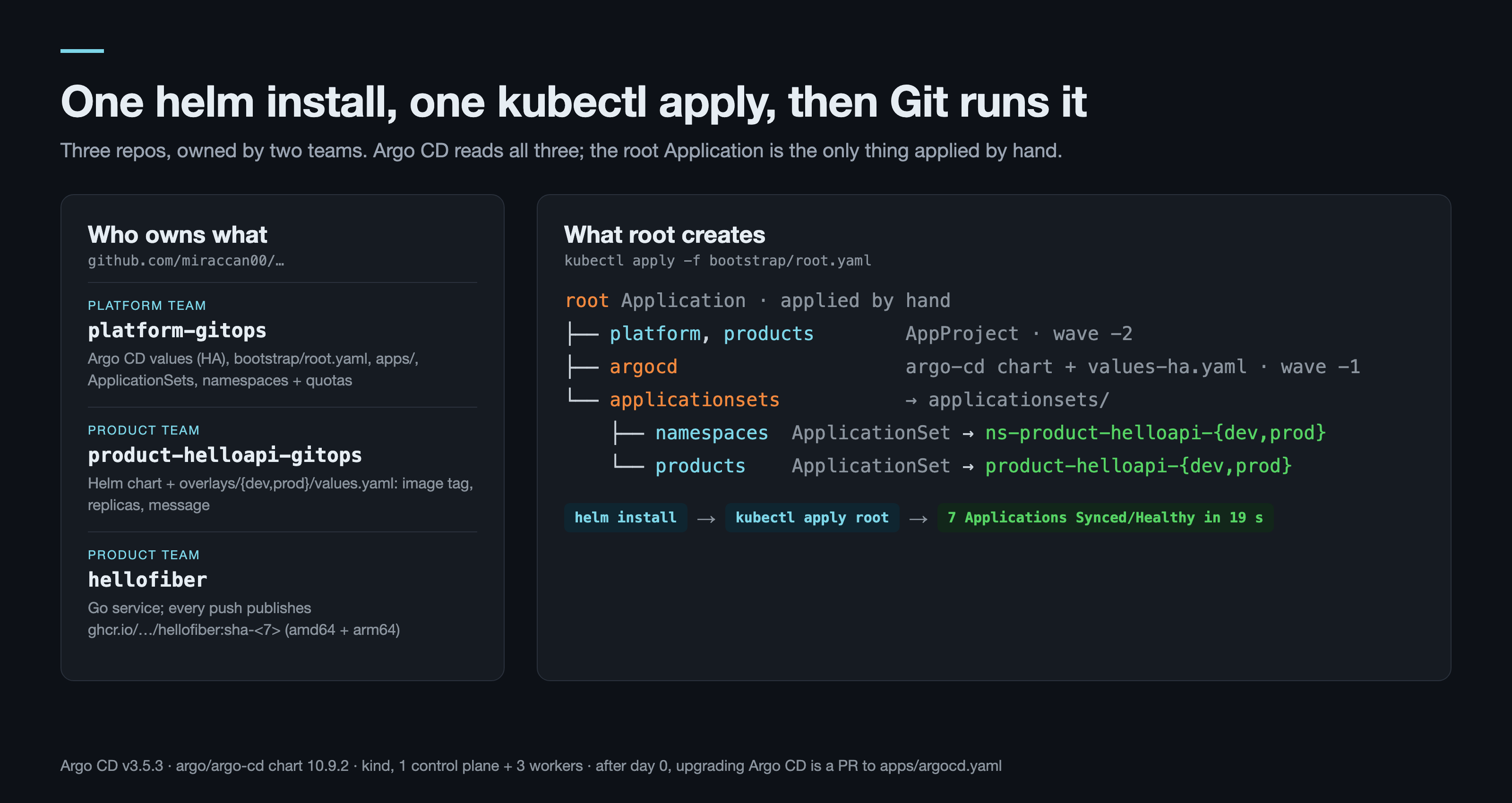
The lab is in the argocd-ha-app-of-apps folder. What Argo CD deploys lives in three public repos, split the way it would be at work: platform-gitops (the platform team's), product-helloapi-gitops (a product team's deploy config) and hellofiber (that team's Go service).
What you need
- Docker with 4 CPU / 8 GB. This run: Colima 0.8 on Apple Silicon, Docker 27. The four nodes use about 3 GB once everything is running.
kind0.33,kubectl,helm3.15+. On macOS:brew install kind kubectl helm.- Versions in this run: argo/argo-cd chart 10.9.2 (Argo CD v3.5.3, Redis 8.6.4),
kindest/node:v1.35.0. - Basic Argo CD: what an
Applicationis, what sync and health mean. This is the first post of GitOps in Production; nothing earlier on the blog is required.
Why this way
Helm chart, not ha/install.yaml. Argo CD ships plain HA manifests, and I used them for years. The chart wins for one reason: the values file becomes the thing Argo CD manages about itself afterwards. With the raw manifests you end up patching ConfigMaps on top of an upstream file, and that goes wrong in a specific way (see What went wrong).
App-of-apps, not one giant Application. One Application per team looked simpler until one broken manifest blocked every service of that team and every sync took minutes. Here the only thing applied by hand is root. It points at a directory, and everything in that directory is itself an Application: Argo CD, the AppProjects, the ApplicationSets that stamp out one Application per product and environment. A broken service breaks its own Application and nothing else.
Three repos, not one. Platform config, a product's deploy config and a product's code change at different speeds and are reviewed by different people. The split below is the one I'd set up at a company; the lab just uses public GitHub repos instead of private ones.
| Repo | Who changes it | What's in it |
|---|---|---|
platform-gitops |
platform team | Argo CD values, bootstrap/root.yaml, apps/, ApplicationSets, namespaces + quotas |
product-helloapi-gitops |
product team | Helm chart, overlays/{dev,prod}/values.yaml (image tag, replicas, message) |
hellofiber |
product team | Go code; CI publishes ghcr.io/miraccan00/hellofiber:sha-<7> for amd64 and arm64 |
Step 1 — Three workers and one helm install
Redis HA puts its three pods on three different nodes with required anti-affinity. With two workers the third Redis pod stays Pending forever, so the kind cluster has three:
# kind/cluster.yaml
kind: Cluster
apiVersion: kind.x-k8s.io/v1alpha4
name: argocd-ha
nodes:
  - role: control-plane
    image: kindest/node:v1.35.0
  - role: worker
    image: kindest/node:v1.35.0
  - role: worker
    image: kindest/node:v1.35.0
  - role: worker
    image: kindest/node:v1.35.0
On Colima, four kind nodes exhaust the default inotify limits and node containers die at boot; scripts/colima-limits.sh raises them (same script as in the Cluster API post).
The values file is where "HA" gets decided, component by component. It lives in platform-gitops, because Argo CD will read it again in Step 2:
# platform-gitops/argocd/values-ha.yaml
redis-ha:
  enabled: true          # the chart's warning: needs 3 nodes (hard anti-affinity)

controller:
  replicas: 1            # no PDB: with one replica, minAvailable 1 would block every node drain

server:
  replicas: 2
  pdb:
    enabled: true
    minAvailable: 1

repoServer:
  replicas: 2
  pdb:
    enabled: true
    minAvailable: 1
  resources:
    requests:
      cpu: 100m
      memory: 256Mi
    limits:
      memory: 1Gi        # a mass sync renders many charts at once; this is the component that OOMs

applicationSet:
  replicas: 2
  pdb:
    enabled: true
    minAvailable: 1

dex:
  enabled: false         # SSO comes in the next post (OIDC); local admin for now

notifications:
  enabled: false

configs:
  params:
    server.insecure: "true"   # the lab reaches the UI through port-forward; TLS belongs on the gateway
    # Concurrent manifest generations per repo-server replica. 0 (default) = unlimited,
    # so a mass sync renders everything at once and memory spikes past the limit.
    reposerver.parallelism.limit: 5
  cm:
    # product-*-gitops overlays wrap the chart with kustomize `helmCharts:`.
    # Without this flag the repo-server refuses to render them:
    #   "must specify --enable-helm"
    kustomize.buildOptions: --enable-helm
What each line buys you:
| Component | Replicas | What HA means for it |
|---|---|---|
Redis (redis-ha) |
3 Redis + 3 Sentinel, 3 HAProxy | Real failover: Sentinel promotes a replica, HAProxy sends traffic to the new master |
| repo-server | 2 | Stateless, renders manifests. Two replicas share the load; the limit + parallelism cap is what stops the OOM |
| API server | 2 | Stateless UI/API. Nice to have; losing it doesn't stop syncs |
| ApplicationSet controller | 2 | Leader election: one works, one waits |
| application controller | 1 | Not active-active. More replicas = sharding across clusters; with one destination cluster a second replica just waits |
That last row is the one to remember. It comes back in Step 5.
make argocd
# helm install argocd argo/argo-cd --version 10.9.2 -n argocd --create-namespace \
#   -f https://raw.githubusercontent.com/miraccan00/platform-gitops/blog-04/argocd/values-ha.yaml --wait --timeout 10m
helm install --wait took 343 seconds. Most of it is Redis: the StatefulSet starts its three pods one after another, and each one waits for Sentinel to see it. Thirteen pods, spread over the three workers (columns trimmed):
NAME                                               READY   STATUS    NODE
argocd-redis-ha-haproxy-647d9bfdf8-qlqcs           1/1     Running   argocd-ha-worker
argocd-server-8646bcb568-lqw9s                     1/1     Running   argocd-ha-worker
argocd-repo-server-566fc4b49f-q4gk4                1/1     Running   argocd-ha-worker
argocd-redis-ha-server-1                           3/3     Running   argocd-ha-worker
argocd-repo-server-566fc4b49f-gw4t7                1/1     Running   argocd-ha-worker2
argocd-redis-ha-haproxy-647d9bfdf8-95wv6           1/1     Running   argocd-ha-worker2
argocd-redis-ha-server-2                           3/3     Running   argocd-ha-worker2
argocd-application-controller-0                    1/1     Running   argocd-ha-worker2
argocd-applicationset-controller-d864b8898-hvts8   1/1     Running   argocd-ha-worker2
argocd-redis-ha-haproxy-647d9bfdf8-s4xg9           1/1     Running   argocd-ha-worker3
argocd-redis-ha-server-0                           3/3     Running   argocd-ha-worker3
argocd-applicationset-controller-d864b8898-qkhnt   1/1     Running   argocd-ha-worker3
argocd-server-8646bcb568-cw8sr                     1/1     Running   argocd-ha-worker3
That is the last helm command in this post.
Open the UI: from here on we watch every step there too
make ui
# http://localhost:8080  admin / <password>
make ui prints the admin password, then port-forwards svc/argocd-server. Because of server.insecure: "true" in the values this is plain HTTP: type http://localhost:8080 in the browser, user admin. A port-forward sticks to one argocd-server pod, and in Step 5 that pod can die, so make ui runs in a loop and reconnects. make ui keeps its terminal busy: leave it open and run every make command from here on in a second terminal, in the same argocd-ha-app-of-apps/ folder (the Makefile sets KUBECONFIG from ./.lab itself).
Direct addresses of the screens used in this post, once you're logged in:
| Screen | Address |
|---|---|
| All Applications | http://localhost:8080/applications |
| root tree | http://localhost:8080/applications/argocd/root |
| Argo CD itself, Pods view | http://localhost:8080/applications/argocd/argocd?view=pods |
| Product, prod | http://localhost:8080/applications/argocd/product-helloapi-prod |
| Product, dev | http://localhost:8080/applications/argocd/product-helloapi-dev |
| ApplicationSets | http://localhost:8080/applicationsets |
The first argocd in those paths is the namespace the Application objects live in.
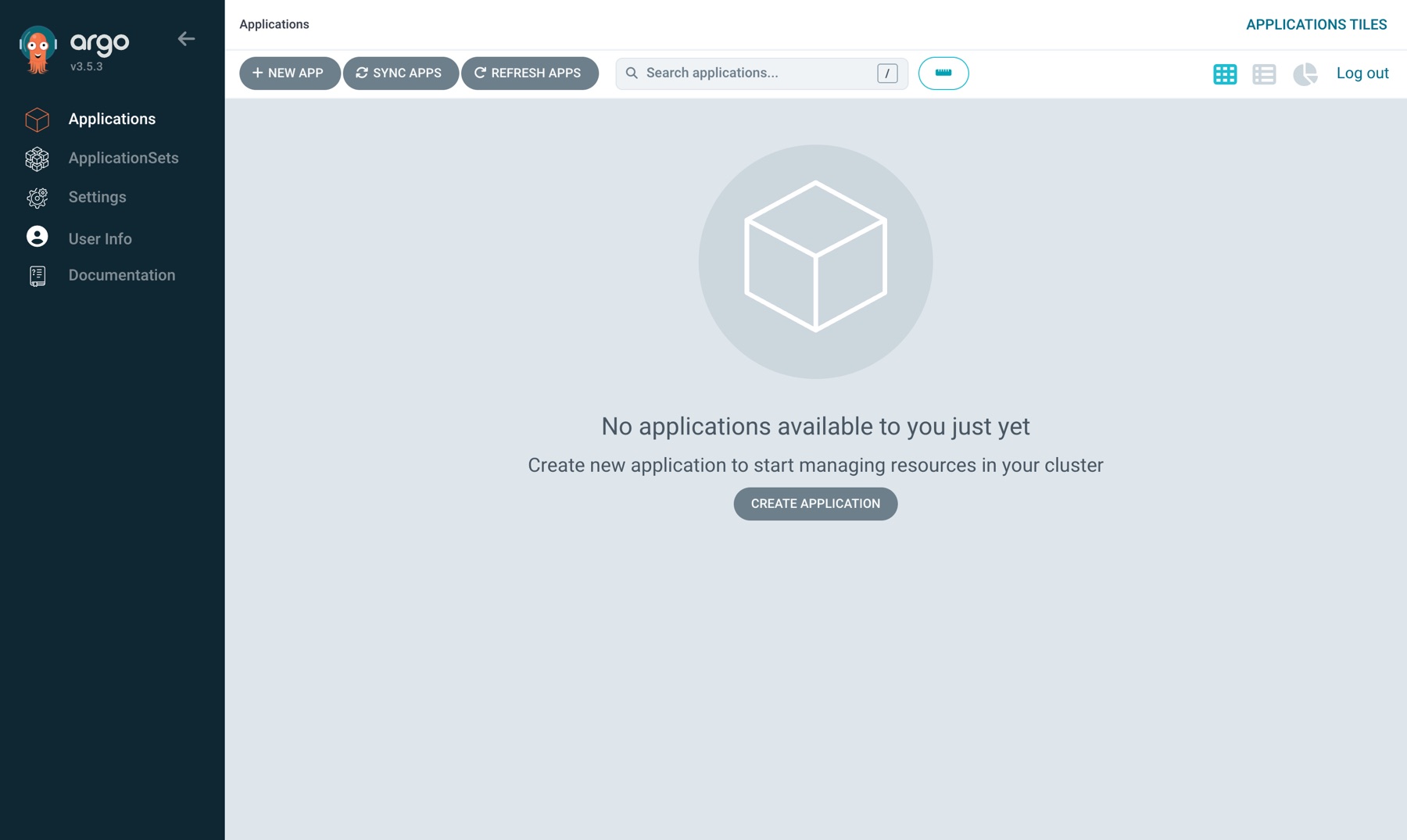
Before the bootstrap the Applications page is empty. Argo CD is installed and running, but it manages nothing yet. Worth seeing once: in a minute a single kubectl apply fills this page.
Step 2 — One kubectl apply, then Argo CD takes over
The root Application is the only object applied by hand:
# platform-gitops/bootstrap/root.yaml
apiVersion: argoproj.io/v1alpha1
kind: Application
metadata:
  name: root
  namespace: argocd
spec:
  project: default
  source:
    repoURL: https://github.com/miraccan00/platform-gitops.git
    targetRevision: blog-04
    path: apps
  destination:
    server: https://kubernetes.default.svc
    namespace: argocd
  syncPolicy:
    automated:
      # prune: a file deleted from apps/ removes that Application from the cluster.
      # Without it a deleted app keeps running and root shows OutOfSync forever.
      prune: true
      selfHeal: true
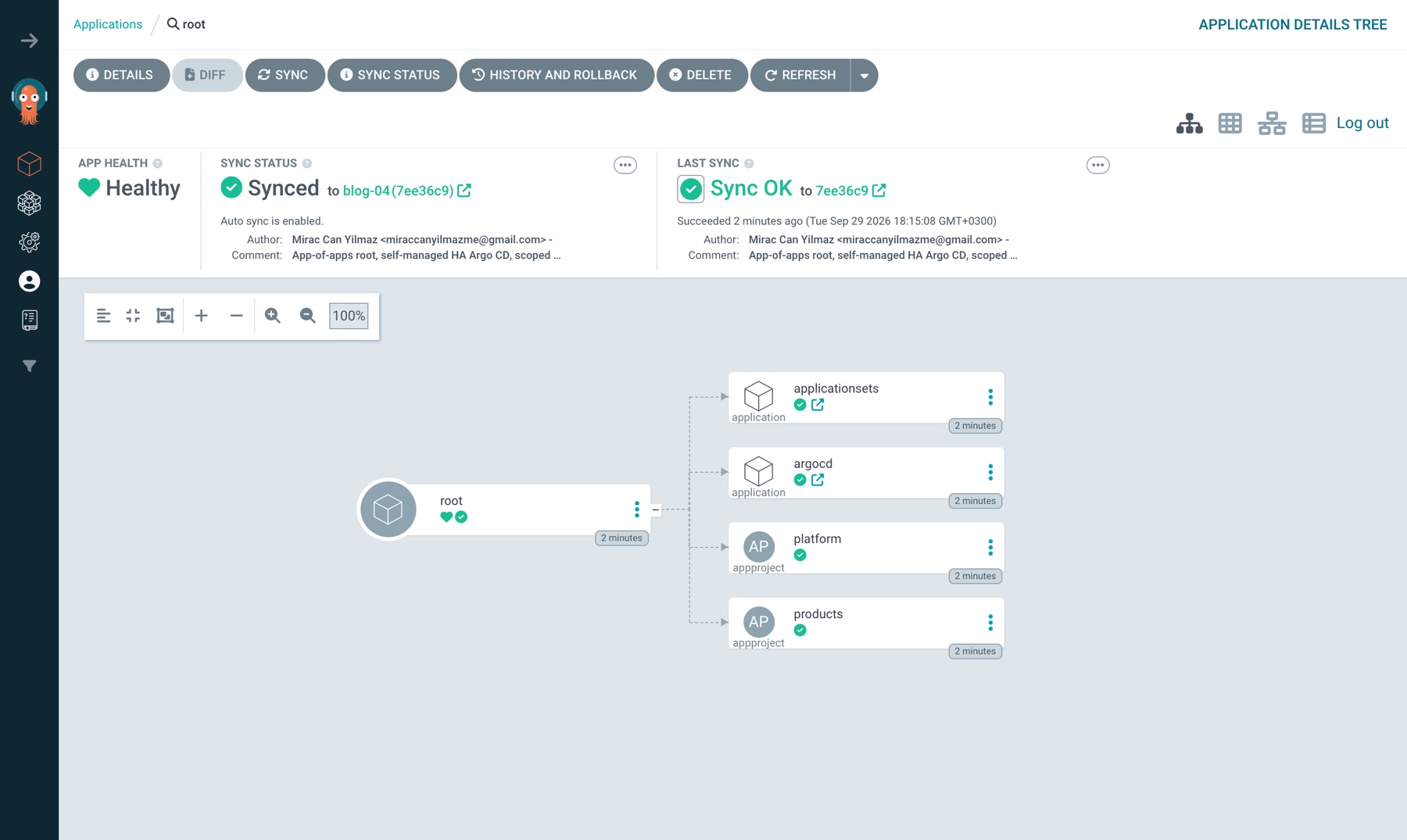
apps/ has three files, and the tree they produce is the whole platform:
root (Application, applied by hand)
├── platform, products (AppProject, wave -2)
├── argocd (Application → argo-cd chart 10.9.2 + argocd/values-ha.yaml, wave -1)
└── applicationsets (Application → applicationsets/)
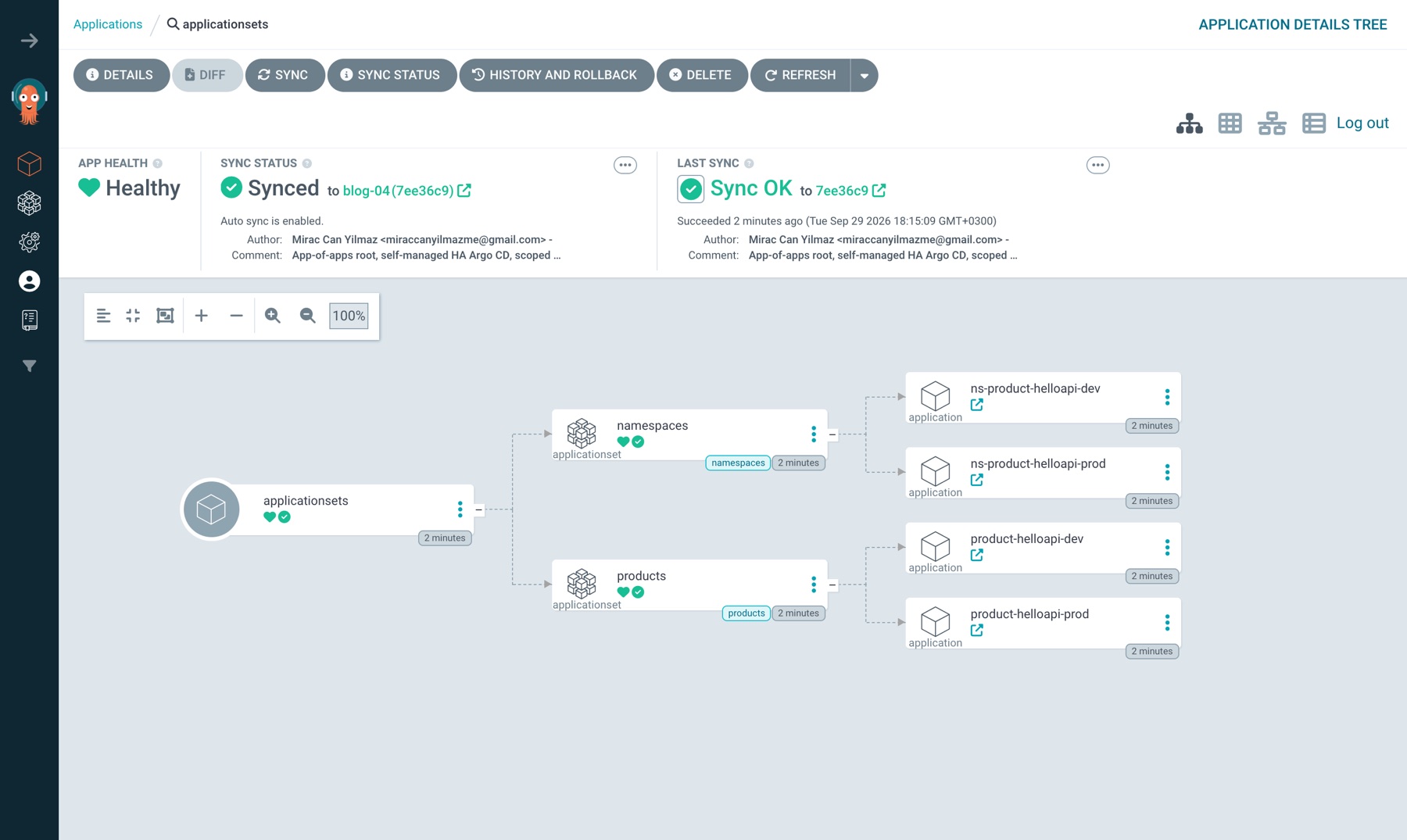
    ├── namespaces (ApplicationSet) → ns-product-helloapi-dev, ns-product-helloapi-prod
    └── products   (ApplicationSet) → product-helloapi-dev, product-helloapi-prod
The interesting one is argocd: Argo CD managing its own install, from the same chart version and the same values file helm install used.
# platform-gitops/apps/argocd.yaml (spec)
spec:
  project: platform
  sources:
    - repoURL: https://argoproj.github.io/argo-helm
      chart: argo-cd
      targetRevision: 10.9.2
      helm:
        releaseName: argocd          # must match `helm install argocd ...`, or every object name changes
        valueFiles:
          - $values/argocd/values-ha.yaml
    - repoURL: https://github.com/miraccan00/platform-gitops.git
      targetRevision: blog-04
      ref: values
  destination:
    server: https://kubernetes.default.svc
    namespace: argocd
  syncPolicy:
    automated:
      # prune false, on purpose: a bad commit that drops a ConfigMap or the redis
      # StatefulSet from the render would make Argo CD delete the parts it runs on,
      # and it could not sync itself back. selfHeal still reverts drift.
      prune: false
      selfHeal: true
    syncOptions:
      - ServerSideApply=true
Two sources: the chart from the Helm repo, the values file from Git ($values points at the second source). Upgrading Argo CD from now on is a one-line PR that changes targetRevision.
make bootstrap
# kubectl apply -f https://raw.githubusercontent.com/miraccan00/platform-gitops/blog-04/bootstrap/root.yaml
NAME                       SYNC STATUS   HEALTH STATUS
applicationsets            Synced        Healthy
argocd                     Synced        Healthy
ns-product-helloapi-dev    Synced        Healthy
ns-product-helloapi-prod   Synced        Healthy
product-helloapi-dev       Synced        Healthy
product-helloapi-prod      Synced        Healthy
root                       Synced        Healthy
all 7 Synced/Healthy in 19s
Nineteen seconds from kubectl apply to seven green Applications.
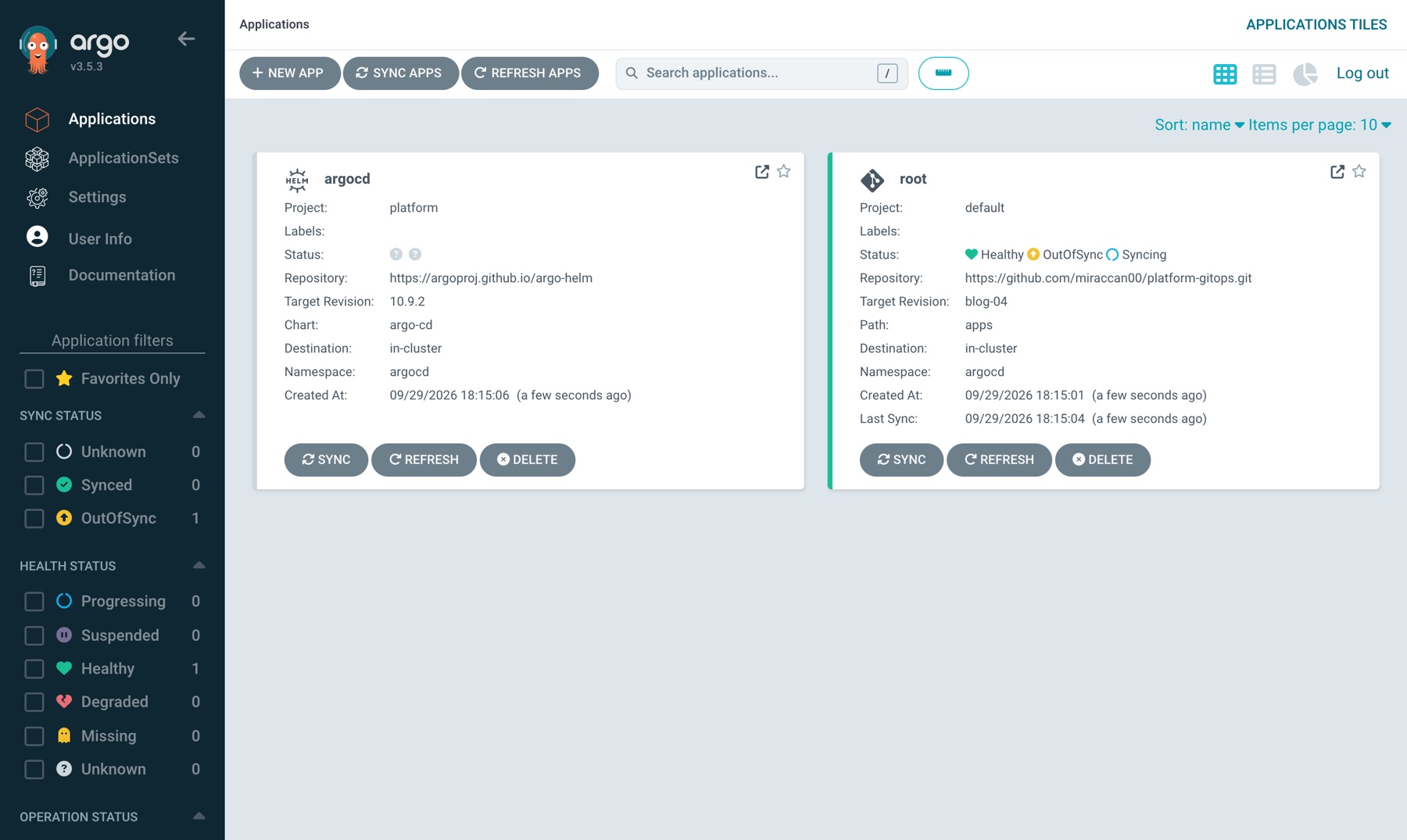
In the UI: run make bootstrap with the UI open. This is five seconds after the apply: root is Syncing, the argocd Application has just been created, applicationsets doesn't exist yet. argocd is in wave -1, applicationsets in wave 0, and root's sync follows the waves.
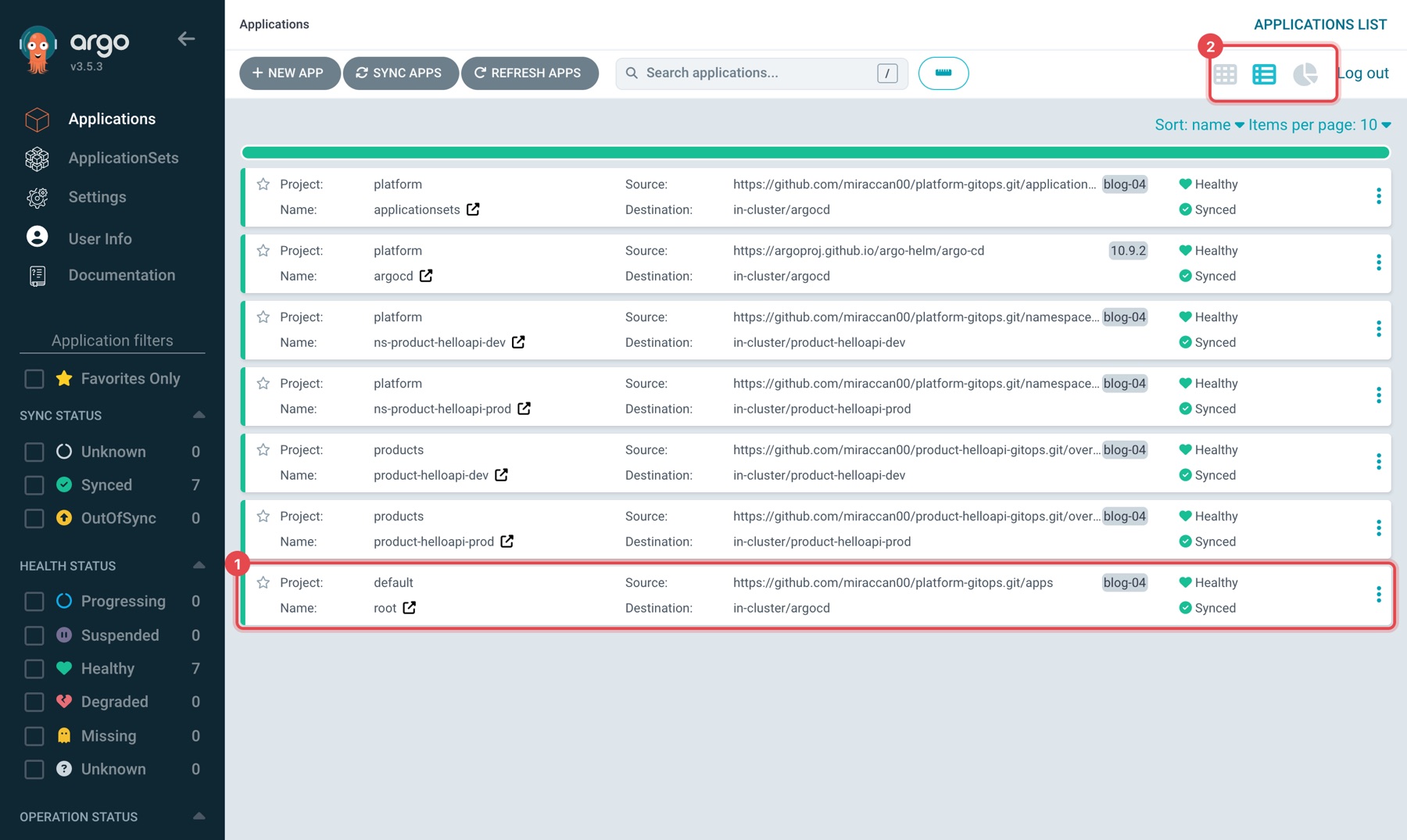
Twenty seconds later, switch to the list view with the icon at the top right (2): seven green Applications. Click the root row at the bottom (1).
root's tree is the apps/ directory itself: two AppProjects and two Applications. The ↗ icon on a card opens that Application's own page.
Go one level down with the ↗ on the applicationsets card. This screen is the second half of the text tree above: two ApplicationSets and the four Applications they generate.
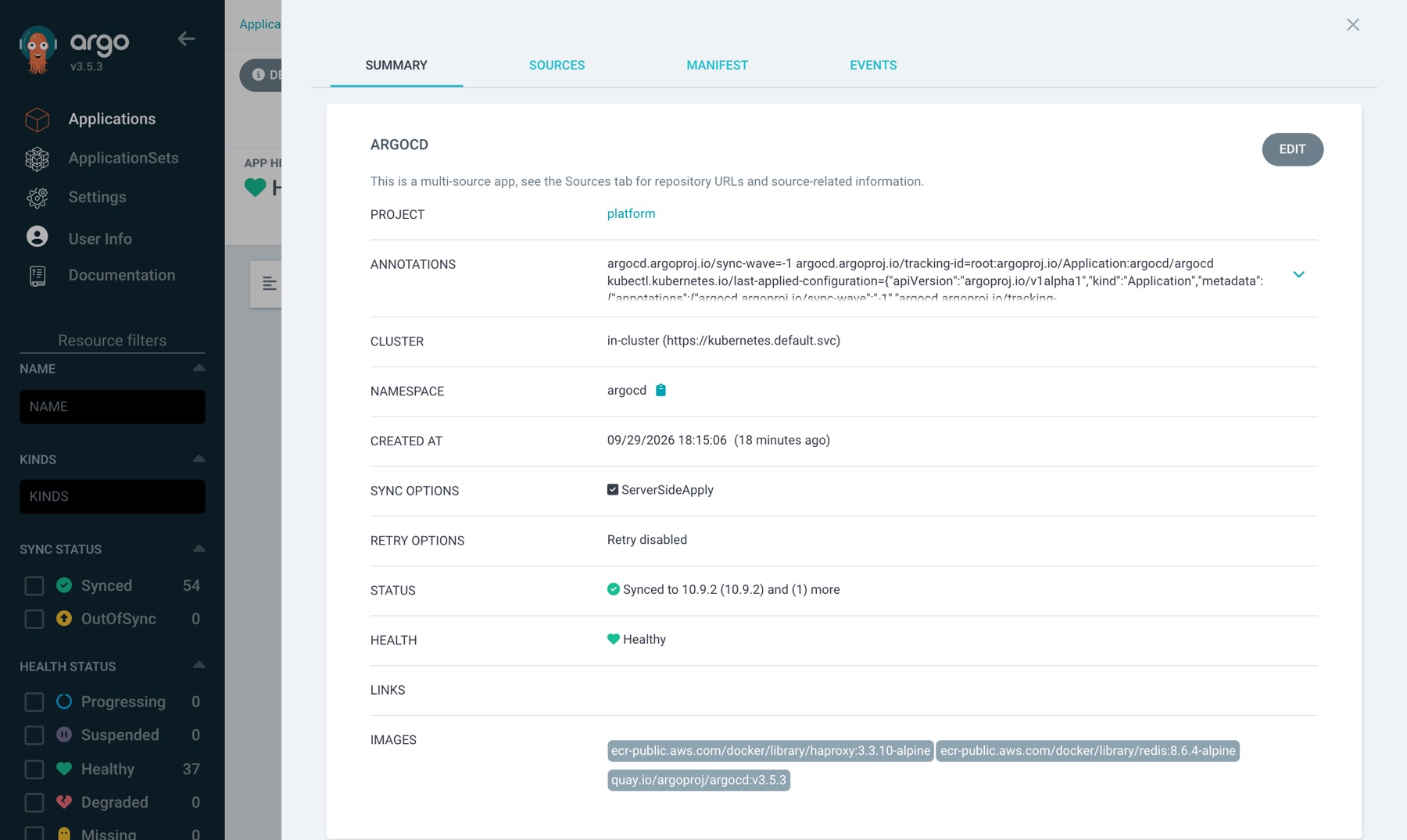
In the argocd Application, click DETAILS. The summary says "This is a multi-source app", the annotations carry sync-wave=-1, and IMAGES lists the three images the chart brings (argocd v3.5.3, redis 8.6.4, haproxy). The SOURCES tab shows the chart and the $values reference separately.
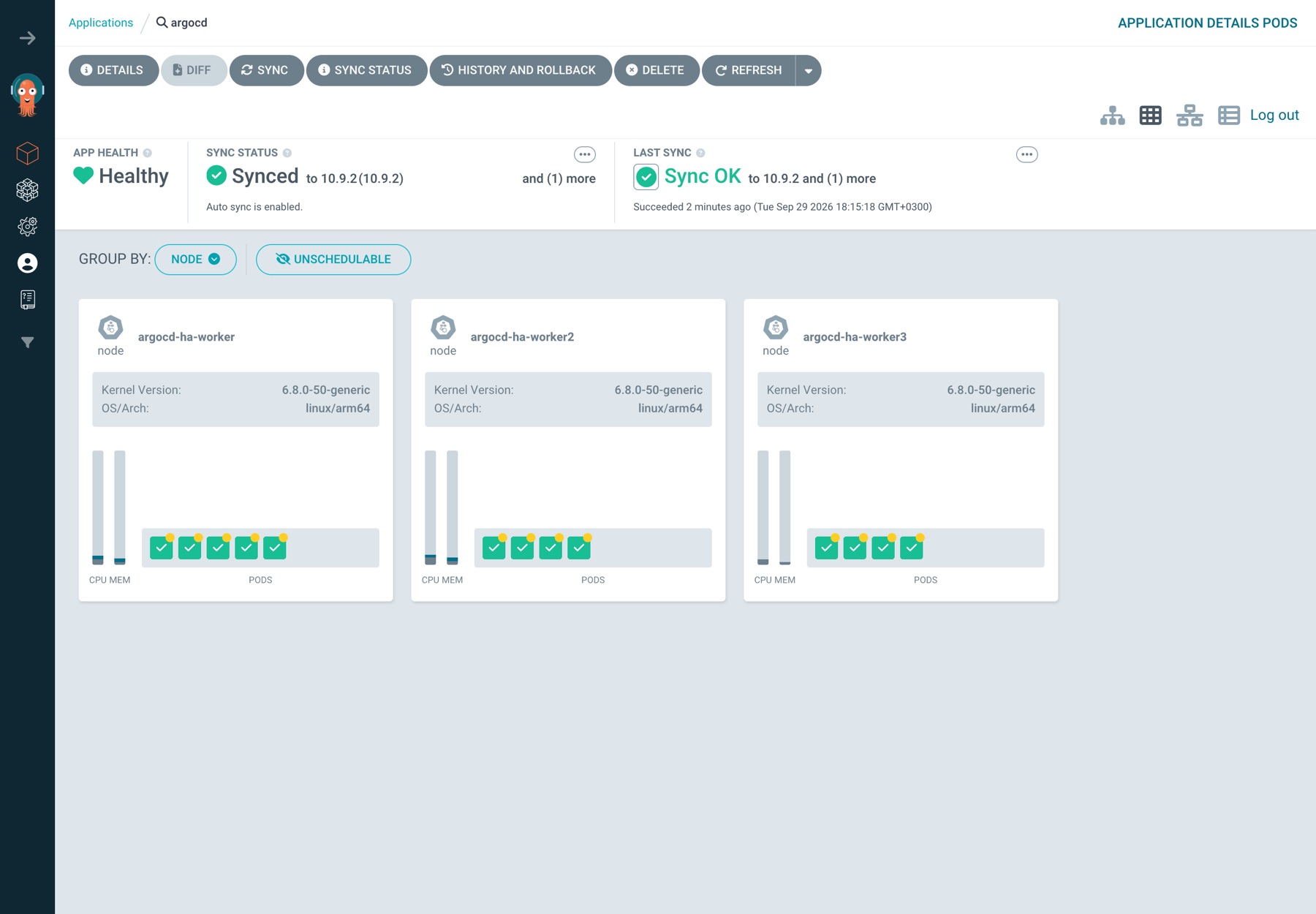
Close the panel and switch to the second icon at the top right, the Pods view; leave GROUP BY on NODE. This is what HA actually looks like: thirteen pods spread over three workers. We come back to this screen in Step 5.
Two things I checked because I didn't trust them:
- Taking over its own install restarted nothing. Every Argo CD pod kept its creation time from the
helm install. The rendered objects were identical, so the server-side apply changed no pod template. - The Helm hook ran again. The chart's
pre-installhook (argocd-redis-secret-init, a Job that creates the Redis password) became an Argo CDPreSynchook and ran once more. It's idempotent, so that's fine; it's also a reminder that Argo CD doesn't run Helm, it renders the chart and maps Helm hooks to its own.
After this, don't run helm upgrade again. Argo CD owns the objects; the Helm release secret sh.helm.release.v1.argocd.v1 stays behind as a stale record of day 0.
Step 3 — The product side
products-appset.yaml in platform-gitops is the product registry: one list element per product, crossed with the environments.
# platform-gitops/applicationsets/products-appset.yaml (generators + source)
  generators:
    - matrix:
        generators:
          - list:
              elements:
                - product: product-helloapi
                  productRepoURL: https://github.com/miraccan00/product-helloapi-gitops.git
          - list:
              elements:
                - env: dev
                - env: prod
  template:
    metadata:
      name: "{{ .product }}-{{ .env }}"
    spec:
      project: products
      source:
        repoURL: "{{ .productRepoURL }}"
        targetRevision: blog-04
        path: "overlays/{{ .env }}"
The products AppProject only accepts repos named product-*-gitops and namespaces named product-*, and nothing cluster-scoped. A product team can't deploy into argocd by mistake.
The product repo wraps its own chart with kustomize:
# product-helloapi-gitops/overlays/prod/kustomization.yaml
apiVersion: kustomize.config.k8s.io/v1beta1
kind: Kustomization

helmGlobals:
  chartHome: ../../

helmCharts:
  - name: chart
    releaseName: product-helloapi
    version: "0.2.0"
    valuesFile: values.yaml
That's why the values file has kustomize.buildOptions: --enable-helm. Without it the repo-server's kustomize (v5.8.1 in this image) stops with:
`: must specify --enable-helm
The service answers in both environments, with the image built from hellofiber:
$ make hello
Hello from helloapi [DEV] (env=development, version=sha-d96497a)
Hello from helloapi [PROD] (env=production, version=sha-d96497a)
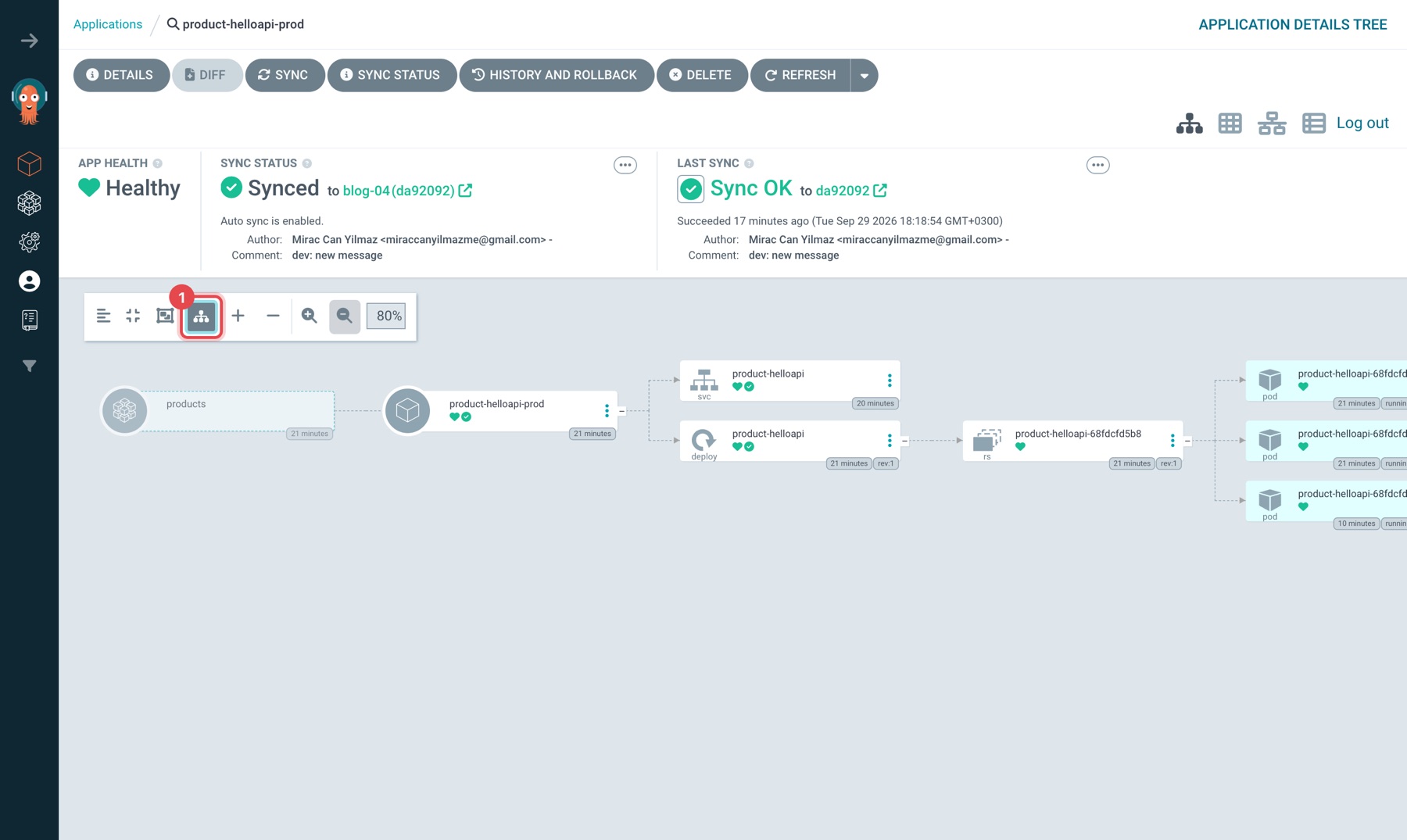
In the UI: click the product-helloapi-prod card on the Applications page (or go straight to http://localhost:8080/applications/argocd/product-helloapi-prod) and press Show ApplicationSet parent node in the tree toolbar (1). The faded node on the far left is the products ApplicationSet that generated this Application; to the right, the Service, then Deployment → ReplicaSet → three pods. The products label under the card is the AppProject.
Step 4 — Shipping a change is a commit
Prod goes from 2 to 3 replicas. One line in product-helloapi-gitops/overlays/prod/values.yaml, commit, push. No kubectl.
Without a webhook, Argo CD polls Git every 120 seconds plus up to 60 seconds of jitter (timeout.reconciliation and timeout.reconciliation.jitter in argocd-cm). In this run:
3/3 ready 91s after push (polling, no webhook)
A webhook makes Argo CD look at Git right away. The lab can't receive a GitHub webhook, so scripts/ship.sh does the same thing a webhook does, a refresh annotation on the Application:
product-helloapi-dev: 943189e -> da92092, Synced/Healthy 4s after refresh
91 seconds versus 4. In production, set up the webhook; the 3-minute worst case is what makes people reach for kubectl "just this once". The page teams get on day one is docs/how-to-ship-a-change.md: where each kind of change lives, how to roll back (revert the PR, not the UI button), what each status means.
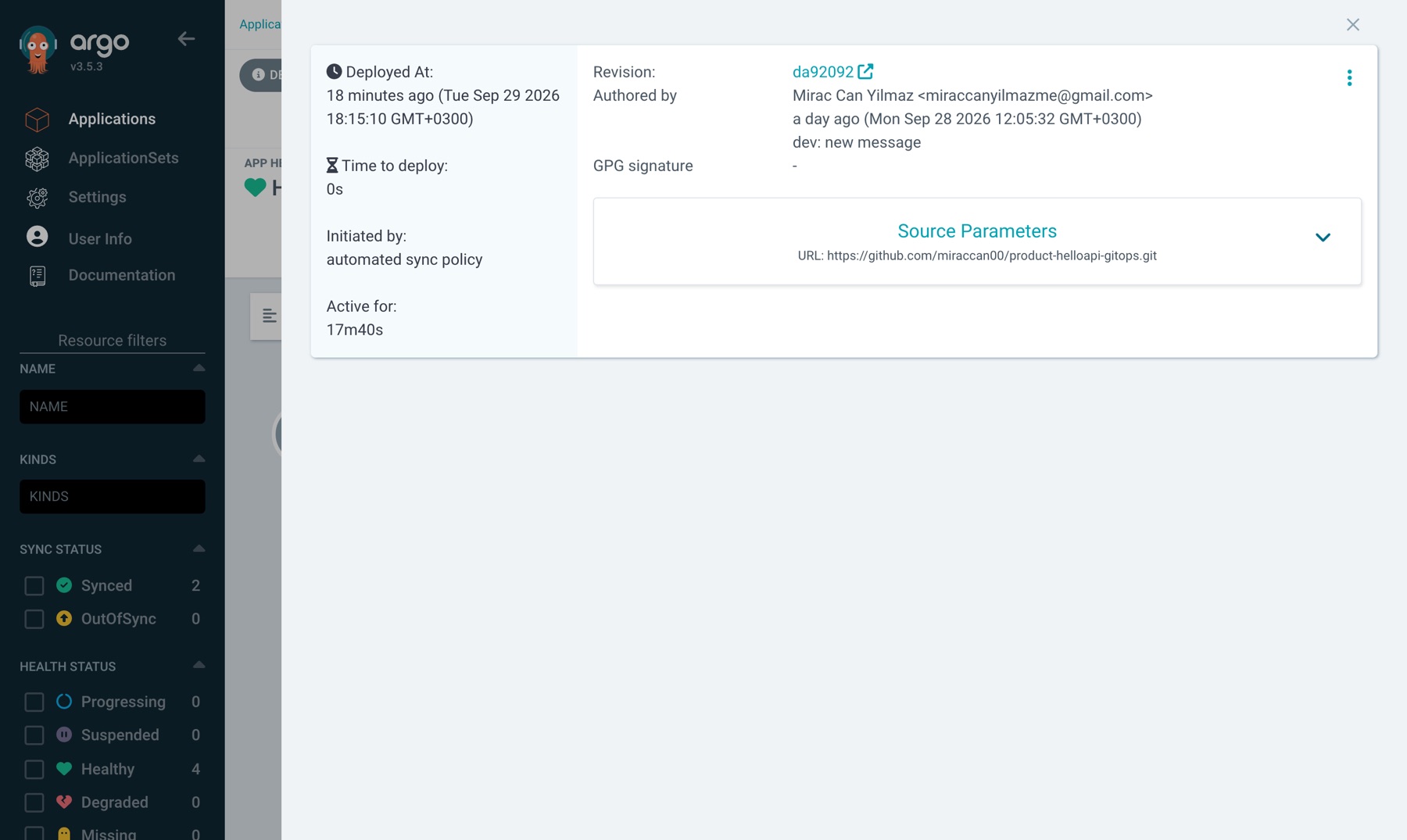
In the UI: click the product-helloapi-dev card (http://localhost:8080/applications/argocd/product-helloapi-dev), then the HISTORY AND ROLLBACK button at the top. Every deploy is a commit: hash, author, commit message, and Initiated by: automated sync policy. Nobody pressed a button; Argo CD saw the new commit in Git and synced it.
You can't push to these repos, so you can't repeat this step as is in your own lab. To see the same loop from the other side, change the cluster instead of Git, with product-helloapi-prod open in the UI:
kubectl -n product-helloapi-prod scale deploy/product-helloapi --replicas=9
Within a second the Application is OutOfSync and Progressing, and six new pods start:
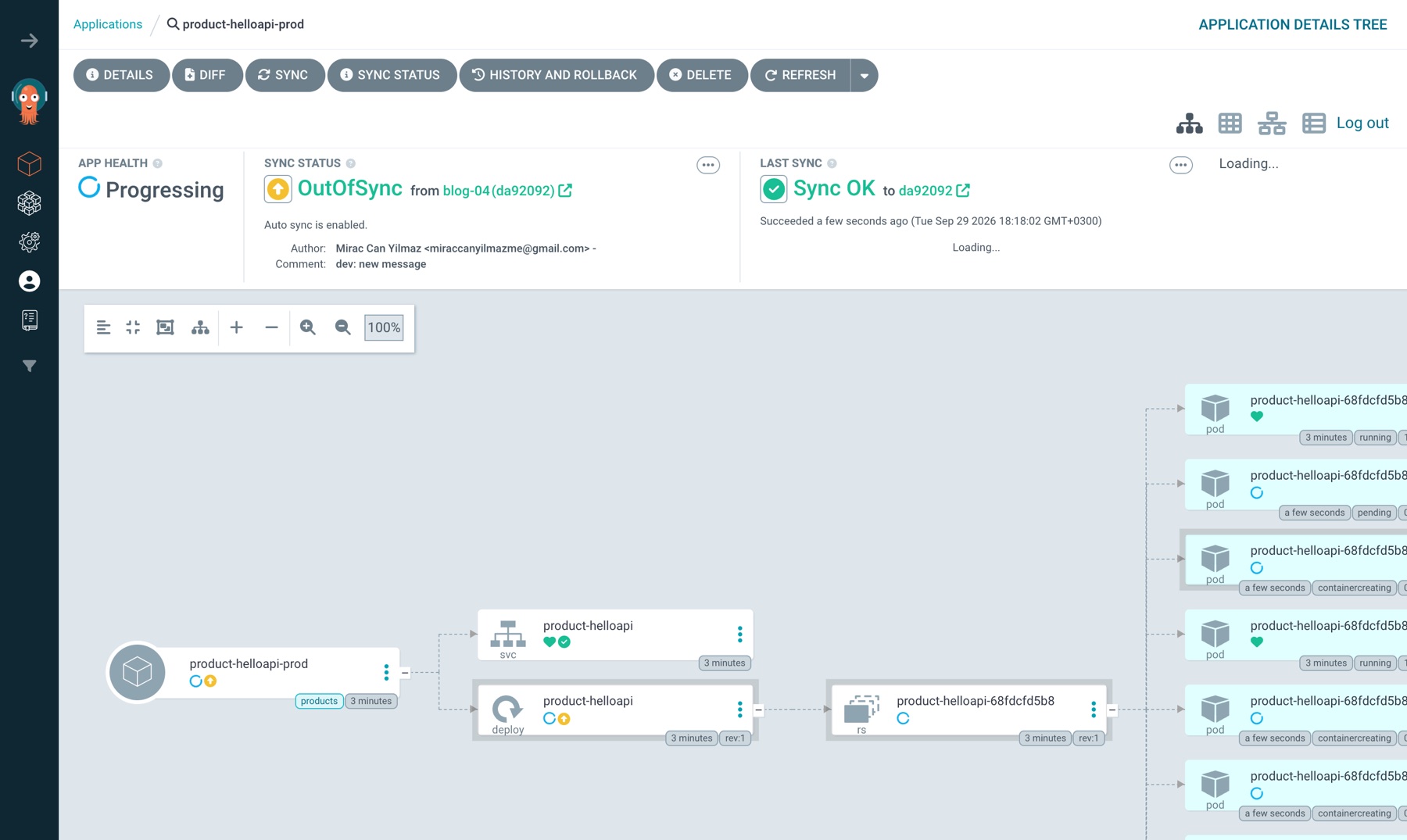
A second later selfHeal has put the Deployment back to the 3 in Git, and six pods are Terminating:
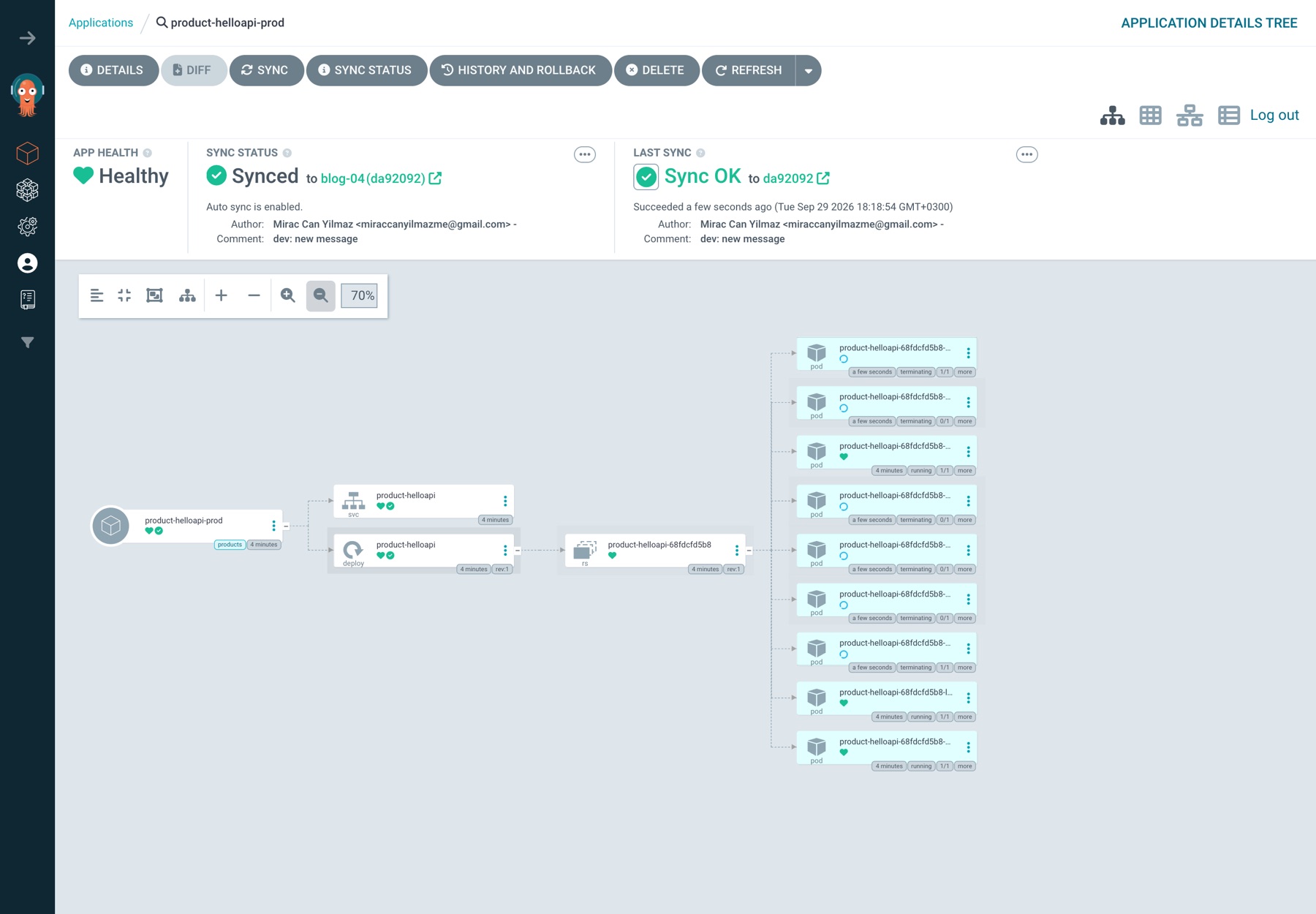
Try it a second time and it takes longer; why is in What went wrong #2.
Step 5 — Breaking it
To prove Argo CD still works after each failure, scripts/probe.sh asks for a hard refresh of product-helloapi-prod and waits for a new reconciledAt. A hard refresh needs all three moving parts: the controller does the comparison, a repo-server re-renders the chart with the cache bypassed, and the result goes through Redis.
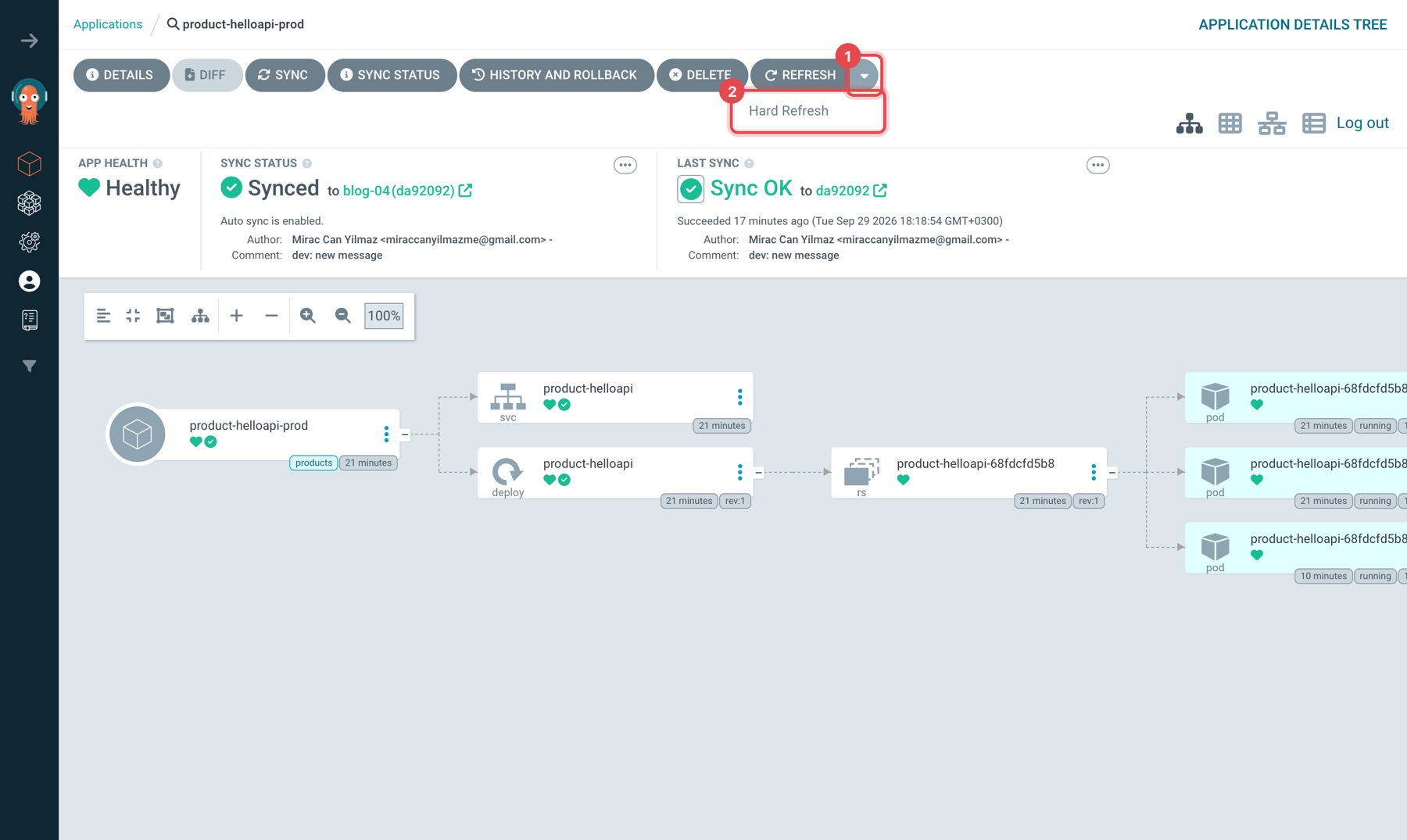
You can do the same check from the UI: on the product-helloapi-prod page, the arrow next to REFRESH (1) → Hard Refresh (2). On a healthy cluster the REFRESH button greys out, a Refreshing badge appears under LAST SYNC and goes away within a few seconds (under 4 in this run). If the badge stays, something is wrong. The time under LAST SYNC doesn't change: it's the time of the last sync, and a refresh doesn't start a sync, it only redoes the comparison.
Before running make failover in the second terminal, open two browser tabs: one with the argocd Application in the Pods view (http://localhost:8080/applications/argocd/argocd?view=pods), one with product-helloapi-prod (http://localhost:8080/applications/argocd/product-helloapi-prod). We watch the failures in the first tab and ask for a Hard Refresh from the second. The script takes about nine minutes and prints the time at the start of each stage; follow the screens below by those times.
$ make failover
baseline: hard refresh reconciled in 2s

== 1. Redis master
12:34:22 master is argocd-redis-ha-server-1 (sentinel: 10.96.201.134), deleting
right after redis master delete: hard refresh reconciled in 6s
12:34:34 sentinel promoted 10.96.229.162 after 12s

== 2. repo-server
12:34:34 deleting argocd-repo-server-566fc4b49f-hxtxz
right after repo-server delete: hard refresh reconciled in 1s

== 3. node running the application controller
12:34:36 controller on argocd-ha-worker2; on the same node:
   argocd-application-controller-0
   argocd-redis-ha-haproxy-647d9bfdf8-5l94l
   argocd-redis-ha-server-2
   argocd-repo-server-566fc4b49f-jkcw6
12:34:36 docker stop argocd-ha-worker2
with argocd-ha-worker2 down: no reconciliation for 420s (last: 2026-09-28T09:34:34Z)
12:41:37 controller pod:
   argocd-application-controller-0 Terminating argocd-ha-worker2
   node argocd-ha-worker2 NotReady
12:41:37 docker start argocd-ha-worker2
after argocd-ha-worker2 is back: hard refresh reconciled in 31s
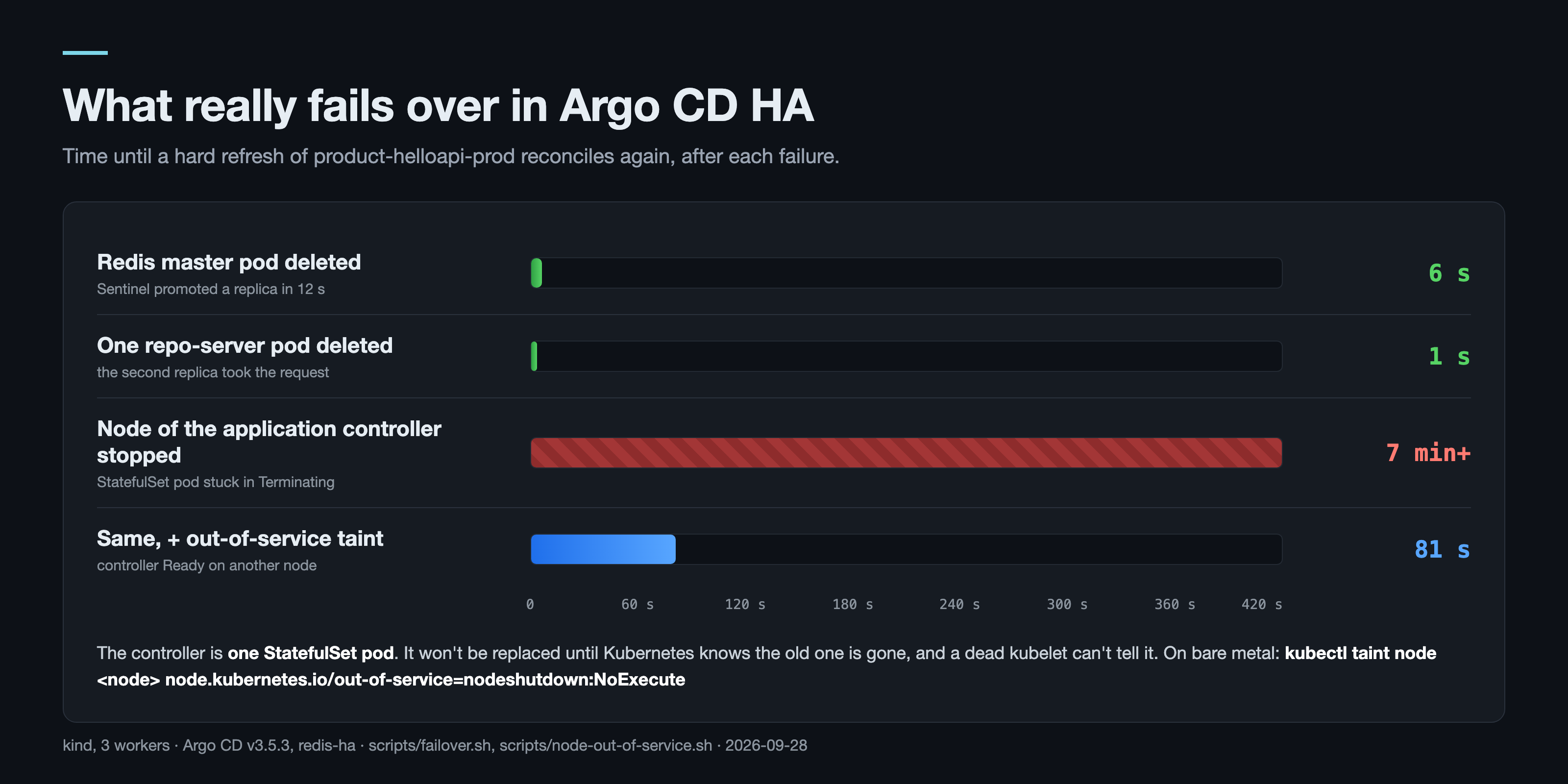
Redis master: Sentinel promoted a replica in 12 seconds (41 in an earlier run). The refresh started during that window still finished in 6 seconds. Redis is a cache for Argo CD; a slow cache is not an outage. In the UI this failure barely shows: a second and a half after the master is deleted, the new Redis pod on worker3 is blue (Progressing) and the Application is still Healthy.
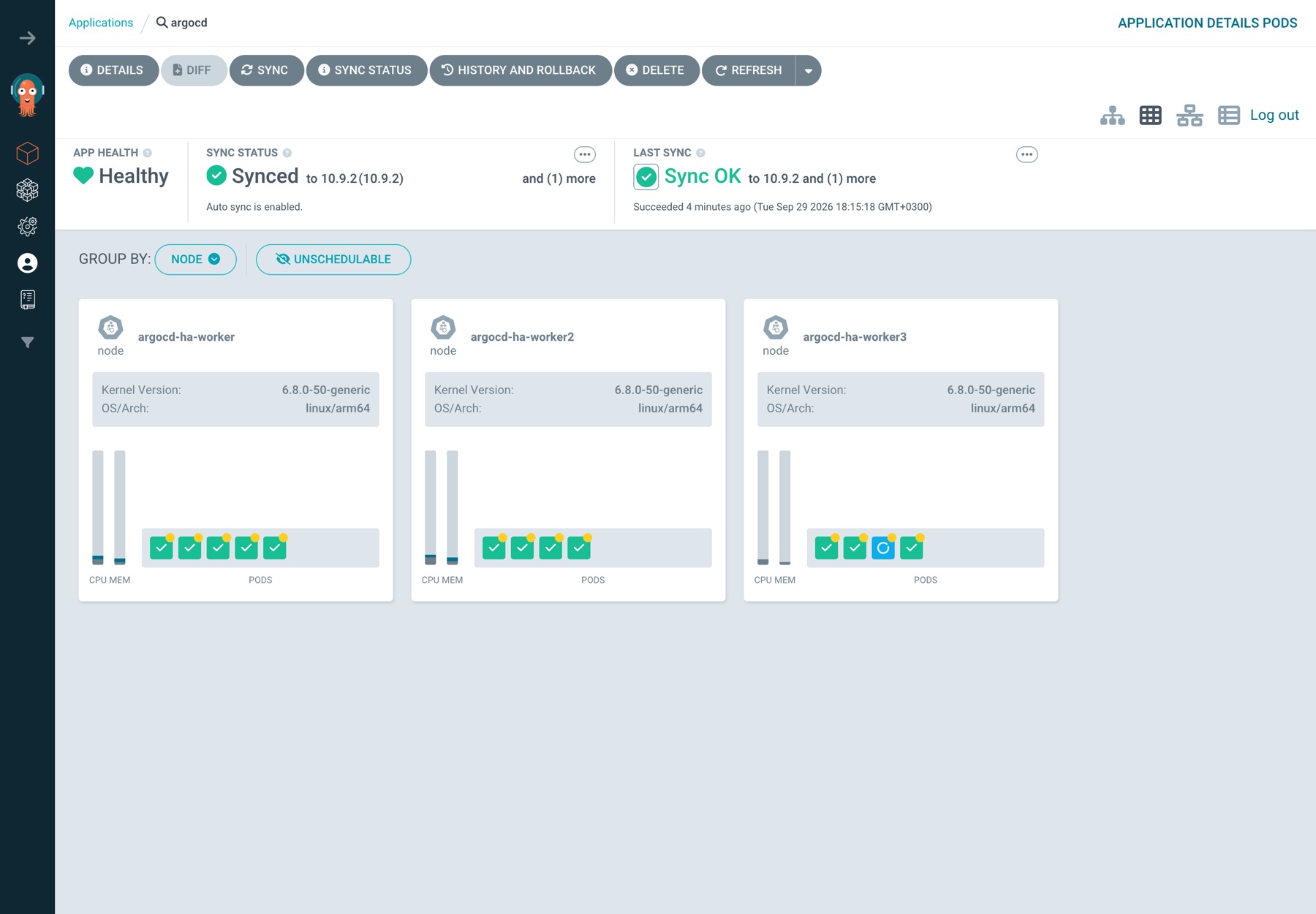
repo-server: 1 second. The other replica took the request. In the Pods view the deleted pod disappears and its replacement stays blue (Progressing) for a few seconds; during that time the Application's health is Progressing and its sync status Synced. Ask for a Hard Refresh from the second tab and the Refreshing badge goes away within a few seconds.
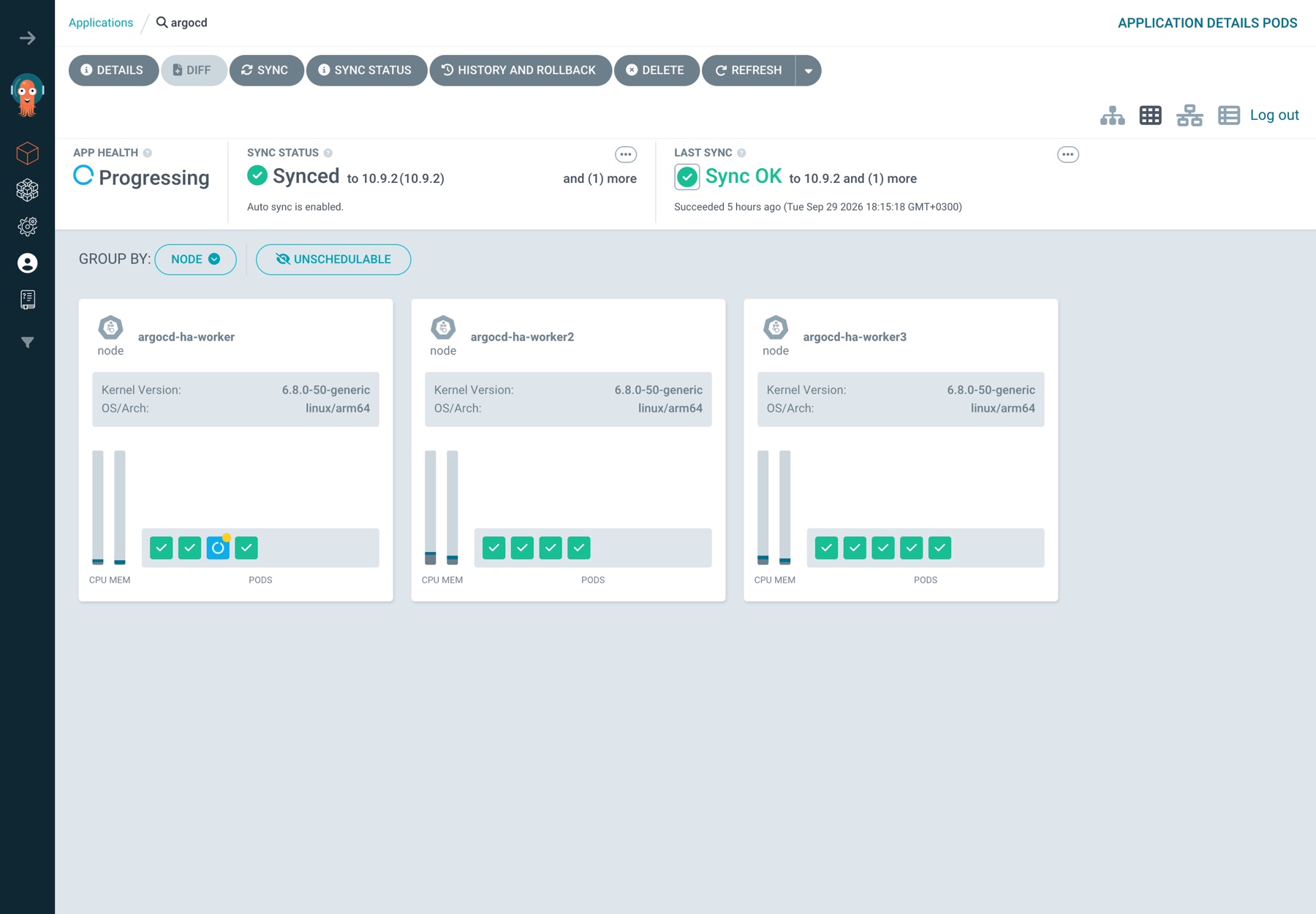
The controller's node: seven minutes of nothing. docker stop is what a dead node looks like to Kubernetes: the kubelet stops reporting, the node goes NotReady after 40–50 seconds (49 in the run below), and after the default 5-minute toleration the pod is marked for eviction. For a Deployment that is where a replacement starts. For a StatefulSet it isn't. argocd-application-controller-0 is a StatefulSet pod, and a StatefulSet never starts a second pod with the same identity until it knows the first one is gone. With the kubelet dead, nobody can confirm that, so the pod sits in Terminating for as long as the node stays down. The API server, both repo-servers and two of three Redis pods were fine the whole time. Argo CD just wasn't reconciling anything.
In the UI this failure is misleading. The node has been dead and NotReady for a minute, but the Pods view still shows five green pods on argocd-ha-worker:
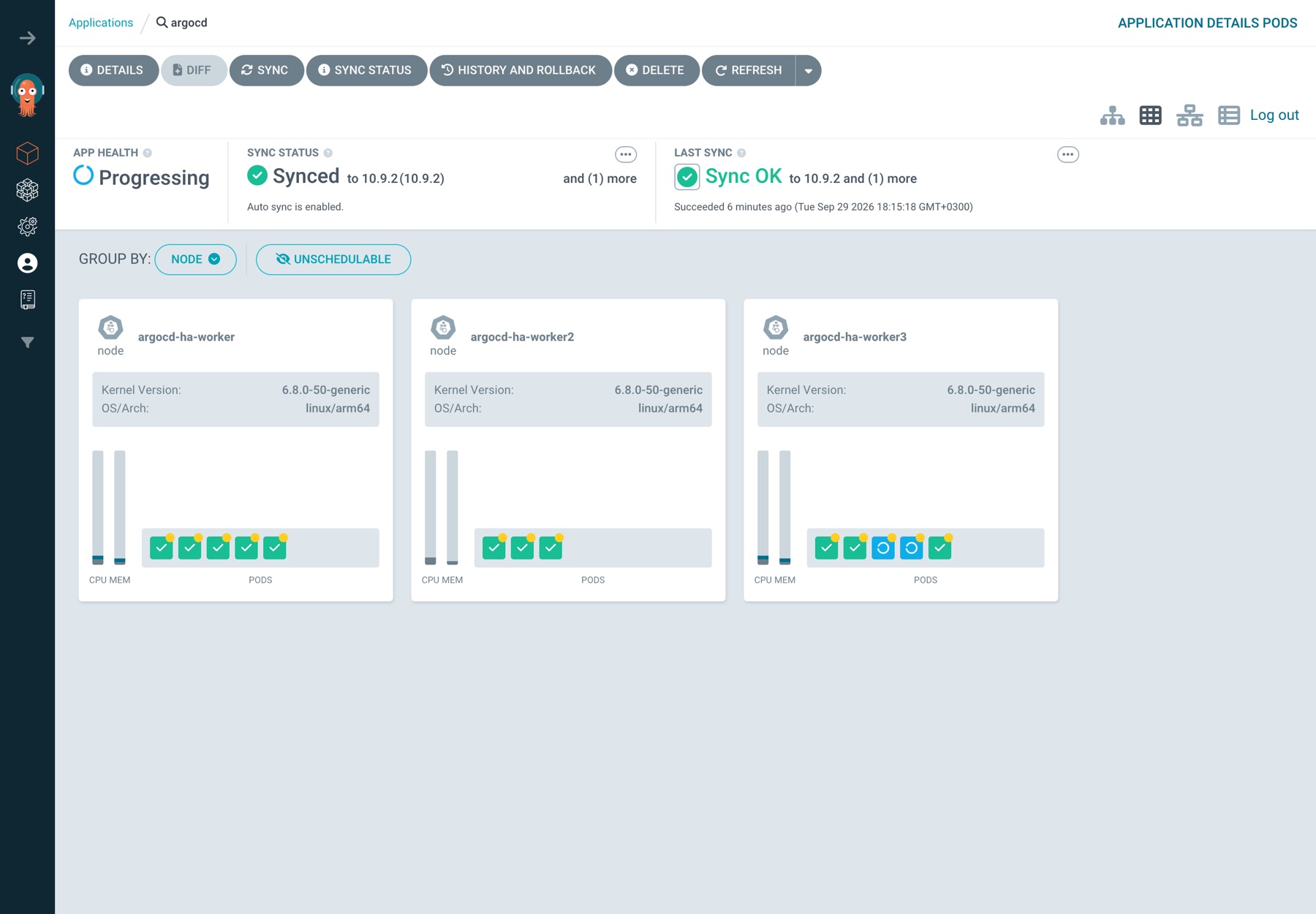
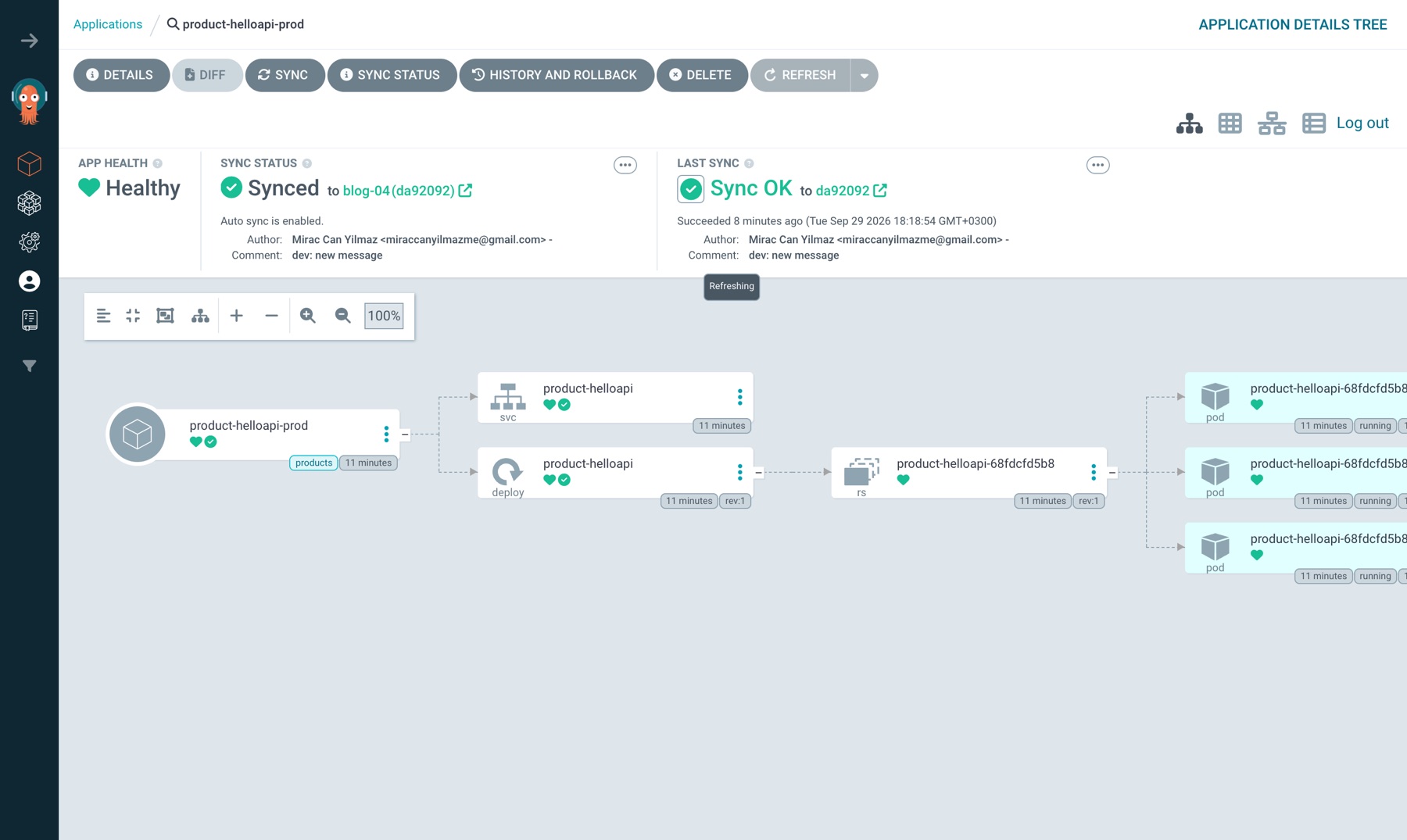
What the UI shows is not live state, it's the last state the controller wrote, and the controller that would update it is one of the five pods on the dead node. In minute six, switch to the second tab, product-helloapi-prod, and ask for a Hard Refresh: the Refreshing badge never goes away, yet the Application's cards are still green:
kubectl tells the truth:
$ kubectl -n argocd get pods -o wide --field-selector spec.nodeName=argocd-ha-worker
NAME                                               READY   STATUS        NODE
argocd-application-controller-0                    1/1     Terminating   argocd-ha-worker
argocd-applicationset-controller-d864b8898-74w59   1/1     Terminating   argocd-ha-worker
argocd-redis-ha-haproxy-647d9bfdf8-8rsrb           1/1     Terminating   argocd-ha-worker
argocd-redis-ha-server-2                           3/3     Terminating   argocd-ha-worker
argocd-repo-server-566fc4b49f-dh66r                1/1     Terminating   argocd-ha-worker
The monitoring rule that falls out of this: don't read Argo CD's health from Argo CD's UI. Watch the Applications' reconciledAt or the controller's metrics from outside.
On a cloud provider the node controller deletes the Node object of a terminated VM and the pod moves on. On bare metal nobody does. The tool Kubernetes gives you for this is the out-of-service taint (non-graceful node shutdown, GA since 1.28): you declare that the node is really gone, and Kubernetes force-deletes its pods.
$ make out-of-service
12:42:31 docker stop argocd-ha-worker2
12:43:20 argocd-ha-worker2 NotReady after 49s
12:43:20 out-of-service taint added
12:43:52 controller Ready on argocd-ha-worker, 81s after the node died
controller moved: hard refresh reconciled in 3s
12:43:57 argocd-ha-worker2 back, taint removed
In the UI the taint shows up in the Pods view: the controller is now on argocd-ha-worker3, and on argocd-ha-worker, back up, the Redis and HAProxy pods that were force-deleted and recreated are Progressing.
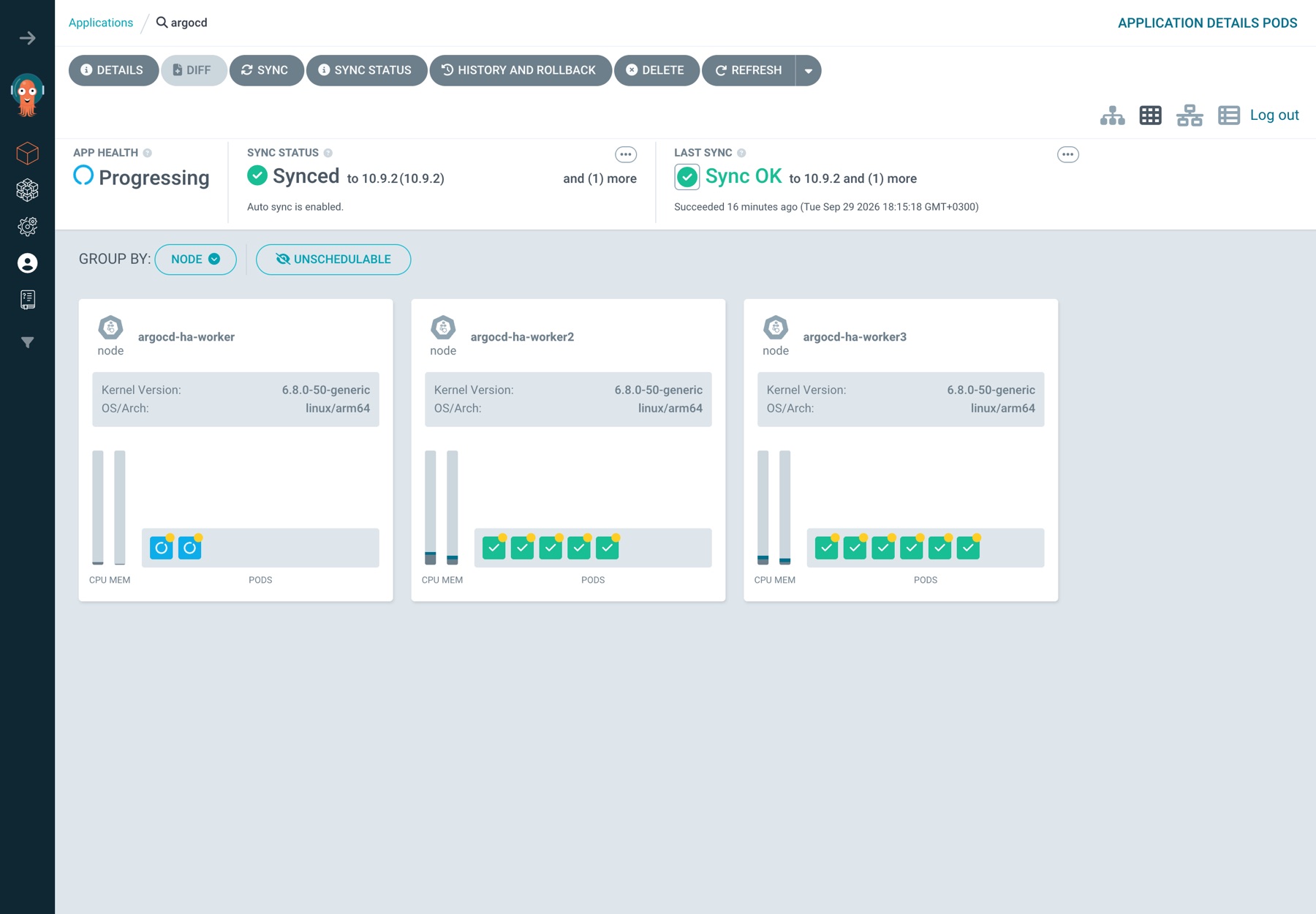
81 seconds instead of "whenever someone notices". The taint is a human decision on purpose: if the node is only partitioned and still running, two controllers would write to the same cluster. Put it in the runbook for "node is dead", together with the command, and remove the taint when the node is back.
What went wrong
1. A ConfigMap without its label takes Argo CD down. Argo CD finds its own settings by label, not by name alone. The config patch at a previous job, a raw argocd-cm applied over the upstream manifests, opened with a warning in capitals: keep the part-of label or every component crash-loops. I reproduced it here by removing that one label:
$ kubectl -n argocd label cm argocd-cm app.kubernetes.io/part-of-
time="2026-09-28T09:44:50Z" level=fatal msg="configmap \"argocd-cm\" not found"
argocd-server-8646bcb568-2rtwd   0/1   CrashLoopBackOff   3 (12s ago)   51s
argocd-server-8646bcb568-bfdt7   0/1   CrashLoopBackOff   3 (12s ago)   51s
The ConfigMap is right there; the message says "not found" because the lookup filters on app.kubernetes.io/part-of: argocd. selfHeal didn't put the label back within 40 seconds, so I did it by hand. (Redis was still recovering from the previous test at that moment, see #3, so I wouldn't read too much into the 40 seconds. The crash itself is immediate.) Two rules came out of it: settings go through the chart's configs.cm / configs.params, never a separate ConfigMap, and the self-managed argocd Application keeps prune: false. The same production notes had the other reason to let Argo CD manage itself at all: config that was applied once by make had drifted for months. The OIDC issuer pointed at the wrong realm, a secret manifest had never been applied, and the UI route returned 404. Nobody noticed, because nothing compared Git to the cluster.
What you see if you try this in your own lab depends on whether pods restart meanwhile. In a second run I removed the label: both argocd-server pods stayed Running for 90 seconds and the UI kept working, because the server reads this ConfigMap at startup. Starting a new pod with kubectl -n argocd rollout restart deploy/argocd-server put that pod straight into CrashLoop with the same configmap "argocd-cm" not found. RollingUpdate doesn't remove the two old pods before the new one is ready, so the UI was still up. So the mistake stays quiet at first and blows up on the next restart, node drain or Argo CD upgrade. After putting the label back and restarting the server, three of the seven Applications were Unknown; the controller turned them all green again in about two minutes:
kubectl -n argocd label cm argocd-cm app.kubernetes.io/part-of=argocd
kubectl -n argocd rollout restart deploy/argocd-server   # don't wait for the pod in CrashLoop
2. selfHeal backs off, and it fooled my first measurement. My first failover script scaled the prod Deployment to 9 by hand and timed how long selfHeal took to put it back. The first revert took 1 second, the next ones 6, 54 and 154 seconds. That wasn't the failures; it was the backoff. The controller log says it:
Skipping auto-sync: already attempted sync to [da92092b10bb...] with timeout 0s (retrying in 4m56.613839256s)
Repeated self-heals on the same commit wait 2 s, then ×3 each time, capped at 300 s (--self-heal-backoff-timeout-seconds, -factor, -cap-seconds). A good default: it stops Argo CD from fighting an HPA or an operator forever. But "selfHeal reverts drift in seconds" is only true the first time. I switched the failover checks to a hard refresh, which has no backoff.
3. After the out-of-service test, Redis didn't come back on its own. The taint also force-deleted argocd-redis-ha-server-2, which couldn't be rescheduled anywhere else (required anti-affinity, the other two workers already had a Redis pod). When the node came back, Sentinel switched masters a few times and server-1 got stuck failing its startup probe with role=slave; repl=connect. The StatefulSet is OrderedReady, so it wouldn't create server-2 until server-1 was Ready. Applications went Unknown (to see which ones in the UI, pick Unknown in the SYNC STATUS filter on the left), and the controller logged NOREPLICAS Not enough good replicas to write. Deleting argocd-redis-ha-server-1 fixed it: 63 seconds later all three Redis pods were 3/3 and the seven Applications were green again in 14 seconds. It doesn't happen every time: in a second run on a fresh lab, Redis was back to 3/3 on its own within 100 seconds. Still, if you use the out-of-service taint on a node that runs a Redis pod, check kubectl -n argocd get pods -l app=redis-ha afterwards.
4. The ApplicationSet sync wave is decoration. products-appset.yaml came with argocd.argoproj.io/sync-wave: "0" on its generated Applications, and namespaces-appset.yaml with "-1", with the idea that namespaces come first. Waves order resources inside one Application's sync. The generated Applications are created by the ApplicationSet controller, not synced as resources of a parent, so those annotations don't order anything. In this run the namespace Applications finished one second before the product ones and nothing failed. That was timing. Next in the series we look at ApplicationSets properly; for now, don't rely on those waves.
Verify
make status        # 7 Applications Synced/Healthy; 13 Argo CD pods over 3 workers
make hello         # both environments answer with the image tag from the overlay
make probe         # hard refresh reconciled in a few seconds
kubectl -n argocd get pdb    # server, repo-server, applicationset: minAvailable 1
kubectl -n argocd get cm argocd-cm -o jsonpath='{.data.timeout\.reconciliation}'   # 120s
The same checks in the UI:
http://localhost:8080/applications: seven cards, all Healthy and Synced; the SYNC STATUS filter on the left shows Synced 7, Unknown and OutOfSync 0.argocd→ Pods view: three worker cards, thirteen green pods in total, nothing blue or red.product-helloapi-prod→ REFRESH arrow → Hard Refresh: the Refreshing badge at the top of the page goes away within a few seconds.- ApplicationSets page:
namespacesandproducts, both Healthy, 2 Applications each.
Sources: the argo/argo-cd chart README ("HA mode", at least 3 worker nodes), Argo CD docs High Availability and Cluster Bootstrapping (app of apps), argocd-application-controller --help in v3.5.3 for the self-heal backoff flags, Kubernetes docs Non-Graceful Node Shutdown.
What HA buys you, in one table
| Failure | What happened | Your action |
|---|---|---|
| Redis master pod dies | Sentinel promotes in 12–41 s; refresh still worked in 6 s | none |
| A repo-server dies | the other one serves; 1 s | none |
| An API server dies | UI/CLI through the other one | none |
| The controller's node dies | no reconciliation until the node returns | out-of-service taint → back in 81 s; check Redis after |
| Someone edits argocd-cm by hand | components crash-loop | settings only through the chart values |
In this series
This is the first article of GitOps in Production. Previous on the blog: Why Cluster API's Docker Provider Can't Bootstrap Talos · Next: Argo CD SSO: OIDC and RBAC for People, Not the admin Password. Dex is off in this lab on purpose; that's where it comes back.
Code for this post: https://github.com/miraccan00/blog-wiki/tree/main/argocd-ha-app-of-apps