The last two posts built the same lab from two ends. In the first, Cluster API's Docker provider (CAPD) turned a kindest/node container into a Kubernetes node in 80 seconds. In the second, we ran Talos in Docker and watched docker exec ... sh come back with "executable file not found". Put the two together, "let me create a Talos cluster with CAPD", and it doesn't work. That's not a missing feature: all three things CAPD expects from a node are absent from Talos on purpose.
This post shows those three things in CAPD's source, gives you a 40-second script that runs the same three checks with plain docker against both the kind image and the Talos image (kind passes 3/3, Talos 0/3), and uses a PR in Sidero Labs' own repository that hit the same wall and was closed in August 2026 as proof. By the end you'll know why the answer is "can't be supported" rather than "not supported yet", and what to use instead.
The script is in the why-capd-cannot-run-talos folder.
What you need
- Cluster API, Explained by Building One: kind, the Docker Provider and a Workload Cluster in 15 Minutes
- Talos Linux, Explained by Running It: No Shell, One Machine Config, an OS You Talk to Over gRPC
- Only Docker if you want to run the script. This run: Colima 0.8 (Apple Silicon, VM kernel 6.8), Docker 27,
kindest/node:v1.34.0andghcr.io/siderolabs/talos:v1.13.10. No cluster is built; two containers start and are removed.
This post builds on those two; below is only the part of each you need here.
What we need from the last two posts
From part 1: how CAPD builds a node. Cluster API splits the job into three provider families. Infrastructure answers "give me a machine", bootstrap "how does this machine become a node", control plane "how many control plane nodes, and how are they replaced". In part 1's lab, infrastructure was CAPD (each node a kindest/node container) and the other two were kubeadm. The kubeadm bootstrap provider renders a cloud-config for every Machine and writes it to a Secret. CAPD starts the container, then runs that cloud-config inside it, command by command. In the "What went wrong" section of the same post we got stuck on the first step of this: the DevMachine condition said CGroupsReady: Waiting for cgroups ready failed: multi-user target not reached yet, because systemd inside the container had died on the inotify limit. Keep that message in mind, it comes back below.
From part 2: what Talos doesn't have. No SSH, no shell, no package manager, no systemd. The whole node is one machine-config document, and the only way to change it is the gRPC API on port 50000. In Docker mode the image's entrypoint is /sbin/init, which is machined. Trying sh or ls with docker exec failed with the binary not found. That's not a hardening setting; the binaries aren't in the image at all. The config was generated by talosctl cluster create docker and handed to the nodes.
Part 1 showed what CAPD asks of a node, part 2 showed what Talos doesn't give. This post puts them side by side.
Why this way
The decision: this is not a setup post, it's a "why it can't work" post. Source excerpts plus a manual replay of CAPD's checks are enough evidence. I could have built a management cluster with CAPD + the Talos bootstrap provider (CABPT) + the Talos control plane provider (CACPPT) and watched the Machines get stuck. I rejected that: it shows the same result as a single condition message at the end of a multi-minute setup, and it doesn't explain why. The script asks each question CAPD asks, one at a time, and shows exactly where the answer is "no".
Step 1 — What CAPD expects from a node
The source is in kubernetes-sigs/cluster-api, under test/infrastructure/docker/. The fact that CAPD lives in the test directory says something on its own: this provider was written for Cluster API's own tests. After starting the container and before bootstrap, the DevMachine reconcile (reconcilers/backends/docker/dockermachine_backend.go) runs a "cgroups ready" task with a 30-second timeout, which calls this (internal/docker/machine.go, trimmed):
var waitUntilLogRegExp = regexp.MustCompile("Reached target .*Multi-User System.*")

func (m *Machine) WaitForMultiUserTarget(ctx context.Context, containerRuntime container.Runtime) error {
    logs, err := containerRuntime.GetContainerLogs(ctx, m.container.Name)
    if !waitUntilLogRegExp.MatchString(logs) {
        return pkgerrors.New("multi-user target not reached yet")
    }
    return m.WaitForCrictlPs(ctx)
}

func (m *Machine) WaitForCrictlPs(ctx context.Context) error {
    err := wait.PollUntilContextTimeout(ctx, 500*time.Millisecond, 4*time.Second, true, func(ctx context.Context) (bool, error) {
        ps := m.Command("crictl", "ps")
        return ps.Run(ctx) == nil, nil
    })
}
That's the first contract: systemd's "Reached target Multi-User System" line must show up in the container log, then crictl ps must succeed inside the container. The multi-user target not reached yet message from part 1 comes from here.
If that passes, CAPD checks whether bootstrap has already started. It does that with a shell command inside the container:
cmd := m.container.Commander.Command("/bin/sh", "-c",
    "test -f /run/cluster-api/capd.bootstrap.started && echo \"true\" || echo \"false\"")
Then it turns the bootstrap data into commands (GetBootstrapCommands). Two formats are supported, cloud-config and ignition. On the cloud-config side, the parser knows exactly two modules (internal/provisioning/cloudinit/adapter.go):
switch name {
case writefiles:
    return newWriteFilesAction()
case runcmd:
    return newRunCmdAction()
default:
    // TODO Add a logger during the refactor and log this unknown module
    return newUnknown(name)
}
write_files itself writes files by running /bin/sh -c "cat > <path> /dev/stdin" through docker exec. Every generated command runs inside the container, one by one. The default timeout for this step is 5 minutes, and the code carries the note "when bootstrap fails on a Machine, there is no retry".
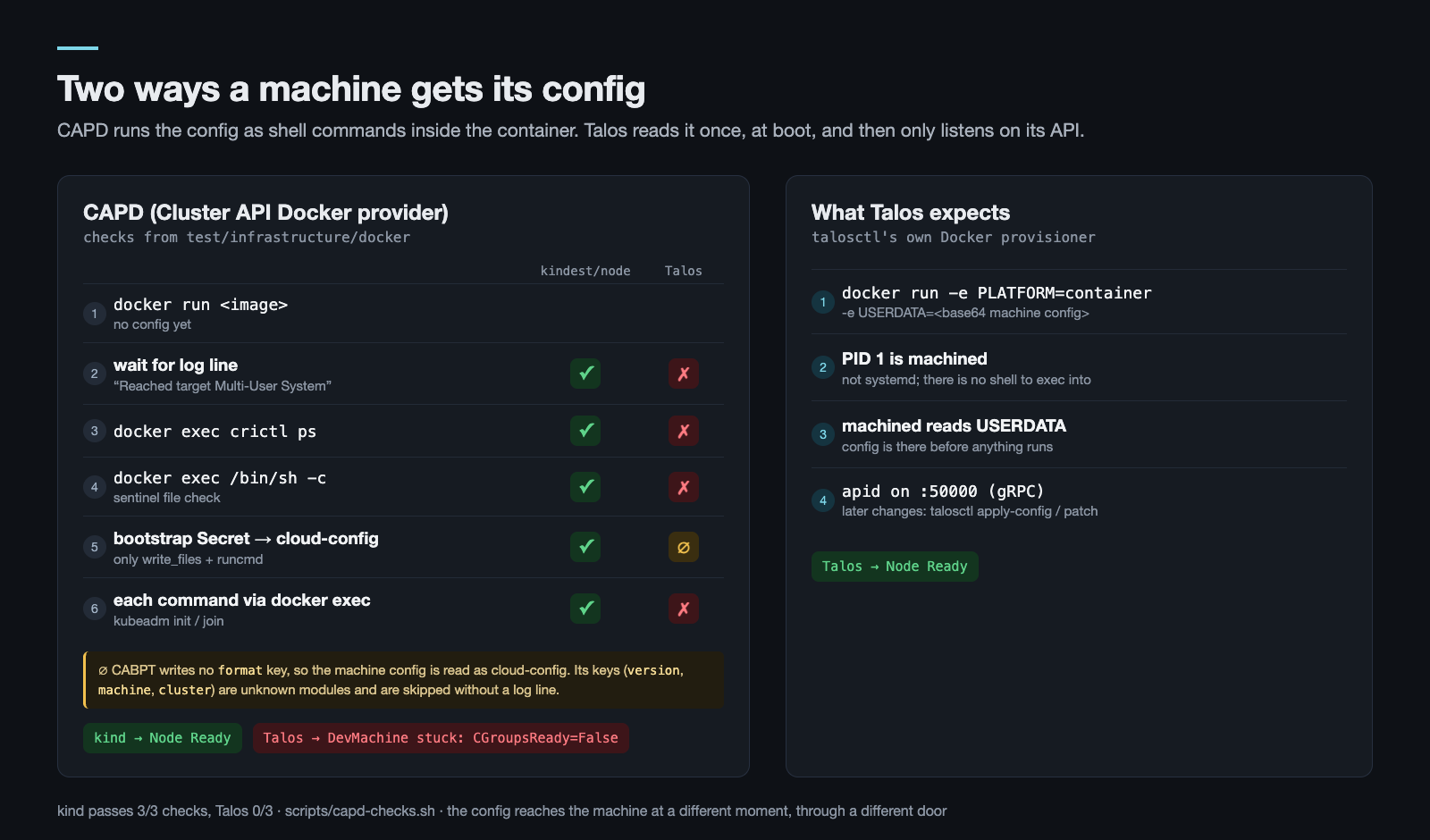
So CAPD expects three things from a node:
| # | What CAPD expects | In the source | kindest/node | Talos |
|---|---|---|---|---|
| 1 | systemd as PID 1, "Multi-User System" in the log | WaitForMultiUserTarget |
yes | no (/sbin/init = machined) |
| 2 | crictl inside the container |
WaitForCrictlPs |
/usr/local/bin/crictl |
no |
| 3 | /bin/sh, and config that turns into shell commands |
CheckForSentinelFile, write_files, runcmd |
/usr/bin/sh, bash, kubeadm |
no; config is applied through the API, not a shell |
Step 2 — What a Talos config looks like to CAPD
On this path the bootstrap data comes from Talos's bootstrap provider, CABPT. The function that writes the Secret (siderolabs/cluster-api-bootstrap-provider-talos, controllers/secrets.go, writeBootstrapData) sets a single key:
Data: map[string][]byte{
    "value": data,
},
No format key. And this is CAPD's reading side:
format := s.Data["format"]
if len(format) == 0 {
    format = []byte(bootstrapv1.CloudConfig)
}
So Talos's machine config reaches CAPD as a cloud-config. A machine config's top-level keys are version, machine and cluster, none of which is write_files or runcmd. The parser treats all of them as "unknown modules", without even logging it (see the TODO). There is no path for the config to reach Talos.
In part 2 the machine config was generated by talosctl cluster create docker. Look at how it hands that config to the container and the difference shows. talosctl's Docker provisioner (siderolabs/talos, pkg/provision/providers/docker/node.go) sets two environment variables when it creates the container: PLATFORM=container and USERDATA=<base64 machine config>. The config is already inside when the container starts; nothing is exec'd in afterwards. In CAPD, the only way bootstrap data reaches the container is commands run with docker exec after it has started. The two models never touch.
Step 3 — Running the same checks by hand
The way to see this without building a cluster is to ask CAPD's three questions with plain docker. The script starts the image, waits for the multi-user line in the log like CAPD's 30-second task does, then tries crictl ps and /bin/sh -c. The Talos container is started with the flags talosctl uses, but without USERDATA, exactly as CAPD would.
# scripts/capd-checks.sh (core)
target=$(docker logs "$NAME" 2>&1 | grep -E 'Reached target .*Multi-User System')   # WaitForMultiUserTarget
docker exec "$NAME" crictl ps                                                        # WaitForCrictlPs
docker exec "$NAME" /bin/sh -c 'echo shell ok'                                       # runcmd / write_files
$ make check
== kindest/node:v1.34.0
0) container: running
1) WaitForMultiUserTarget
   OK   [  OK  ] Reached target multi-user.target - Multi-User System.
2) WaitForCrictlPs: crictl ps
   OK
3) runcmd: /bin/sh -c
   OK   shell ok
== ghcr.io/siderolabs/talos:v1.13.10
0) container: running
1) WaitForMultiUserTarget
   FAIL multi-user target not reached yet
2) WaitForCrictlPs: crictl ps
   FAIL OCI runtime exec failed: exec failed: unable to start container process: exec: "crictl": executable file not found in $PATH: unknown
3) runcmd: /bin/sh -c
   FAIL OCI runtime exec failed: exec failed: unable to start container process: exec: "/bin/sh": stat /bin/sh: no such file or directory: unknown
36 seconds in total. The Talos container is up, not crashing. Its log says exactly what you'd expect:
[talos] platform information {"component": "early-startup", "mode": "container"}
[talos] service[apid](Waiting): Waiting for service "containerd" to be "up", config to be ready
Talos is waiting for a config, CAPD is waiting for systemd. Both keep waiting. In a real CAPD setup this means the DevMachine stays False on the same CGroupsReady condition as in part 1. This time the reason isn't a systemd that died, it's a systemd that was never there. Even if the first check passed, it would stop at the second and the third, so this isn't a single bug you could fix and move past.
Looking inside the images gives the same picture:
$ make inspect
== kindest/node:v1.34.0
   usr/bin/bash
   usr/bin/kubeadm
   usr/bin/sh
   usr/bin/systemctl
   usr/local/bin/crictl
== ghcr.io/siderolabs/talos:v1.13.10
   (none of them)
The Talos image's file system has 587 entries. Under /usr/bin there's containerd, runc, iptables/nftables, LVM and file-system tools. No shell, no systemd (only systemd-udevd, which isn't an init), no crictl, no cloud-init.
What went wrong: Sidero's own attempt
I'm not the first to try this. On 4 August 2026, PR #266 was opened in Sidero Labs' own control plane provider repository: "feat(ci): migrate e2e integration tests from AWS to Docker (CAPD)". The goal was to run CACPPT's end-to-end tests against a local CAPD setup, without AWS credentials. The PR added a DockerProvider test harness, an e2e-docker.sh script and Makefile changes. It was closed two days later without being merged. The closing comment:
Closed due to CAPD that cannot be used only as infrastructure provider with cacppt and cabpt.
So the maintainers of Talos's own providers couldn't use CAPD as the infrastructure provider under CABPT and CACPPT either. The three points in this post are that sentence spelled out. The provider table in part 1 gives the impression that "swap the infrastructure row and nothing else changes". The reverse isn't true: CAPD's "infrastructure" layer also assumes how bootstrap will run. It expects a kubeadm-style image, systemd and a shell.
The general lesson: when you check whether one provider can replace another, looking at the CRDs isn't enough. You also have to look at which path the bootstrap data takes to reach the machine. Real infrastructure providers (cloud, KubeVirt, bare metal) hand that data to the machine as user-data, config-drive or nocloud, and that's exactly what Talos reads. CAPD writes it into the machine through a shell.
So what should you use
- A quick Talos cluster on a Mac:
talosctl cluster create docker. That's what we did in part 2, and Talos's own Docker provisioner hands over the config the right way, viaUSERDATA. No Cluster API. - Cluster API + Talos: an infrastructure provider that boots a machine which reads its config as user-data. Later in this series we do exactly that with CABPT + CACPPT on KubeVirt VMs (11 → 13 → 15). That path has its own traps, which I cover in those posts.
- Managing a Talos fleet: Sidero's own product, Omni. I compare its license and the state of the CAPI providers in part 19.
Verify
cd why-capd-cannot-run-talos
make check      # kind: 3× OK, Talos: 3× FAIL (output above)
make inspect    # kind ships sh/bash/systemctl/crictl/kubeadm, Talos ships none of them
docker ps -a --filter name=capd-check   # empty: the script removes its containers on exit
Sources, main branches as of September 2026:
- kubernetes-sigs/cluster-api: test/infrastructure/docker/internal/docker/machine.go (WaitForMultiUserTarget, WaitForCrictlPs, CheckForSentinelFile, GetBootstrapCommands), test/infrastructure/docker/reconcilers/backends/docker/dockermachine_backend.go (getBootstrapData), test/infrastructure/docker/internal/provisioning/cloudinit/adapter.go.
- siderolabs/cluster-api-bootstrap-provider-talos: controllers/secrets.go (writeBootstrapData).
- siderolabs/talos: pkg/provision/providers/docker/node.go (PLATFORM=container, USERDATA).
- siderolabs/cluster-api-control-plane-provider-talos#266, closed without merge on 2026-08-06.
In this series
Previous: Talos Linux, Explained by Running It: No Shell, One Machine Config, an OS You Talk to Over gRPC · Next: One Box, Real VMs: k3s, Cilium, KubeVirt and CDI as a Management Cluster. That's where we build what CAPD can't give: a real machine that reads its config as user-data, with KubeVirt.
Code for this post: https://github.com/miraccan00/blog-wiki/tree/main/why-capd-cannot-run-talos