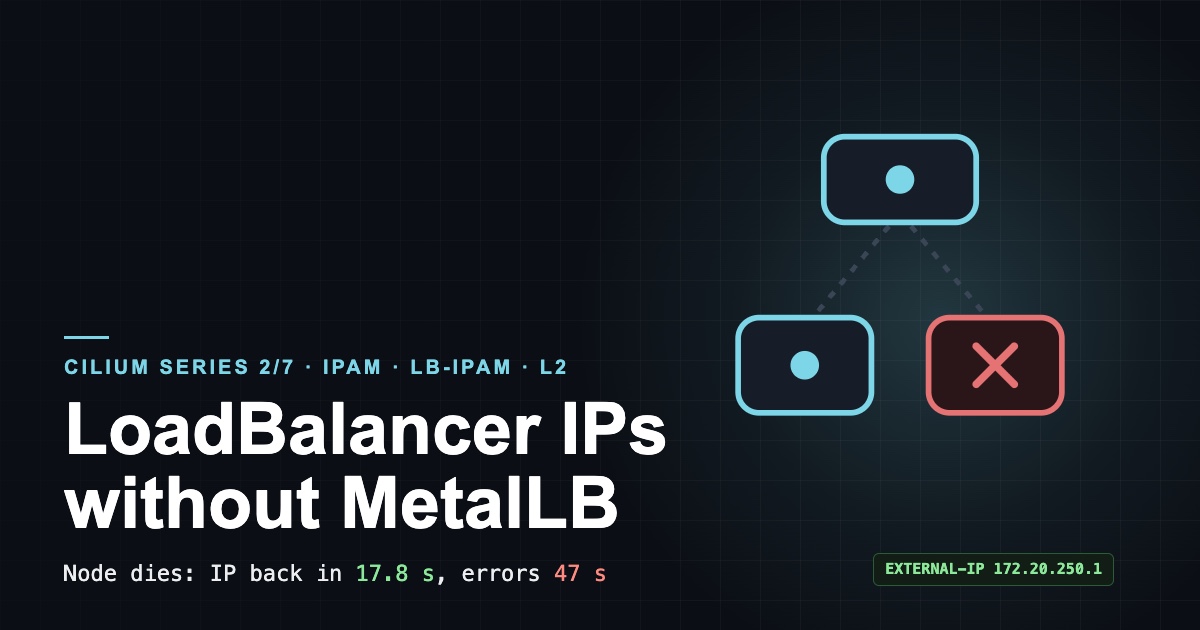
On a bare-metal cluster, the first Service you create with type: LoadBalancer shows <pending> in the EXTERNAL-IP column and stays there forever. In the cloud, the provider's controller fills that column; on your own servers nobody does. The usual answer is to install MetalLB. In this post I let Cilium, which already runs in the cluster, do the same job, and then asked the question that matters: what happens when the node announcing the IP dies? I measured it in the lab: the IP moved to another node in 17.8 seconds, but some requests kept failing for 47 seconds.
This is the second post in the Cilium series. First I look at where pod IPs come from (IPAM), then at LB-IPAM, which gives Services an external IP, and at L2 announcements, which make that IP reachable on the network. Every step comes with real output from the lab.
The problem, and why it matters
Teams running Kubernetes on their own hardware have three networking questions.
First, who gives an external Service its IP? NodePort works, but nobody wants to hand a customer port :31666. And a LoadBalancer Service gets no IP on its own outside the cloud.
Second, how do other machines on the network find that IP? Handing out an IP from a pool is not enough. When a router or a machine on the same network asks "who has this IP?" (ARP), somebody has to answer. And when that node dies, somebody else has to start answering.
Third, pod IPs. In a default install every pod gets its IP from a single range. Where several teams or customers share a cluster, the firewall team usually asks: "Give customer A's pods their own range so I can write the rule for it." That depends on who hands out pod IPs, and from which pool.
Cilium answers all three by itself: IPAM modes and per-namespace pools for pod IPs, LB-IPAM for Service IPs and L2 announcements to make them reachable. No extra component to install.
Cilium IPAM modes: who hands out pod IPs
IPAM (IP Address Management) is the part that decides which block of pod IPs each node gets and which IP a pod takes from it. Cilium has three common modes, and the difference is who cuts the blocks:
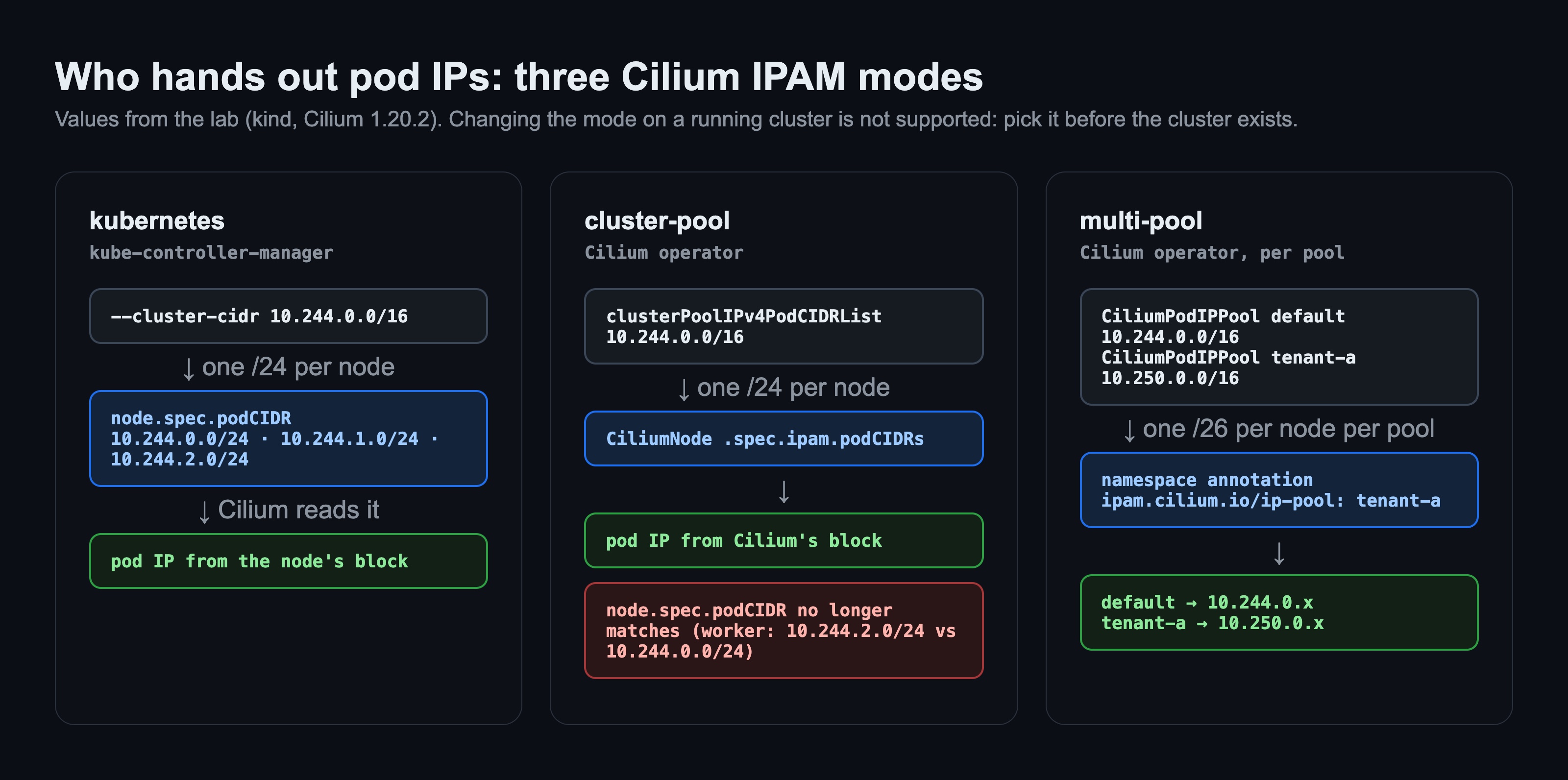
| Mode | Who cuts the blocks | When |
|---|---|---|
kubernetes |
Kubernetes (kube-controller-manager, node.spec.podCIDR) |
Simplest setup; the default for kind and kubeadm |
cluster-pool |
Cilium operator (CiliumNode) |
Cilium's default; manage the range independently of Kubernetes |
multi-pool |
Cilium operator, separately per pool | A different IP range per namespace or tenant |
The most important rule comes first: you cannot change the IPAM mode on a running cluster. The Cilium docs call it unsupported; below I show what happened when I tried anyway. Pick the mode before the cluster exists.
The lab: what I built
On an Apple Silicon Mac, on Colima (4 CPU / 8 GB, kernel 6.8), the same cluster as in the first post of the series:
- kind v0.33 with 1 control plane + 2 workers, Kubernetes v1.37.0, default CNI and kube-proxy disabled.
- Cilium 1.20.2 via Helm, kube-proxy replacement on. A fresh cluster for each IPAM mode.
- The final setup runs
multi-pool: adefaultpool10.244.0.0/16and atenant-apool10.250.0.0/16, both cut into a/26per node. - The LB-IPAM pool is a
/24inside kind's Docker network (172.20.0.0/16); L2 announcements only on the workers. - Demo: a simple HTTP echo service with two replicas, spread so that each worker runs one pod.
The full final setup (cluster, Cilium, pools, LB, L2) takes 117 seconds from scratch; verification and the failover test take 66 seconds.
Step 1 — kubernetes vs cluster-pool mode: same blocks, different owner
I built the first two clusters with the same 10.244.0.0/16 range, one in kubernetes mode and one in cluster-pool mode. On every node I looked at two places: the podCIDR Kubernetes writes on the node and Cilium's own CiliumNode record.
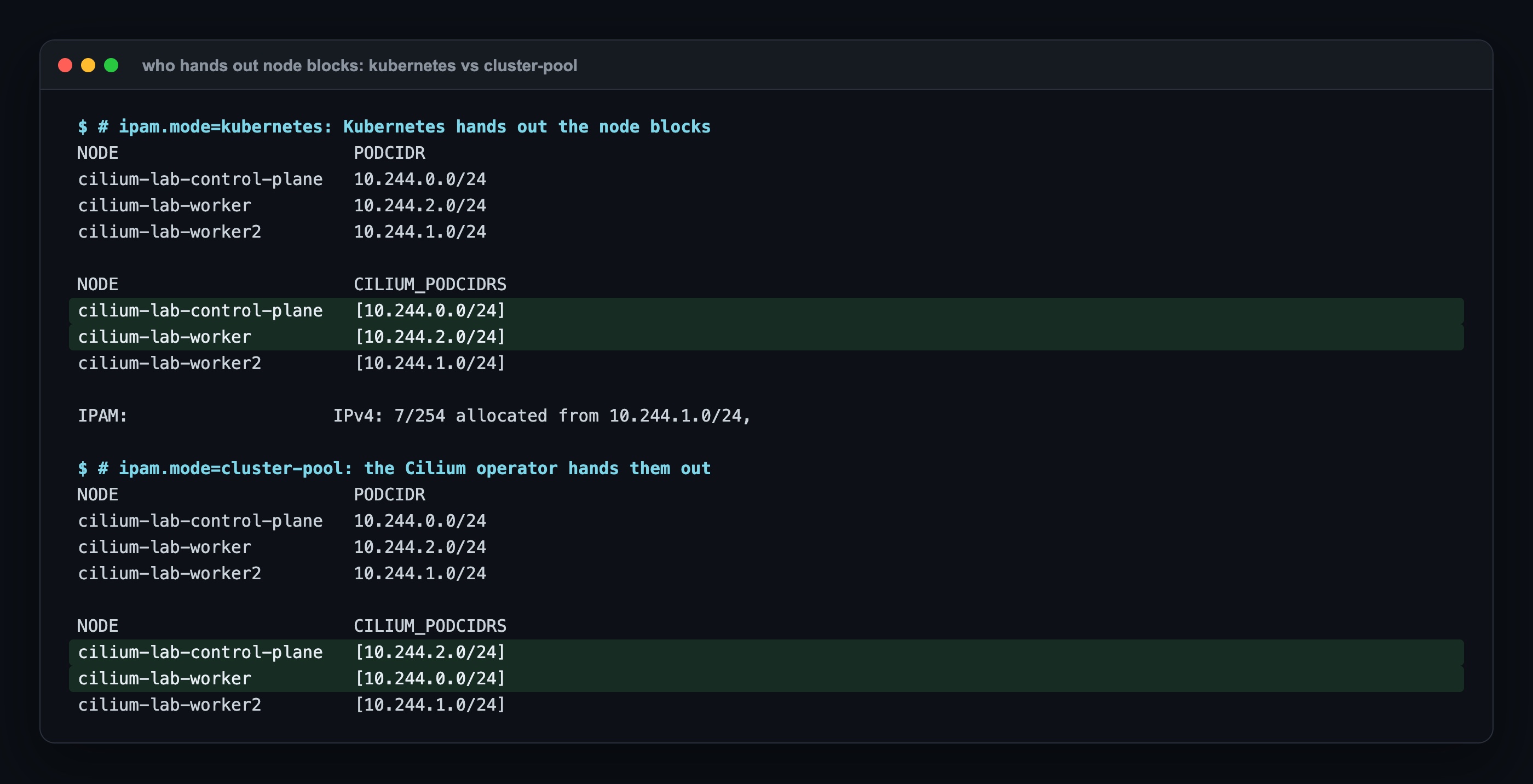
In kubernetes mode both sides are identical: Cilium reads the block Kubernetes assigned and uses it. In cluster-pool mode the blocks come from the Cilium operator and do not match what Kubernetes wrote on the node: for the worker, Kubernetes says 10.244.2.0/24 while its pods get IPs from 10.244.0.0/24. Nothing breaks, but kubectl get nodes -o wide, or any monitoring tool that reads node.spec.podCIDR, now shows the wrong thing. The real source of the pod IP is CiliumNode.
Step 2 — Changing IPAM mode on a running cluster: silently nothing happens
I tried what the docs call unsupported anyway: a helm upgrade with cluster-pool values on a cluster running in kubernetes mode. I expected an error. None came:
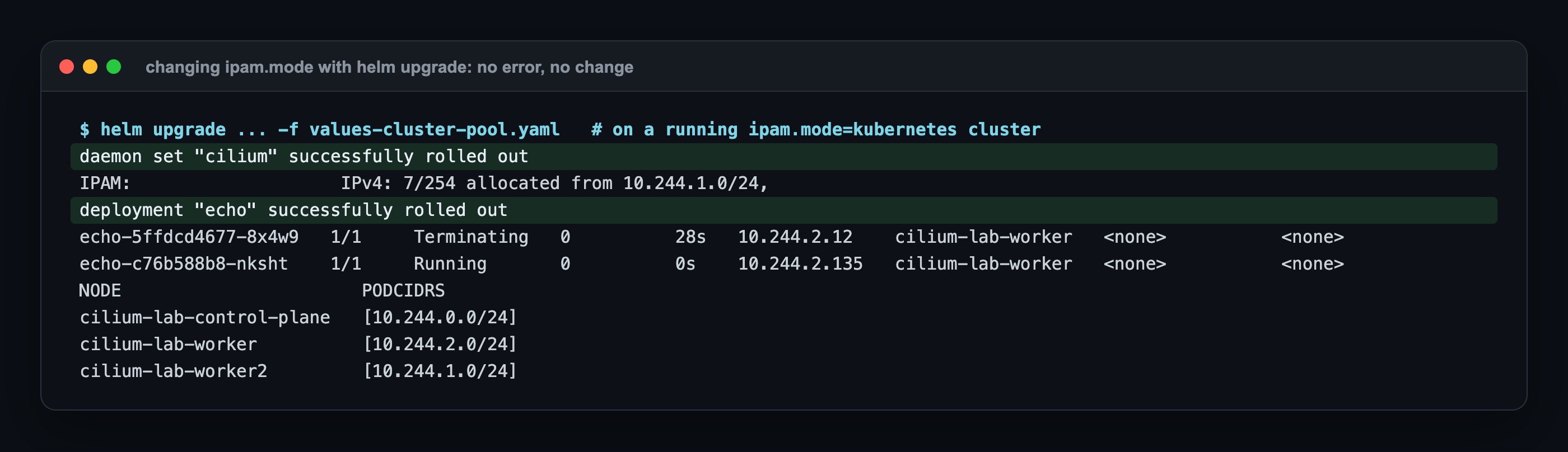
The DaemonSet said "successfully rolled out" and the new pods were Running. But the agent still allocates from the old block, and the blocks in CiliumNode stayed the same as Kubernetes'. The mode looks changed and isn't. Worse, nobody guarantees what happens when a node restarts after this half-changed state. The right path is a new cluster and moving the workloads; the lab builds a fresh cluster for each mode.
Step 3 — multi-pool and CiliumPodIPPool: an IP range per namespace
In multi-pool mode Cilium keeps more than one IP pool. A pool is a CiliumPodIPPool resource, and an annotation on the namespace says which pool it uses. In the lab the tenant-a namespace is bound to the 10.250.0.0/16 pool and everything else uses default.
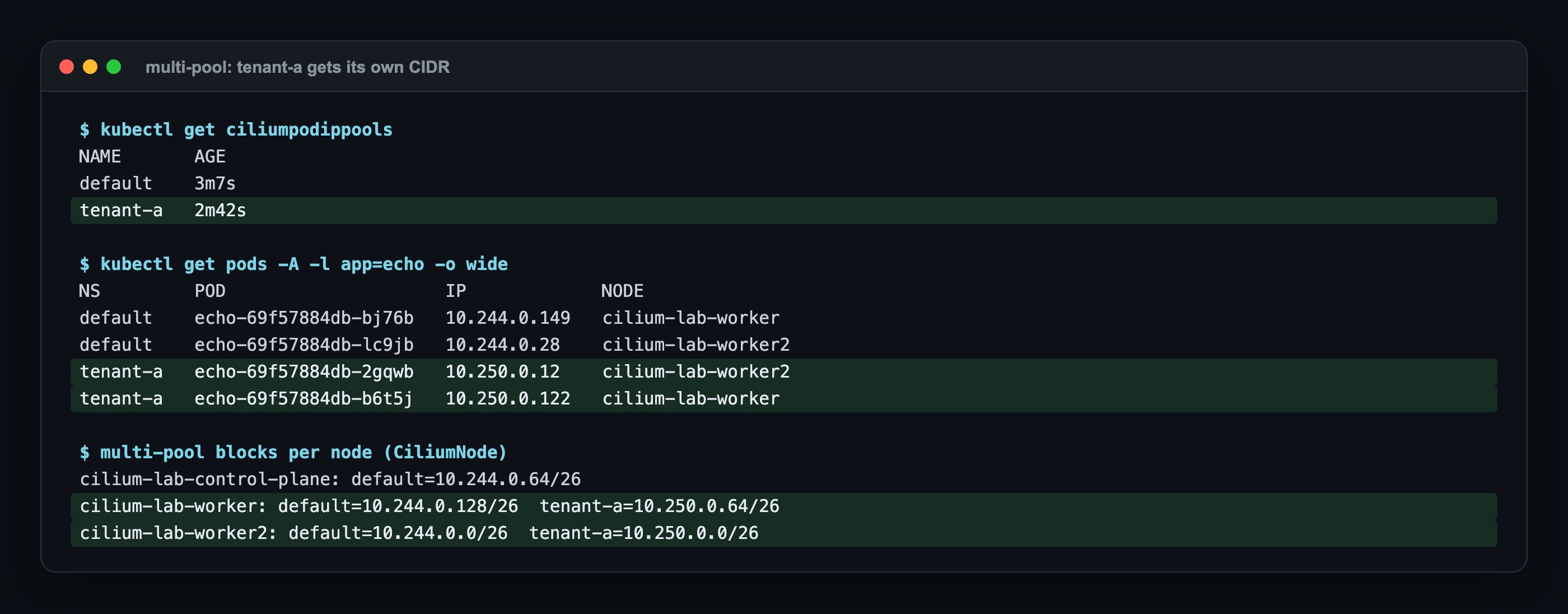
Two copies of the same app, on the same nodes, got IPs from two different ranges: the default namespace 10.244.0.x, tenant-a 10.250.0.x. The operator cuts a separate /26 (62 IPs) from each pool for each node; if a pool is not used on a node at all (like tenant-a on the control plane), no block is opened there. Now I can tell the firewall team "tenant-a = 10.250.0.0/16".
Two notes. Pool ranges must not overlap each other. And the /26 is small on purpose: once a node has more than 62 pods, the operator gives it a second block from the same pool; on a large cluster a wider mask makes more sense.
Step 4 — LB-IPAM: a LoadBalancer Service from <pending> to an IP
Pod IPs are done; now the Service that faces the outside. LB-IPAM is the part of Cilium that gives LoadBalancer Services an IP from the range in a CiliumLoadBalancerIPPool. Nothing extra to enable; defining the pool is enough.
With no usable pool, the Service stayed <pending> like on any cluster outside the cloud. Once the pool was in place it got 172.20.250.2 within seconds:
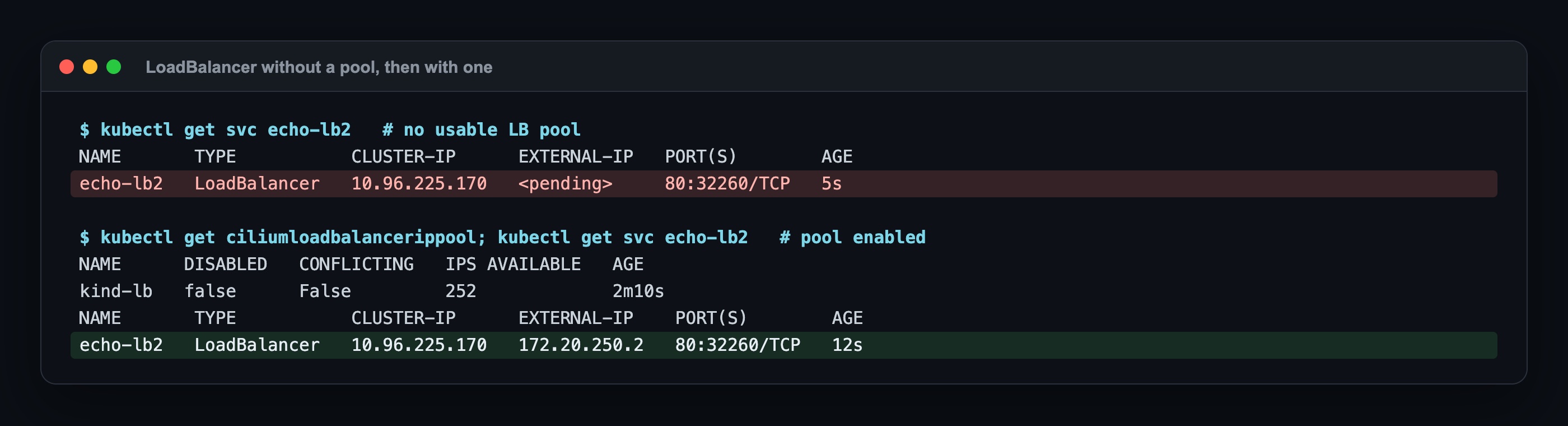
The pool is a /24 inside kind's Docker network: 172.20.250.0/24. The first and last addresses are excluded, which leaves 253 IPs. On a real network this range is a slice of the servers' VLAN that DHCP does not hand out. That choice matters, and I learned why on my first try (below, "Where it broke" #1).
Step 5 — L2 announcements: making the IP reachable
Writing an IP on a Service does not mean the network can find it. When a machine on the same network wants to send a packet to 172.20.250.1, it first asks via ARP "which MAC address has this IP?"; if nobody answers, the packet goes nowhere.
Cilium's L2 announcements give that answer. Each Service gets a Kubernetes lease; the single node holding the lease answers ARP for that IP. A CiliumL2AnnouncementPolicy decides which nodes are candidates and on which interface they answer; in the lab, only the workers, on eth0.
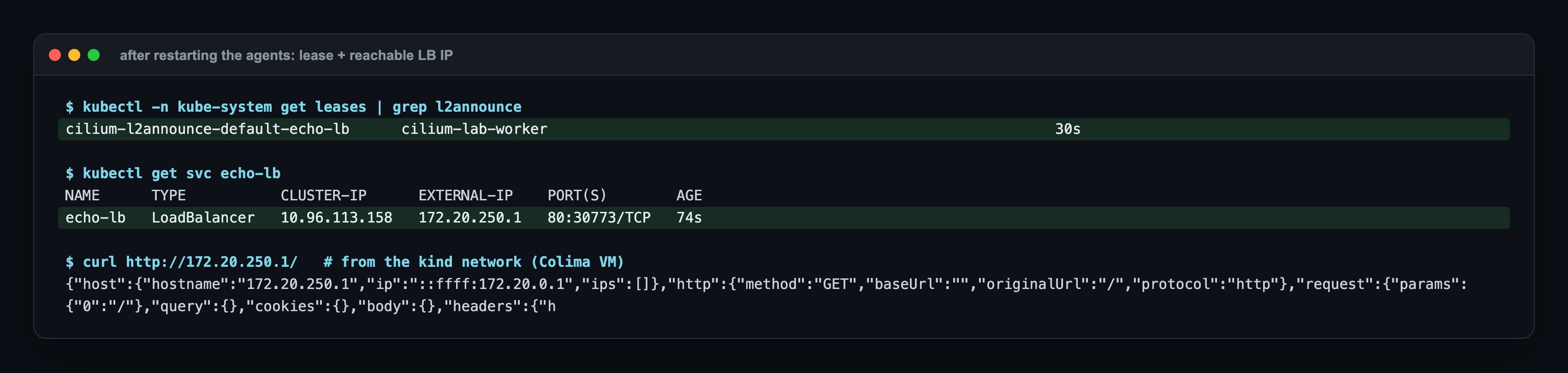
The lease is on a worker, the Service is on 172.20.250.1, and a curl from the kind network got the echo service's answer. On Colima the Mac cannot reach kind's Docker network directly, so the request runs inside the Colima VM. On a real network it works from every machine on the same VLAN.
Three timers in the config matter, because they are what I measure in the next step: lease duration 15 s, renew deadline 5 s, retry period 2 s. Each Service means one lease, and each lease means regular writes to the API server; as the number of Services grows, Cilium's API rate limit has to go up too (20 QPS in the lab).
Step 6 — Measuring L2 failover: what happens when the node dies
The real question about L2 announcements: what if the node announcing the IP goes away? To measure it I wrote a script: it checks that the echo pods are spread over both workers, sends about 10 requests per second to the LoadBalancer IP, kills the lease holder instantly with docker kill and records when things happen.
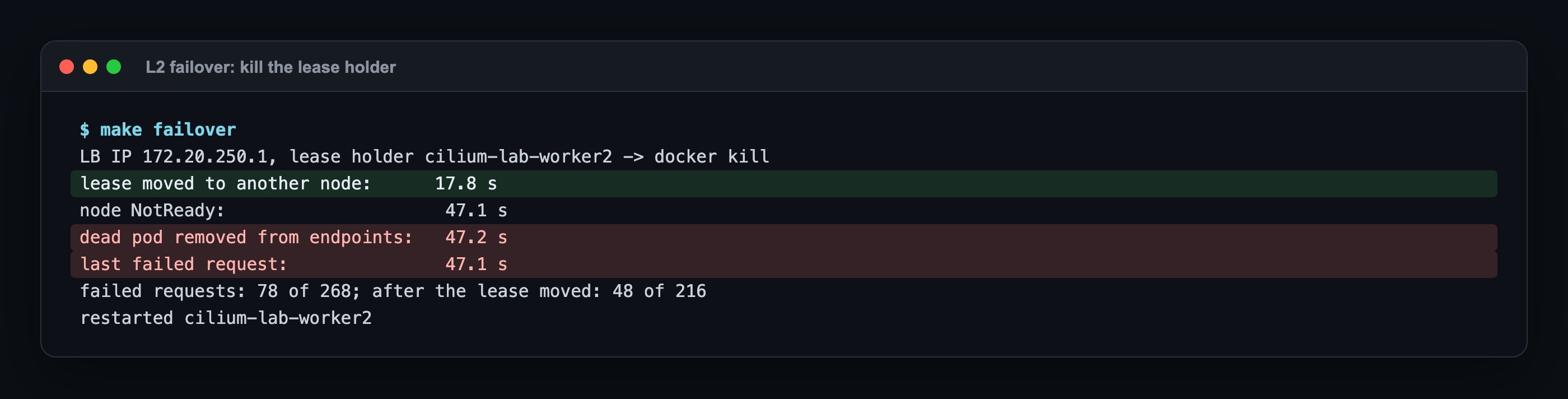
The result was more interesting than I expected. It is really two failovers:
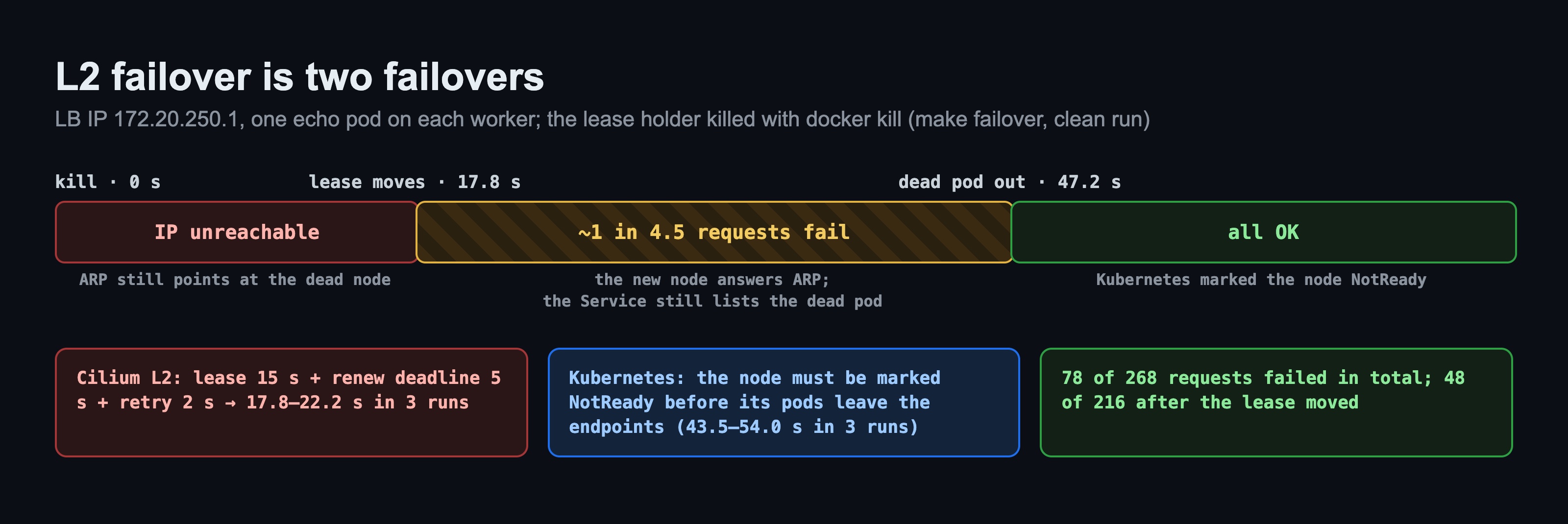
- Cilium's failover (0 → 17.8 s). The dead node cannot renew its lease; when the lease expires another worker takes it and starts answering ARP. The lease is 15 s, plus the renew and retry timers; across three runs I measured 17.8 to 22.2 seconds. During this window the IP is unreachable.
- Kubernetes' failover (17.8 → 47.2 s). The IP is now on a live node, but the Service's endpoint list still contains the pod on the dead node. Kubernetes only removes it after marking the node
NotReady, which happens once it has not heard from the kubelet for long enough. Until then some requests go to the dead pod and fail: 48 of 216 even after the lease had moved.
I ran the test three times. In the other two runs the lease moved at 18.9 and 22.2 s, endpoints were cleaned up at 43.5 and 54.0 s, and 71 of 265 and 88 of 269 requests failed. The numbers move, the shape stays the same: about 20 seconds of full outage, then around half a minute of partial errors.
The practical takeaway: tightening the L2 announcement timers only shortens the first part. What decides the total outage is how fast Kubernetes notices the dead node. Readiness probes don't shorten the second part either, because the kubelet on the dead node can't report anything.
Where it broke: 4 real errors
1. level=fatal msg="exit status 28": the LB pool was outside the Docker network
My draft used 172.18.250.0/24 for the LB pool, because kind's Docker network is 172.18.0.0/16 on many machines. Not on this one: on Colima it is 172.20.0.0/16. Cilium didn't object at all; the Service got 172.18.250.1 from the pool, and the EXTERNAL-IP column looked filled and correct. But nothing on the network has a route to that range; curl waited 5 seconds and timed out.
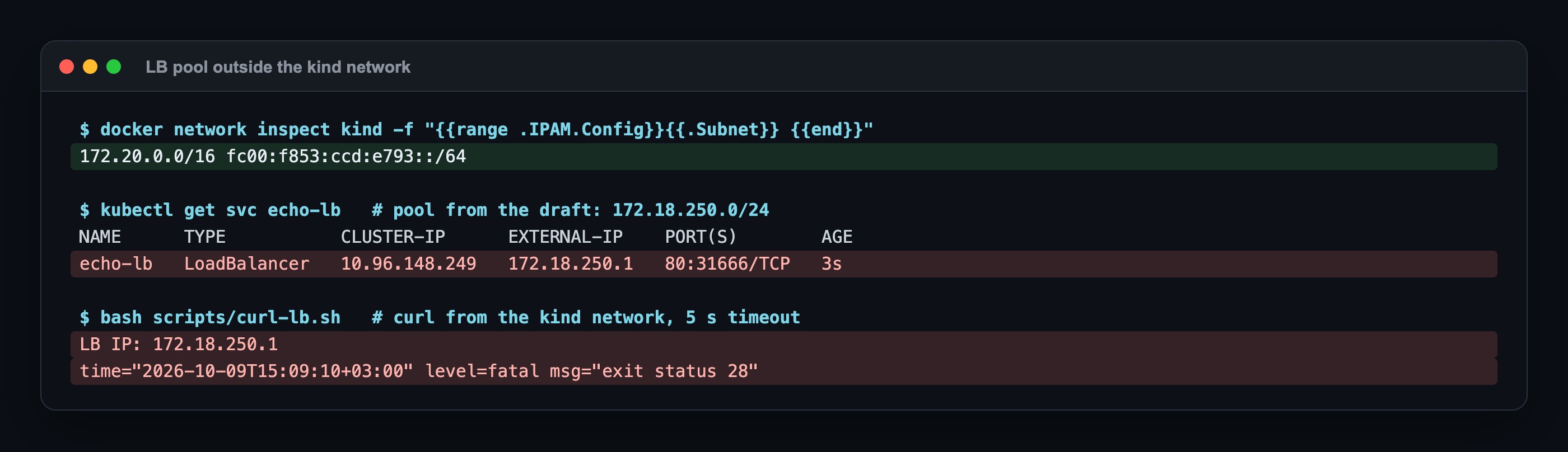
Lesson: LB-IPAM "assigning" an IP doesn't mean the IP is reachable. The pool must be inside the L2 network the nodes are on. The lab now derives the pool from the kind network's address.
2. Mismatch found ... enable-l2-announcements actual=false: helm upgrade doesn't restart the agents
I turned on L2 announcements on a running cluster with helm upgrade. The upgrade succeeded, but no lease appeared and the IP was unreachable. The agent log said why:
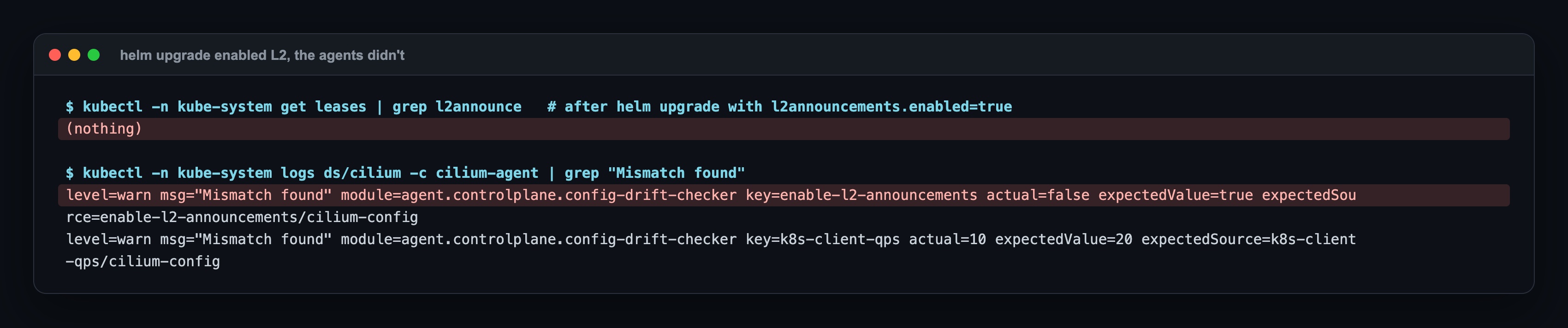
helm upgrade updates Cilium's ConfigMap, but running agents only read this setting at startup. The agent notices the difference and even logs a warning, but doesn't restart itself. After a rollout restart of the Cilium agents and the operator, the lease appeared within seconds. The lab now does this step itself.
3. The mode change gave no error
The case from Step 2 deserves its own entry here, because it is the quietest one: helm upgrade from kubernetes to cluster-pool looked successful and changed nothing. No error, no warning. Choose the IPAM mode before the cluster exists.
4. My first failover measurement measured pod rescheduling, not L2
On the first try both echo pods were on the node I killed. The lease moved, but there was no pod left to answer; what I measured was how long Kubernetes took to reschedule the pod on another node. The lab now spreads the pods over both workers and checks that each worker runs one before killing a node.
Verification
These show the lab is set up correctly:
cilium-dbg status:KubeProxyReplacement: True, routingNative, host routingBPF.kubectl get ciliumpodippools:defaultandtenant-a; pods in thedefaultnamespace on10.244.x, intenant-aon10.250.x.kubectl get ciliumloadbalancerippool:kind-lb,CONFLICTING False.- The
echo-lbService'sEXTERNAL-IPis172.20.250.1. - The
cilium-l2announce-default-echo-lblease is on a worker. curl http://172.20.250.1/from the kind network returns the echo response.- Failover: the lease moves to another worker in about 20 seconds, and requests succeed once the dead pod leaves the endpoints.
Sources: Cilium docs IP Address Management (IPAM), Multi-Pool (Beta), LoadBalancer IP Address Management (LB IPAM) and L2 Announcements / L2 Aware LB (Beta); Kubernetes Nodes (node heartbeats and the node controller), Service (type: LoadBalancer).
Next in the series
This is the second post in the Cilium End to End series. Next: The Road to Default-Deny with CiliumNetworkPolicy: L3/L4, DNS and L7 HTTP Rules. Previous post: What Is Cilium: Kubernetes Without kube-proxy, eBPF and Hubble, Hands-On.
The code for this lab (kind config, Cilium values for each IPAM mode, the pools, the failover script and the Makefile) is shared with Lab Access members on Buy Me a Coffee; the repo invite comes by email after you join: https://buymeacoffee.com/miraccanyilmaz/membership